
The Drive AI
Share
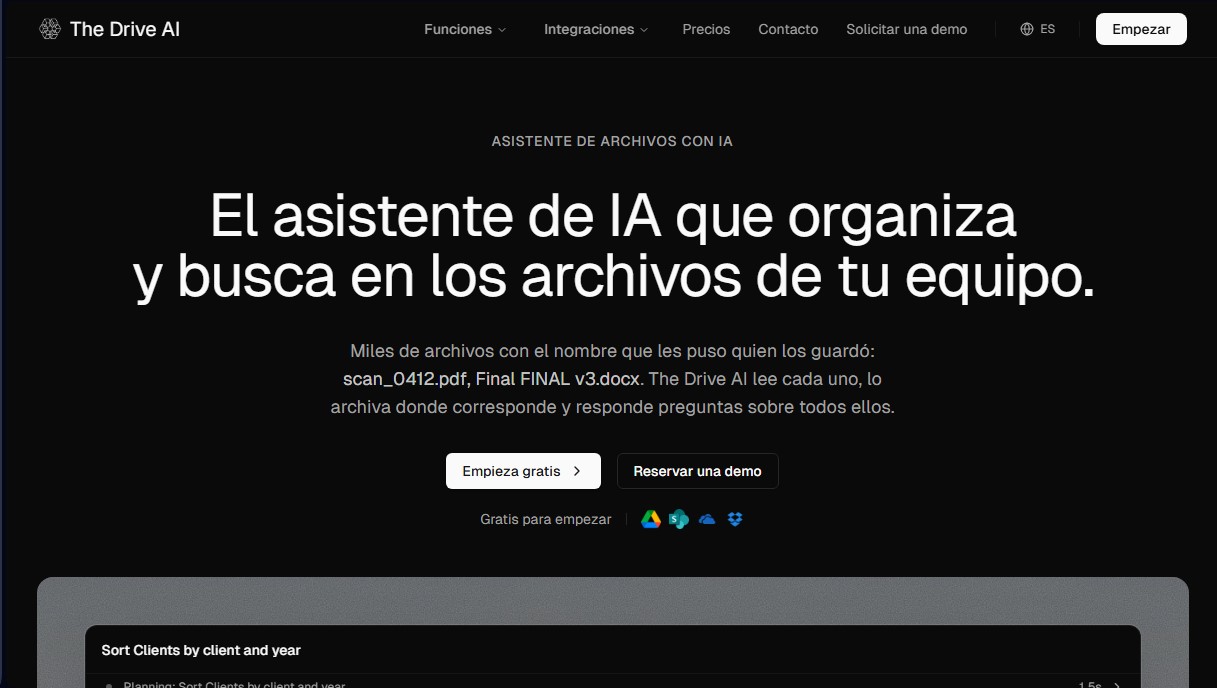
AI assistant that automatically organizes, renames, and summarizes team files. Answers questions about content and automates your team’s cloud document management.
What is The Drive AI?
The Drive AI is an advanced file assistant designed for teams that manage large volumes of documents and need to optimize their workflow. Unlike traditional storage systems where organization depends on manual labeling, this tool uses artificial intelligence to read the actual content of each file. Its primary function is to automatically organize, search, and answer questions about thousands of documents, eliminating the need to manually rename or classify files.
The way The Drive AI works is based on a straightforward process: connect, request, and approve. The platform integrates natively with cloud storage services such as Google Drive, SharePoint, OneDrive, and Dropbox. Once the connection is established, users can interact with their repository using natural language. When requesting a task, such as "sort all invoices by client and year," the AI analyzes the content, proposes a detailed change plan, and, upon user approval, executes the file moves or name changes.
This tool stands out for its ability to create intelligent workflows and custom automations. It is possible to set up rules so that any new file arriving via Gmail, Outlook, Slack, or Microsoft Teams is automatically read and filed in the correct folder. In addition to organization, The Drive AI offers semantic search and document-based response generation (grounded answers), allowing users to extract specific data from contracts or summarize lengthy reports while always citing the original source.
The capabilities of this application are especially valuable across various professional sectors:
- Law Firms: Locating renewal clauses in contracts and managing confidential agreements.
- Real Estate and Property Management: Classifying lease agreements, addendums, and receipts by unit and date.
- Human Resources: Organizing onboarding packages and splitting multi-page documents into employee folders.
- Accounting: Bulk renaming invoices by extracting vendor, date, and amount directly from the text.
Regarding technology and security, The Drive AI employs AES-256 encryption and holds CASA Tier 2 certification. A critical point for the business environment is that data is never used to train external AI models. The platform also integrates practical tools such as e-signatures, PDF merging, and a full audit log to monitor every change made by the assistant. Users can access these features from their computer via the Chrome extension or through the mobile app, ensuring efficient document management on any device.
The Drive AI features and use cases
How to use The Drive AI
The Drive AI FAQ
What exactly is The Drive AI and how does it help organize my files?
It is an AI assistant that reads your documents to automatically classify them, rename them, and answer questions about their content using natural language.
Is The Drive AI compatible with tools like Google Drive, SharePoint, or Dropbox?
Yes, the platform connects directly to these storage services to organize and manage your files without needing to move them from their original location.
Is my data secure, and is my information used to train the AI?
Your documents are protected with AES-256 encryption and advanced security certifications, ensuring your data is never used to train AI models.
What happens if The Drive AI renames or moves a file by mistake?
The assistant always asks for your approval before making major changes and includes an undo feature, allowing you to restore files to their previous state instantly.
Is there a free version to start using The Drive AI?
Yes, we offer a "free forever" plan that allows you to perform basic organizational tasks and chat with the assistant so you can test all of its features.
How can The Drive AI help me find specific information among thousands of documents?
Using content-based search, the assistant locates specific data within your files and generates direct answers, always citing the source of the information.
Can I automate repetitive tasks for new files received by my team?
Yes, you can set up workflows so the assistant automatically processes, renames, and archives any new document that arrives in your folders or email.
Does The Drive AI support e-signatures and file requests?
Yes, electronic signature and file request features are integrated into the platform to streamline managing contracts and documentation with third parties.
The Drive AI pricing and plans
Free
0 $ per month. Ideal for individuals just starting out.
Includes 20 tasks per month (chat is free).
10 workflow files per month.
1 GB of storage, up to a maximum of 50 files.
Support for PDF, Word, spreadsheets, and text files.
Premium
19,99 $ per month. Enhanced power for daily use.
Includes 500 tasks per month (chat is free).
100 workflow files per month.
20 GB of storage, up to a maximum of 500 files.
Support for all file types, including images, audio, and video.
Max
99,99 $ per month. Everything power users need.
Includes 2,000 tasks per month (chat is free).
1,000 workflow files per month.
Assistant works directly in Google Drive, OneDrive, SharePoint, and Dropbox.
Workflows in connected drives, Gmail, Outlook, Slack, and Microsoft Teams.
500 GB of storage and unlimited files.
Support for all file types (images, audio, and video).
eSignatures and file requests.
Priority support.
Team
95 $ per user per month (minimum 3 users). For team workspaces.
2,000 tasks per user per month (pooled for the team).
1,000 workflow files per user per month (pooled).
1 TB of storage per user (pooled).
Direct integration with Google Drive, OneDrive, SharePoint, and Dropbox for the entire team.
Workflows in connected drives, Gmail, Outlook, Slack, and Microsoft Teams.
Unlimited eSignatures and file requests.
Admin controls, roles, and activity logs.
Priority support and option to pause billing.
7-day free trial.
Business
149 $ per user per month, billed annually (minimum 10 users). For companies with compliance requirements.
4,000 tasks per user per month (pooled).
4,000 workflow files per user per month (pooled).
2 TB of storage per user (pooled).
Includes all Team plan features.
SSO / SAML authentication.
HIPAA BAA compliance.
Audit log export and retention policies.
Enterprise
Custom pricing (for more than 50 users). Tailored terms for large organizations.
Includes all Business plan features.
Service Level Agreement (SLA) and dedicated support.
On-premise connectors.
Custom integrations and terms.
The Drive AI Screenshots
The Drive AI alternatives

rabbit OS3
Agentic OS that automates tasks and manages files, connecting your computers with AI models to run workflows using natural language.



MyAiCompany
A business launch platform that automates web design, customer acquisition, billing, and logistics with AI agents. Manage your business in a visual environment.