
RenamerX
Share
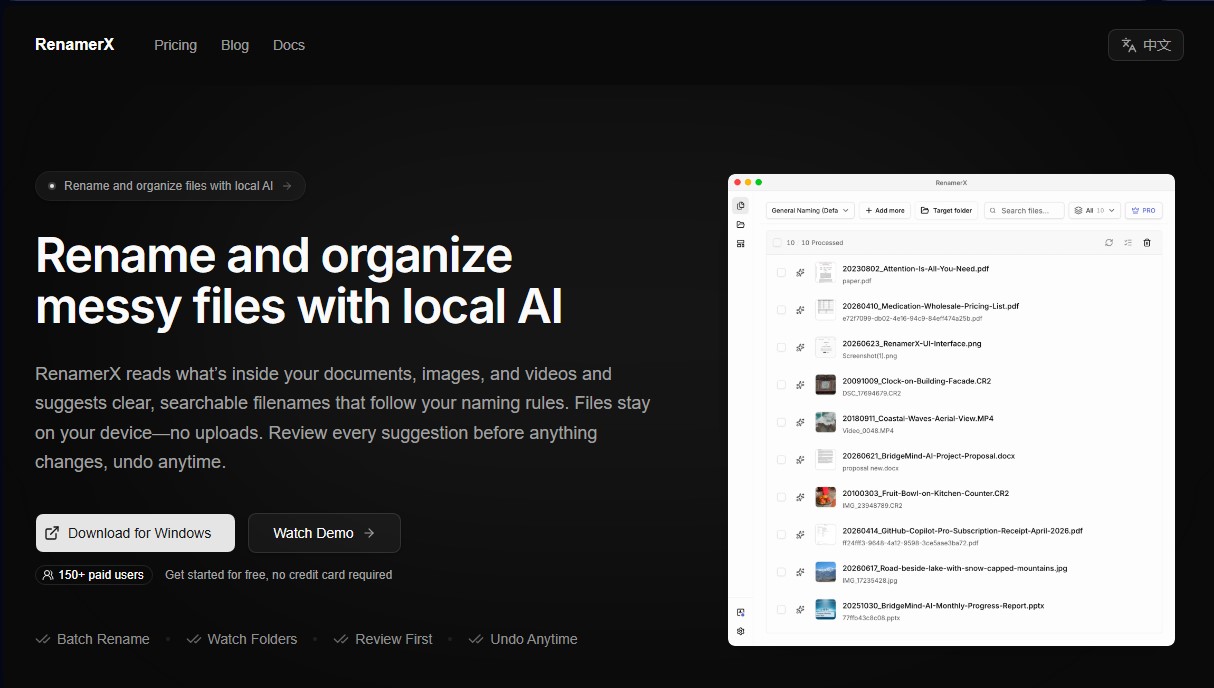
Organize and rename files with local AI. Analyzes document and photo content to suggest accurate names without cloud uploads. Review and undo changes anytime.
What is RenamerX?
RenamerX is an advanced AI-powered file organization tool designed for users who manage large volumes of documents, images, and videos. Unlike traditional methods based on rigid rules, this application reads the actual content of files to suggest descriptive and structured names. Its primary function is efficient batch renaming, transforming files with generic names into an organized, professional system that is easy to locate via search.
RenamerX operates using local AI, meaning information processing happens directly on the user's computer without the need to upload files to the cloud. It utilizes built-in models like Qwen3.5 4B, while also offering the flexibility to connect with other local providers such as Ollama and LM Studio, or external services like OpenAI and Google Gemini. This architecture ensures data privacy, making it an ideal solution for handling invoices, contracts, research documents, or sensitive corporate material.
The workflow is structured around customizable naming templates. Users define specific fields they wish to extract (such as dates, client names, amounts, or projects), and the tool generates precise suggestions. One of its greatest advantages is total control: the system allows you to review every suggestion before applying it and includes an undo changes feature at any time, eliminating the risk of file system errors.
Key technical capabilities and practical benefits include:
- Watch Folders: Automate the processing of new files arriving in specific directories, featuring a safety system that waits for the file to finish writing before taking action.
- Structural Organization: Beyond renaming, it can automatically move files into folders organized by category, type, or date.
- Wide Format Compatibility: Supports over 62 extensions, including Office documents, PDFs, text files, RAW images from professional cameras (CR3, NEF, ARW), and various video formats like MP4 or MOV.
- Intelligent Content Processing: The ability to extract text from documents and read technical metadata in multimedia files.
RenamerX is especially useful for photographers, finance teams, researchers, and small businesses looking for intelligent document management. The application is optimized for Windows and macOS (especially Apple Silicon), allowing for the smooth execution of local AI to streamline repetitive digital archiving tasks without compromising data security.
RenamerX features and use cases
How to use RenamerX
RenamerX FAQ
Is RenamerX safe for processing my private documents?
Yes, the tool processes all files locally on your computer without uploading them to the internet, ensuring your information remains completely private.
What file types can RenamerX organize?
The app supports over sixty different file extensions, including PDFs, Microsoft Office files, various image formats, and multiple video types.
Can I undo changes if I don’t like the new names?
Yes, you can review every suggestion before it’s applied. There is also an undo option that lets you revert files to their original names at any time.
How does the credit system work in the free version?
The free version includes fifty monthly credits that renew automatically, allowing you to try out the AI-powered organization features at no cost.
Can I automate the organization of new files with RenamerX?
Absolutely. Using the "watched folders" feature, you can monitor specific directories so the tool automatically processes and renames any new files you add.
What makes RenamerX different from conventional file renamers?
Unlike traditional tools, RenamerX uses local artificial intelligence to read the actual content of your documents and suggest descriptive names based on context.
Do I need a monthly subscription to use the Pro version?
No, the Pro license is a one-time lifetime purchase that gives you unlimited access to all automation features and AI credits.
Does RenamerX require downloading external AI models?
The tool comes with a built-in local model that is configured during setup. However, it also allows you to connect other providers if you prefer to use your own infrastructure.
RenamerX pricing and plans
Free
0 $
Batch renaming.
File organization.
Naming templates.
Local AI processing.
Review and undo changes.
50-credit monthly limit.
Does not include watch folders or auto-apply.
Pro
36 $ (one-time payment, lifetime license)
Batch renaming.
File organization.
Naming templates.
Local AI processing.
Review and undo changes.
Unlimited credits.
Automation via watch folders.
Auto-apply changes.
RenamerX Screenshots
RenamerX alternatives

rabbit OS3
Agentic OS that automates tasks and manages files, connecting your computers with AI models to run workflows using natural language.


The Drive AI
AI assistant that automatically organizes, renames, and summarizes team files. Answers questions about content and automates your team’s cloud document management.


MyAiCompany
A business launch platform that automates web design, customer acquisition, billing, and logistics with AI agents. Manage your business in a visual environment.