
DocsMint
Share
AI-powered document and knowledge manager that centralizes information. Organize, search, and share structured data with teams and agents.
What is DocsMint?
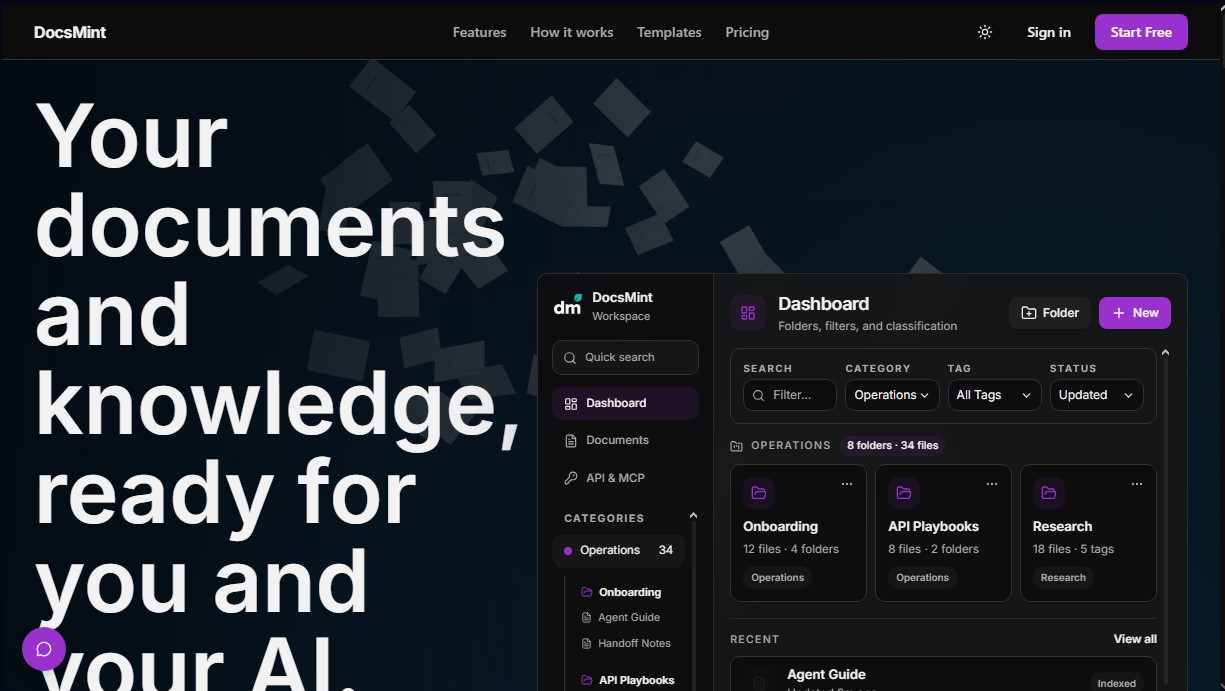
DocsMint is a knowledge management and document editing platform designed to centralize scattered information into a single structured workspace. This tool allows users and teams to organize notes, research, and decisions so they are easily retrievable by both people and AI agents. Its primary focus is transforming fragmented data into useful, accessible knowledge through an advanced organizational system and professional search capabilities.
DocsMint’s operation is based on an intuitive three-phase workflow: creation, organization, and reuse. Users can generate documents from scratch, use curated templates, or import existing files. The platform features a focused visual editor that facilitates technical and creative writing, while the structure is managed through categories, nested folders, and custom tags. To locate information, it integrates a workspace-wide search engine that allows users to quickly return to the original source, avoiding the loss of context typical of long message threads or disconnected tools.
In the field of applied AI, the tool stands out by offering assisted writing features that allow users to seamlessly generate, rewrite, format, and translate content. However, its core value lies in the technical architecture that facilitates access for AI agents via REST API keys and the MCP (Model Context Protocol). This enables external applications to access a persistent and controlled knowledge base, utilizing technologies like GraphRAG to ensure that the context provided to the AI is accurate, verified, and relevant.
Main capabilities and benefits of DocsMint include:
- Knowledge organization through a flexible, multi-dimensional classification system (folders, tags, and categories).
- Detailed version control to review change history and restore previous states of any document.
- Technical collaboration with explicit access rules, shared permissions, and commenting systems for teams.
- Agent memory that provides external AI tools with a structured and persistent source of information.
- Flexible deployment with an open-source option (DocsMint OSS) for teams that prefer self-hosting on their own infrastructure.
This solution is particularly useful for professionals looking to build a digital second brain, teams in need of a shared knowledge base, and developers who need to feed their language models with reliable data. DocsMint scales from individual use on a desktop to corporate environments, ensuring that critical information remains operational for any modern, AI-powered workflow.
DocsMint features and use cases
How to use DocsMint
DocsMint FAQ
What exactly is DocsMint, and what is it used for?
DocsMint is a centralized workspace designed to create, edit, and organize documents and knowledge in a structured format for users, teams, and AI.
Can I start using DocsMint for free?
Yes, there is a free plan that provides access to core editing, organization, template, and search features at no initial cost.
Do I need any AI knowledge to use DocsMint?
No, the tool functions as a standard document manager, and the use of AI features is entirely optional.
How can I organize my information within the platform?
The system allows you to categorize all content using categories, nested folders, and custom tags, making it easy to find your data quickly.
What is the difference between the paid plans and the DocsMint OSS version?
The Pro and Advanced plans are managed cloud services, while DocsMint OSS is an open-source version that you can host on your own infrastructure.
Does DocsMint support document sharing and teamwork?
Yes, the tool makes it easy to share documents with others and manage comments through specific access rules and permissions.
Can I connect DocsMint to external AI agents?
Yes, through API keys and the MCP protocol, you can provide controlled access to your documents so that external AI tools can utilize that knowledge.
Does DocsMint have a version history for recovering previous edits?
Yes, the platform includes a version history feature that allows you to review past changes and restore a document to any previous state.
DocsMint pricing and plans
Free Plan
Free
Main document workspace.
Editing, organization, and search tools.
Access to templates.
Document sharing features.
Pro Plan
9 €/month
Higher API limits.
AI-powered editing for translation, rewriting, and proofreading workflows.
Advanced Plan
24 €/month
Higher usage limits than previous plans.
Eligible shared workspaces.
Controlled access to MCP (Model Context Protocol).
Self-hosted (OSS)
Free (Open Source)
Install the DocsMint OSS stack on your own infrastructure.
Open-source option independent of SaaS subscription plans.
DocsMint Screenshots
DocsMint alternatives
The Drive AI
AI assistant that automatically organizes, renames, and summarizes team files. Answers questions about content and automates your team’s cloud document management.
Assindo iOS
AI agent that makes and answers calls, manages social media, and organizes tasks. It searches the web, books appointments, and automates your daily schedule—all serverless.




Dashworks AI
AI assistant that centralizes corporate knowledge. It resolves team questions by searching across all your apps and documents to provide real-time answers.