

GenVideo Text to Video Generator
Share
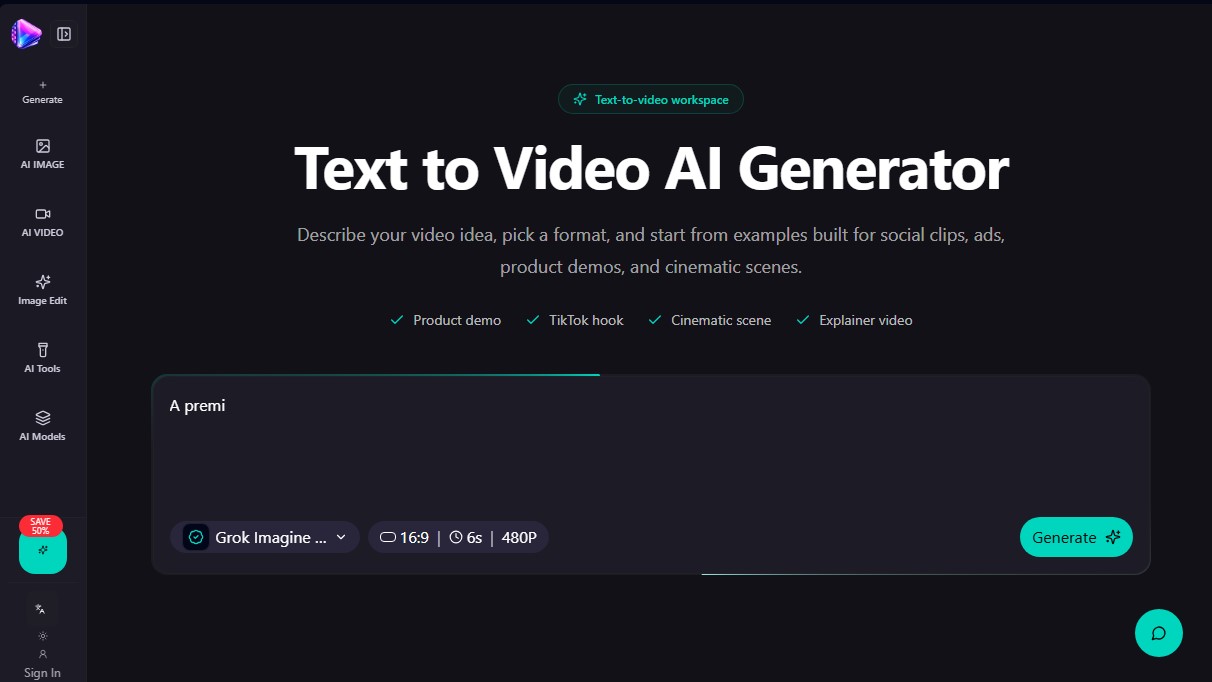
Generate professional videos from text for social media, ads, and demos. Select formats and cinematic styles to create high-quality visual content quickly.
What is GenVideo Text to Video Generator?
GenVideo Text to Video Generator is a specialized workspace designed for creating video clips from text descriptions. This generative AI tool allows users to transform ideas, scripts, or visual concepts into functional video drafts without the need for physical filming equipment or advanced knowledge of traditional video editing software. The system relies on interpreting structured prompts to generate scenes ranging from product demonstrations to complex cinematic sequences.
The platform integrates advanced AI models such as Grok, Veo, Seedance, Kling, Wan, and HappyHorse, offering great versatility in style and technical quality. Its operation is straightforward: the user defines the subject, action, camera movement, visual style, lighting, and the tone of the scene. This technical approach allows for precise control over visual composition, facilitating the creation of content adapted for different channels using 16:9, 9:16, or 1:1 output formats.
Key capabilities and specific workflows include:
- TikTok and Reels Hooks: Generating vertical clips with fast pacing and dynamic camera movements for social media.
- Product Demos: Creating commercial videos with studio lighting and fluid camera rotations for online stores and founders.
- AI Ads: Rapid prototyping of creatives for marketing campaigns and performance testing on landing pages.
- Cinematic Scenes: Designing sequences with atmosphere, depth, and narrative visual language for filmmakers and creative teams.
- Explainer Videos: Transforming abstract concepts or workflows into clear animations for the SaaS and education sectors.
This tool is especially useful for content creators, marketing managers, and social media teams who need to produce visual material quickly from their computers. GenVideo eliminates the editing timeline barrier, allowing users to iterate on a concept simply by refining the text. Additionally, it includes a library of reusable examples that serve as a foundation for new projects, optimizing generation time and ensuring the result aligns with commercial or artistic objectives.
The workflow is structured into logical steps: goal selection, detailed scene and movement description, format choice, and draft generation. Thanks to its ability to process specific camera movements (such as orbit, dolly, or handheld), the user can virtually direct the scene, producing high-quality material ready for integration into professional workflows.
GenVideo Text to Video Generator features and use cases
How to use GenVideo Text to Video Generator
GenVideo Text to Video Generator FAQ
What is GenVideo Text to Video Generator?
It is an AI tool that transforms written descriptions into short video clips, perfect for social media, advertisements, and cinematic scenes.
How can I write an effective prompt in GenVideo?
We recommend following a structure that combines the subject, action, camera movement, visual style, lighting, and mood.
Does the tool allow me to create content for TikTok or Reels?
Yes, you can choose a vertical aspect ratio to generate visual hooks and short clips optimized for vertical video platforms.
What screen formats are available in GenVideo?
The platform supports widescreen, square, and vertical formats to fit websites, ads, and various social media networks.
Is there an option to try GenVideo for free?
After signing up, you can generate a free six-second preview at 480p resolution without needing to add a payment method.
Can I use the generated videos for commercial purposes?
The videos can be used for business and creative projects in accordance with the terms of use and the rights included in your subscription plan.
What happens if the video doesn't match exactly what I asked for?
The best approach is to refine your description by simplifying the details, clarifying the subject, or adjusting one element at a time to improve the result.
How are credits deducted when generating content in GenVideo?
The generate button shows the estimated credit cost before you start the task, which depends on the AI model and the chosen duration.
Does the platform keep a record of my past projects?
Yes, the platform maintains a permanent history of your generations so you can easily review your work and reuse previous prompts.
What types of professional workflows does the tool offer?
It includes specific settings for product demos, explainer videos, performance ads, and cinematic story concepts.
GenVideo Text to Video Generator pricing and plans
Free Version: 0 $
Includes one 6-second video preview.
480p resolution powered by the Grok Imagine model.
No credit card required.
Creator: 35 $ per month (or 336 $ per year)
4,500 credits per month.
Access to all currently supported video models.
Commercial workflow support.
Permanent generation history via R2 storage.
Restore video settings after payment.
Pro: 80 $ per month (or 672 $ per year)
10,500 credits per month.
Access to all supported video models.
Higher usage limits for Veo, Seedance, Wan, and HappyHorse models.
Commercial workflow support.
Permanent generation history via R2 storage.
Studio: 200 $ per month (or 1,200 $ per year)
26,000 credits per month.
Optimized for teams with high production volumes and high-resolution workflows.
Access to all supported video models.
Commercial workflow support.
Permanent generation history via R2 storage.
One-time credits
1,200 credits: 9.90 $
2,000 credits: 20 $
6,000 credits: 50 $
12,500 credits: 100 $
25,500 credits: 200 $
GenVideo Text to Video Generator Screenshots
GenVideo Text to Video Generator alternatives



Osmo Studio
AI animation studio for professional motion graphics and videos. Control every detail, collaborate with teams, and export with transparent backgrounds.

Victoria Secret Runway
Create fashion show videos by integrating your face into real scenes. Just upload a photo to replace professional models and walk the runway.


VideoWeb Video Generator
Generate professional AI videos from text or images. Features realistic avatars, automated scripts, and optimized formats for marketing and social media.