
Share
Build AI assistants trained on your documents and integrate them into your site. Runs via your Cloudflare account for total control over your data and costs.
What is Gravytrainer?
Gravytrainer is a membership platform specializing in the creation, training, and deployment of custom artificial intelligence assistants. Its primary function is to allow any user to build an AI chatbot trained on their own documents and web pages, ensuring that responses are based exclusively on the information provided rather than generic internet data. This tool stands out by integrating directly into the user's Cloudflare account, granting them full control over execution and data privacy.
Gravytrainer's operation is powered by advanced technologies like Cloudflare Workers AI and Vectorize. By connecting their own cloud infrastructure account, users avoid token reselling and leverage the power of language models to run the assistant natively. The system uses a vector storage approach to index information from PDF, TXT, Markdown, and CSV files or web links, allowing the AI to retrieve precise data during conversations. Deployment is handled through a simple embed code that can be placed on any website, enabling seamless interaction from desktops or mobile devices.
Key capabilities and practical benefits include:
- Custom Training: The ability to learn from manuals, company policies, product catalogs, or blog content.
- Visual and Behavioral Customization: Adjust colors, logos, welcome messages, and response tones to maintain brand consistency.
- Privacy and Security: Uses encrypted storage for API credentials and offers two-factor authentication (2FA) to protect account access.
- No Per-Message Paywalls: The platform does not block the widget after a set number of interactions, as the AI inference is handled by the user's own account.
- Real-Time Preview: A tool to test the assistant's behavior and fine-tune its responses before they go live for visitors.
This conversational AI solution is particularly useful for online stores, technical support services, blogs, and personal projects looking to automate customer service without unpredictable variable costs. By delegating execution to Cloudflare, low latency and easy scaling are guaranteed. Additionally, Gravytrainer includes a dashboard for token usage statistics and chat sessions, making it easy to monitor assistant performance and manage the knowledge base in a centralized and professional manner.
Gravytrainer features and use cases
How to use Gravytrainer
Gravytrainer FAQ
What exactly is Gravytrainer and what is it used for?
It is a membership platform that allows you to create, train, and embed a custom AI assistant on your website using your own documents and content.
Is Gravytrainer’s basic plan actually free?
Yes, the free plan offers a lifetime AI widget with a ten-document capacity and does not impose paywalls based on the number of messages your visitors send.
Why do I need a Cloudflare account to use Gravytrainer?
The tool runs on your own Cloudflare infrastructure, ensuring you maintain full control of your data and can take advantage of their AI services without us reselling tokens to you.
What types of files can I upload to train my assistant?
You can use various formats such as PDF, text files, CSV, Markdown, JSON, and even web pages so the AI can provide answers based on your specific information.
Can I customize the appearance of my assistant in Gravytrainer?
Yes, you can modify the colors, logo, welcome message, and widget size to perfectly match your brand's visual identity.
What happens if my Cloudflare account’s daily free tokens run out?
The widget will still load on your site, but queries will show an error until Cloudflare’s free limit resets at midnight or you choose to upgrade to a paid plan on their platform.
Is it safe to connect my Cloudflare account to Gravytrainer?
Security is a top priority; your credentials are stored in an encrypted vault protected by an access password that only you know and that we never store.
How do I embed the assistant on my website once it’s trained?
Once you have configured and tested your assistant in the dashboard, the tool will provide an embed code that you simply need to paste into your site.
What advantages does the Gravytrainer Pro plan offer over the free one?
The Pro plan increases storage and document limits, allows you to remove branding from the widget, offers advanced analytics, and lets you choose from different AI models.
Can I use Google to log in to the platform?
Yes, you can quickly and easily sign up and access your account using your Google profile once you have accepted the terms of service.
Gravytrainer pricing and plans
Free
0 $ forever
Lifetime AI widget for your website.
Fully customizable chat.
Standard AI model (platform default).
10 MB training data limit.
Up to 10 training documents (files, PDFs, or web pages).
Guided Cloudflare setup and embed code.
Includes "Powered by" link on the widget.
Ad-supported (banner in the widget footer).
Restriction: Requires a Cloudflare account (uses Cloudflare's free tier limit of 10,000 daily "neurons").
Pro
7,99 $ per month or 84,99 $ per year
Lifetime AI widget with no ads or promotional links.
Clean widget without "Powered by" branding.
Ability to choose from various chat and image models.
50 MB training data limit.
Up to 100 training documents.
Advanced usage analytics.
Guided Cloudflare setup and embed code.
Restriction: AI execution runs on the user's Cloudflare account; if the Cloudflare free limit is exceeded, any additional compute costs are billed directly through that platform.
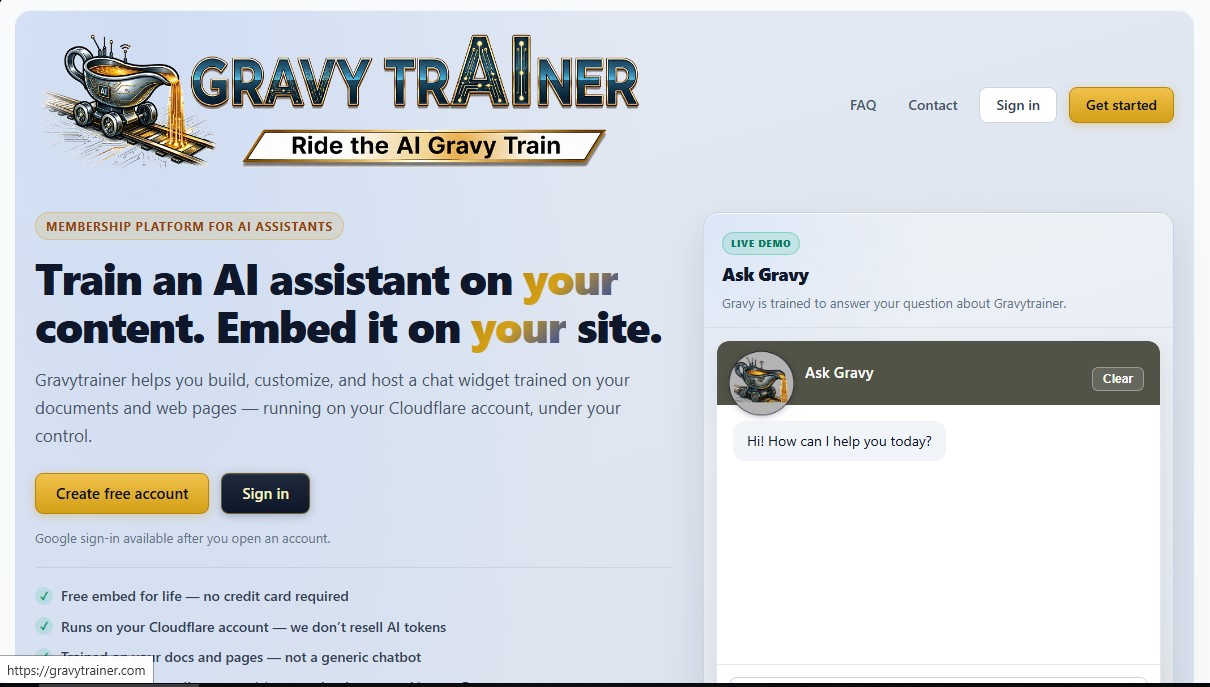
Gravytrainer Screenshots
Gravytrainer user reviews
Write a review
Checking your session...
Gravytrainer Reviews
Loading reviews...
Gravytrainer alternatives



HannahDream
Chat with virtual partners for adults with customizable memory. Build romantic bonds, evolve your relationship, and generate realistic photos with no explicit content.


SayLingo.ai
Practice 30 languages with AI tutors. Improve your pronunciation and grammar through real conversations, guided lessons, and official exam preparation.

JapanesePal
Practice Japanese conversation with an AI tutor. Improve your fluency and pronunciation for travel, work, or culture with instant corrections.