

Image MCP Server
Share
MCP server to generate, edit, upscale, and remove backgrounds with AI agents. Create and retouch images directly in your editor with a single integration.
What is Image MCP Server?
Image MCP Server is a technical infrastructure solution designed to equip AI agents and integrated development environments (IDEs) with advanced visual capabilities through the Model Context Protocol. This tool acts as a unified bridge, allowing developers and AI users to generate, edit, and transform images without the need to manage multiple provider-specific API integrations or SDKs.
The primary function of the Image MCP Server is to eliminate friction in workflows where coding agents—such as Cursor, Claude Code, Windsurf, or GitHub Copilot—need to create visual content. Instead of writing additional code to connect with various image generation services, the server provides a single, standardized interface. This is especially useful for professionals building landing pages, automating content, or designing user interfaces directly from their computer.
Its operation is based on connecting a single MCP server that provides access to eight specialized tools. The system uses automatic routing technologies to process requests across more than 40 leading models, including Gemini, FLUX, SDXL, and Recraft. Key technical and functional capabilities include:
- AI image generation via text (text-to-image) or by using reference images to guide style and composition.
- Advanced editing and retouching (inpainting) to modify, add, or transform specific elements of an existing image using natural language instructions.
- Automatic background removal to isolate subjects and obtain precise cutouts in transparent PNG format.
- High-resolution image upscaling, enabling qualities up to 4K while preserving sharp details.
- Vector creation from text, facilitating the generation of fully editable logos, icons, and shapes in SVG format.
- File optimization, including tools to compress image size and convert formats between PNG, JPG, WEBP, GIF, and BMP.
From an operational standpoint, Image MCP Server provides significant practical benefits by centralizing management in one place. Through its dashboard, users can issue and revoke API keys, audit detailed request logs to monitor latency and consumption, and set monthly spending limits. This oversight capability is essential for avoiding unexpected costs when AI agents operate autonomously in development loops.
This tool is ideal for content automation workflows, video game asset creation, and web interface development. By integrating directly into the developer's workflow, it allows the AI agent to generate not only a site's code but also all necessary graphic assets simultaneously.
Image MCP Server features and use cases
How to use Image MCP Server
Image MCP Server FAQ
What is Image MCP Server, and what are its core features?
It is an MCP protocol-based server that enables AI agents to generate, edit, upscale, and transform images through a single, unified integration.
How do I integrate Image MCP Server into my workflow?
You can connect it by adding the server URL to your MCP client settings or by making direct calls to its centralized API from your application.
What kind of editing tools does Image MCP Server offer?
The server includes eight specialized tools, such as text-to-image generation, background removal, inpainting, 4K upscaling, and format conversion.
Is Image MCP Server compatible with code editors like Cursor or VS Code?
Yes, it is fully compatible with Cursor, VS Code, Claude Code, GitHub Copilot, and other development environments or agents that support the standard MCP protocol.
Do I need to set up my own API keys from other providers to use it?
No, it is not necessary. The server automatically manages access to over forty different models using its own single API key and a unified credit system.
How are costs managed for Image MCP Server operations?
Pricing is based on a prepaid credit system. Costs vary depending on the model used, and you can set monthly limits to prevent unexpected charges.
Can I generate vector files with this tool?
Yes, the tool includes a specialized feature for creating logos, icons, and shapes in fully editable SVG format from text descriptions.
What information is logged in the server's request history?
The log records details about the prompt used, the selected model, response latency, and the exact credit cost for each operation.
Does Image MCP Server allow you to modify existing images?
Yes, you can use tools to edit specific parts of an image, change its style, remove the background, or increase its resolution while maintaining the original quality.
What happens if my AI agent uses up all available credits?
Since it is a prepaid system, operations will stop once your balance is exhausted. This ensures you never receive bills for amounts you have not previously authorized.
Image MCP Server pricing and plans
Free Tier
Price: $0 per month.
30 credits per month.
Basic image editing tools.
Text-to-image generation.
API and MCP server access.
Starter
Price: $20 per month.
1,000 credits per month.
All image editing tools.
Text-to-image generation.
Text-to-SVG and image-to-SVG conversion.
API and MCP server access.
Pro
Price: $50 per month.
3,000 credits per month.
Includes all Starter plan features.
Priority processing.
Early access to new tools.
Enterprise
Price: $100 per month.
8,000 credits per month.
Includes all Pro plan features.
Maximum rate limits.
Priority support.
Image MCP Server Screenshots
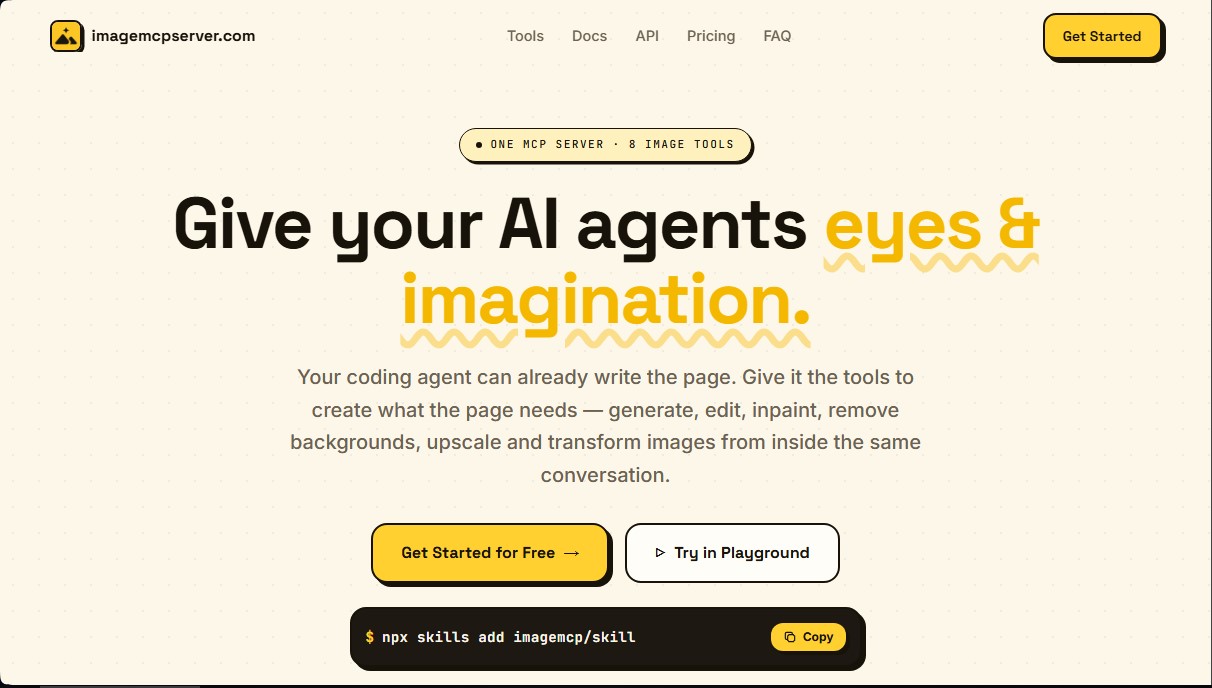
Image MCP Server user reviews
Write a review
Checking your session...
Image MCP Server Reviews
Loading reviews...
Image MCP Server alternatives
Sprite Fusion
Generate and animate professional pixel art for games using AI. Create sprites, character sheets, and normal maps with direct export to Unity and Godot.

AI Comic Builder
A platform to create comics and webtoons from text. Generate panels with consistent characters and diverse art styles—no drawing skills required.

Panel & Ink
Create comic series from an idea. Generate consistent characters, design panels in various styles, and get narrated episodes ready to publish. No drawing skills required.

ColorCraft
Create Amazon KDP books. Generate coloring pages, stories, puzzles, and print-ready full covers, plus promotional mockups in a single workflow.


Tesla Wrap Generator
Tesla Wrap Generator uses AI to paint designs onto the official UV template of each Tesla model for Paint Shop, with a 3D preview before you download.