

Share
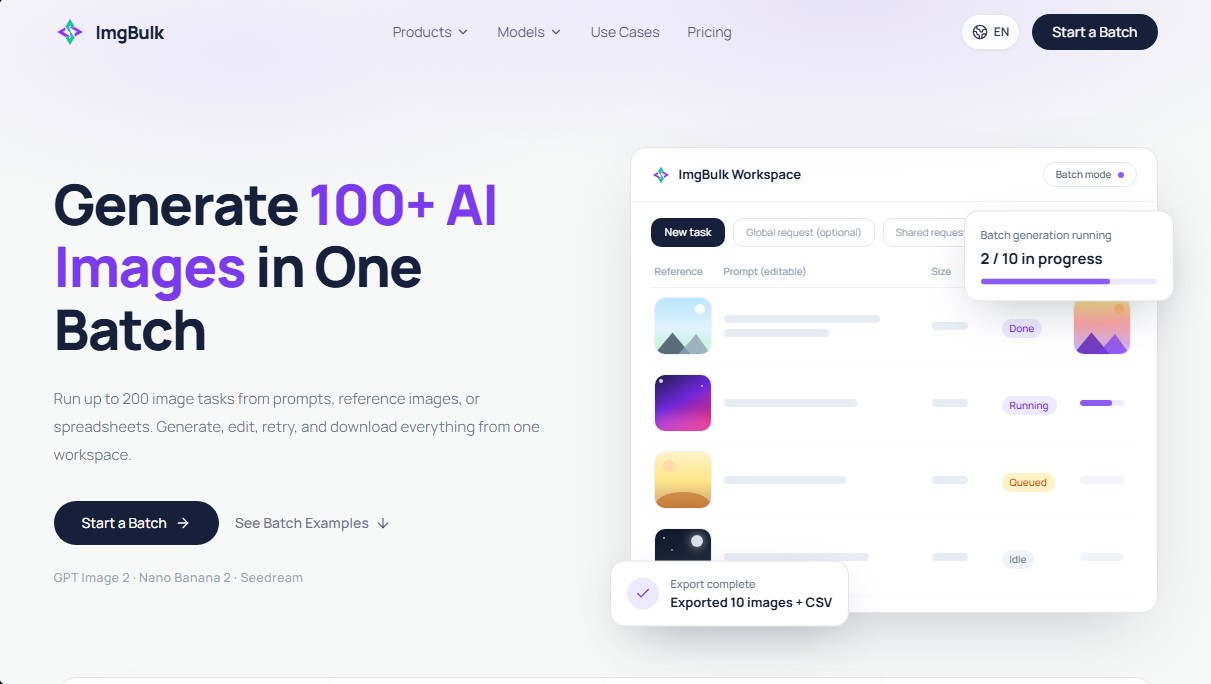
Batch generate and edit up to 200 images with AI. Process multiple prompts or CSV files simultaneously and download all results in a ZIP file.
What is ImgBulk?
ImgBulk is a bulk AI image generation platform designed to optimize high-production workflows. Unlike conventional generators that process requests individually, this tool allows you to run up to 200 simultaneous tasks in a single workspace. Its primary function is to transform lists of prompts, reference images, or spreadsheet files into professional-ready visual assets, making it an effective solution for content managers, marketing agencies, and e-commerce businesses that require a high volume of graphic material.
The operation of ImgBulk is based on the integration of various specialized AI models tailored to the user's technical goals. The system allows users to select from GPT Image 2, optimized for text rendering and design layout; Nano Banana 2, focused on image editing and maintaining visual consistency; and Seedream 5.0, geared toward high resolution and creative quality. The platform's technology ensures that each task within a batch is fully independent, meaning users can assign a specific prompt and a different reference image to each processing line without losing centralized control of the batch.
The tool offers three main methods for managing mass production:
- Bulk Text to Image: Converting a list of up to 200 text descriptions into an image generation queue.
- Bulk Image to Image: Enabling independent edits or the creation of lifestyle scenes from base images, such as transforming a product photo into multiple decorative settings.
- CSV or Excel Import: Full automation via spreadsheet uploads, facilitating the conversion of content calendars or data matrices into final images.
One of the functional advantages of ImgBulk is its real-time task management dashboard. Users can monitor the status of each generation (queued, processing, completed, or failed). In the event of an error with a specific image, the system allows you to retry only the failed tasks, avoiding the need to re-process work that has already been completed. Once the batch is finished, the platform enables bulk downloading in ZIP format, delivering all files along with a reference CSV for easy organization on your computer.
This tool is particularly useful for creating product catalogs, food marketing assets, and visual content for the travel industry. It facilitates large-scale visual concept exploration and the generation of seasonal variations without the need for constant manual intervention, optimizing the performance of generative AI in professional environments.
ImgBulk features and use cases
How to use ImgBulk
ImgBulk FAQ
What is ImgBulk, and what are its advantages for image generation?
ImgBulk is an AI-powered platform that allows you to generate and edit up to 200 images simultaneously in a single batch.
How many tasks can I process at once in an ImgBulk batch?
The system allows you to configure and run up to 200 individual tasks for every generation batch you start.
Is it possible to use different prompts and references for each image within a batch?
Yes, each task in the workspace is independent, meaning it can have its own unique text prompt and reference images.
Can I import my tasks into ImgBulk from an external file?
The tool allows you to upload CSV or Excel files to automatically convert cell data into a task queue that is ready for processing.
What happens if one of the tasks in the batch fails during generation?
If a task fails, ImgBulk allows you to retry only that specific item without having to re-run the images that were successfully completed.
Which AI models are available on the platform?
You can currently choose from GPT Image 2, Nano Banana 2, Seedream 5.0, and Seedream 4.0, depending on your project's specific needs.
How does ImgBulk's payment system work?
The tool uses an on-demand credit system with no subscription required, allowing you to pay only for the images you actually generate.
How do I download the results once the process is complete?
Once the batch is finished, you can download all the generated images together in a single compressed ZIP file.
ImgBulk pricing and plans
Starter
$5 (One-time payment)
500 credits.
Approximately 41 to 83 images (depending on the chosen AI model).
Batch processing for up to 200 tasks.
Bulk ZIP downloads.
Access to models like GPT Image 2, Nano Banana 2, and Seedream.
Creator
$19 (One-time payment)
2,100 credits.
Approximately 175 to 350 images (depending on the chosen AI model).
Batch processing for up to 200 tasks.
Upload tasks via prompts, reference images, or CSV/Excel files.
Exclusive retries for failed tasks at no extra cost.
Pro
$29 (One-time payment)
3,600 credits.
Approximately 300 to 600 images (depending on the chosen AI model).
Batch processing for up to 200 tasks.
Independent task control: each image can have its own prompt and reference within the same batch.
Most popular choice for large production runs.
Bulk
$139 (One-time payment)
20,000 credits.
Approximately 1,666 to 3,333 images (depending on the chosen AI model).
Batch processing for up to 200 tasks.
Designed for high-volume production and team workflows.
Includes all batch management features and support for all available models.
ImgBulk Screenshots
ImgBulk user reviews
Write a review
Checking your session...
ImgBulk Reviews
Loading reviews...
ImgBulk alternatives
Sprite Fusion
Generate and animate professional pixel art for games using AI. Create sprites, character sheets, and normal maps with direct export to Unity and Godot.

AI Comic Builder
A platform to create comics and webtoons from text. Generate panels with consistent characters and diverse art styles—no drawing skills required.

Panel & Ink
Create comic series from an idea. Generate consistent characters, design panels in various styles, and get narrated episodes ready to publish. No drawing skills required.

ColorCraft
Create Amazon KDP books. Generate coloring pages, stories, puzzles, and print-ready full covers, plus promotional mockups in a single workflow.


Tesla Wrap Generator
Tesla Wrap Generator uses AI to paint designs onto the official UV template of each Tesla model for Paint Shop, with a 3D preview before you download.