

Share
AI-powered accounting software that automates expense categorization, optimizes tax deductions, and generates real-time financial reports for businesses and freelancers.
What is Kick?
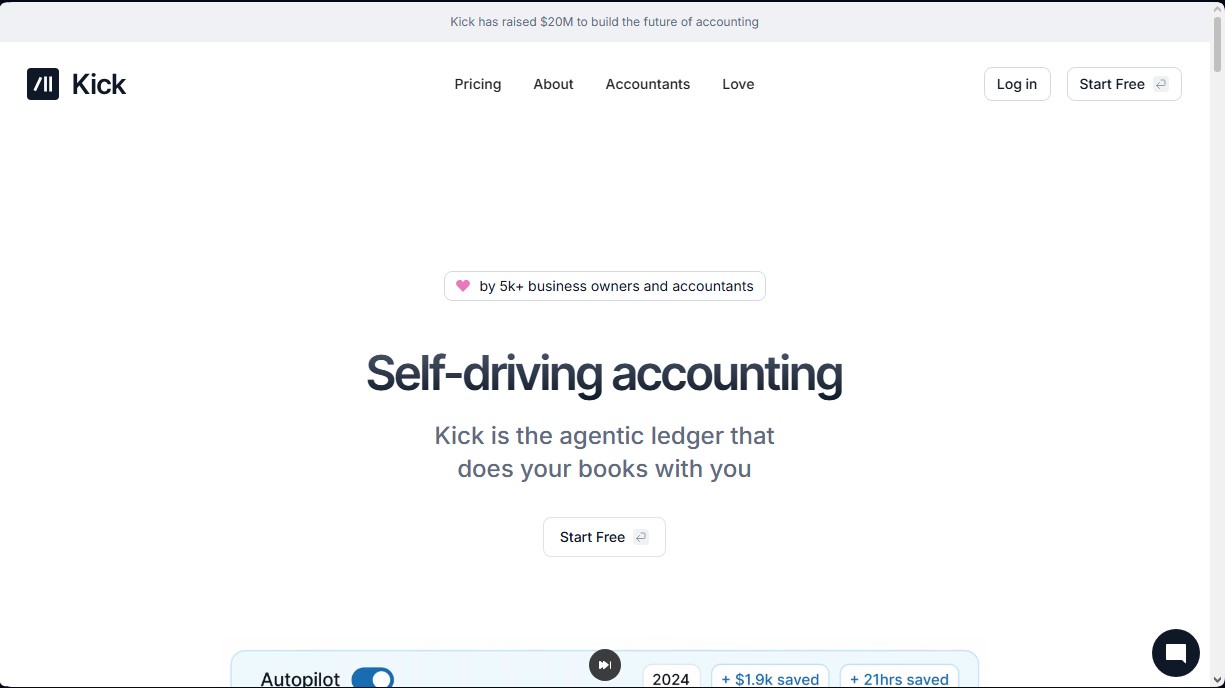
Kick is an AI-powered autonomous accounting platform that redefines financial management for businesses and freelancers. It defines itself as an agentic ledger, meaning it doesn’t just record data—it acts proactively to organize the user's finances. This tool is designed for business owners, multipreneurs, and accountants who need to maintain impeccable financial hygiene without spending hours on manual data entry at their computers.
Kick’s functionality is based on real-time data processing and automatic transaction categorization. By connecting bank accounts, the AI analyzes every transaction and assigns it to the appropriate category, learning from user corrections to create custom rules. This technological approach allows the tool to operate independently, validating record accuracy through expert oversight, which ensures that books are always up to date and free of human error.
Its functional capabilities are geared toward maximizing operational efficiency and tax savings:
- Tax Deduction Optimization: The system automatically identifies often-overlooked expenses, such as home office costs, commutes, travel, and vehicle expenses, ensuring no tax benefits are missed.
- Multi-Entity Management: It allows for the supervision of multiple companies, accounts, and entities from a single dashboard, automatically managing intercompany transfers and linked balances.
- Instant Financial Reports: It generates real-time profit and loss (P&L) statements and balance sheets, allowing for the export of complete tax packages ready for an advisor or accountant.
- Vendor Expense Tracking: It provides a monthly breakdown of vendor payments and software subscriptions, making it easy to identify unnecessary costs to optimize cash flow.
- Revenue Customization: It allows for the creation of custom revenue lines to precisely understand the source of monthly billing, whether from consulting, courses, or memberships.
For professional users, Kick acts as a financial assistant that eliminates the complexity of traditional systems. The platform facilitates seamless bank reconciliation and receipt matching, transforming accounting into a transparent and simple process. By centralizing all financial information into an intuitive interface, users can make informed decisions based on real-time data, preparing for the fiscal year-end without the usual stress of last-minute reviews. It is an ideal solution for those seeking a financial AI tool that combines advanced automation with a professional and scalable ledger structure.
Kick features and use cases
How to use Kick
Kick FAQ
What is Kick, and how does it simplify my business accounting?
Kick is an intelligent ledger that automates your bookkeeping through real-time categorization and expert review.
Is there a free version of Kick available for new users?
Yes, the platform offers a free plan designed for startups and freelancers that allows you to process up to 250 transactions per year.
How does Kick help identify commonly overlooked tax deductions?
The system automatically detects deductible expenses related to home offices, vehicle use, and business travel to maximize your savings.
Can I manage multiple businesses or entities from a single dashboard in Kick?
This tool allows you to track all your businesses and bank accounts in one place, even making it easy to manage inter-company transfers.
Can I customize the transaction categorization rules?
You can easily adjust the app's suggested rules and quickly create specific conditions for your regular vendors.
What kind of financial reports can I generate to share with my accountant?
The platform generates tax-ready balance sheets and profit and loss (P&L) statements that you can send directly to your CPA or tax professional.
Does Kick allow for detailed vendor spend tracking?
The dashboard provides monthly breakdowns that help you identify and eliminate unnecessary expenses by comparing the costs of your subscriptions and services.
Kick pricing and plans
Free Plan
0 $ per month
Plan for new businesses and freelancers.
- Limit of 250 transactions per year.
- Automatic categorization and receipt matching.
- Profit and loss reports and balance sheets.
- Access to MCP/CLI and universal importer.
Basic Plan
40 $ per month
Designed for full-time businesses that require automation.
- Unlimited transactions.
- Includes all Free plan features.
- Bank reconciliation.
- Statement syncing.
Plus Plan
100 $ per month
For growing companies with accrual accounting needs.
- Unlimited transactions.
- Includes all Basic plan features.
- Multi-entity and class management.
- Accounts Receivable and Payable (AR/AP) automation.
- Accrual general ledger.
Advanced Plan
Custom pricing (contact sales)
Solution for complex enterprises that need tailored support.
- Unlimited transactions.
- Includes all Plus plan features.
- Migration and training.
- Dedicated support.
- Entity consolidation.
- Deduction optimization.
Kick Screenshots
Kick user reviews
Write a review
Checking your session...
Kick Reviews
Loading reviews...
Kick alternatives


PropHours-Material Participation
Track rental tasks and material participation hours with AI. Attach evidence and generate reports to maximize tax deductions.

FactorialHR
AI platform centralizing HR, finance, and IT. Automate payroll, time tracking, and expenses to streamline management and boost your company's productivity.


Bank Statement Converter
Convert PDF bank statements and images to Excel or CSV. Securely edit transactions and validate balances against the original without sharing login credentials.