
Share
Free AI voice cloning tool with no registration. Generate realistic voiceovers in 75 languages from short audio clips to create digital content quickly.
What is KikiVoice?
KikiVoice is a specialized AI voice cloning platform designed to simplify the creation of high-fidelity audio content. Its primary function is to transform short audio clips into highly realistic synthetic voices, allowing users to generate new voiceovers from text while maintaining the original speaker's tone and essence. This tool is particularly useful for content creators looking to diversify their productions without the need for constant recording sessions.
The application's operation is straightforward and efficient. Users simply upload a few seconds of audio to the system; the artificial intelligence then processes the phonetic characteristics to perform the voice cloning. Once the input is processed, you just enter the desired text to receive a narrated audio track in less than three minutes. As a tool that requires no registration, it significantly streamlines the workflow from your computer, allowing for immediate experimentation.
KikiVoice's technological architecture relies on three specific models tailored to different production needs:
- Kiki Core: Optimized to offer a balance between processing speed and stability, making it the ideal choice for quick, everyday content creation.
- Kiki Pro: Focused on emotional expression precision and fine-tuning parameters. This is the recommended model for professional-level productions that demand superior interpretive nuances.
- Kiki Multilingual: Designed for international projects, this model supports over 75 languages, facilitating global content localization.
Key technical capabilities include accent control and emotion and style management—factors that enable a 99% similarity to the original voice. This versatility makes the platform a practical solution for voice synthesis in multiple contexts, from video narration to the creation of personalized audio avatars.
To achieve optimal results with this voice AI, using high-quality input audio samples is essential, as the clone's fidelity depends directly on the clarity of the source file. While the platform stands out for its accessibility and processing speed, it operates ephemerally since it lacks user accounts for saving work, reinforcing its focus on agile, on-demand production of audio assets.
KikiVoice features and use cases
How to use KikiVoice
KikiVoice FAQ
What is KikiVoice and what is it used for?
It is a free AI voice cloning platform designed for creators to generate realistic synthetic voices from short audio clips.
Do I need to pay to use KikiVoice's features?
No, the tool is completely free and does not require any type of subscription or payment to access its voice models.
Do I need to create an account to start cloning voices?
There is no need to register or create a user account, allowing you to start working immediately and easily.
How long does KikiVoice take to process a new voice clone?
The process is very fast and is typically completed in less than three minutes after the original audio file is uploaded.
What are the differences between the Core, Pro, and Multilingual models?
The Core model focuses on balance and speed, the Pro model offers greater emotional accuracy for professional work, and the Multilingual model supports more than seventy-five languages.
How many languages can KikiVoice generate content in?
The platform is compatible with more than seventy-five different languages, making it ideal for international projects and multilingual content.
How similar are the voices cloned with KikiVoice to the original?
The technology behind this tool allows for up to ninety-nine percent similarity to the original voice sample provided.
Can KikiVoice be used offline?
No, the platform currently requires an active internet connection to function and does not offer an offline desktop version.
Can I save my projects on the platform?
There is no personal account option to save your work, so it is recommended to download your results at the end of each session.
What type of audio should I upload to get good results with KikiVoice?
To achieve the best cloning quality, it is necessary to provide clear, high-quality original audio samples.
KikiVoice pricing and plans
Free - 0 €
- AI voice cloning from short audio clips with no registration required.
- Access to the "Kiki Core" model, optimized for speed and stability for everyday content.
- Access to the "Kiki Pro" model, designed for professional productions with enhanced emotional precision.
- Access to the "Kiki Multilingual" model, with support for international projects in over 75 languages.
- Accent, style, and emotion control tools to customize voice clones.
- Fast voice track processing in under three minutes.
- Restrictions: No user account to save work, no offline version available, and requires high-quality audio samples for optimal results.
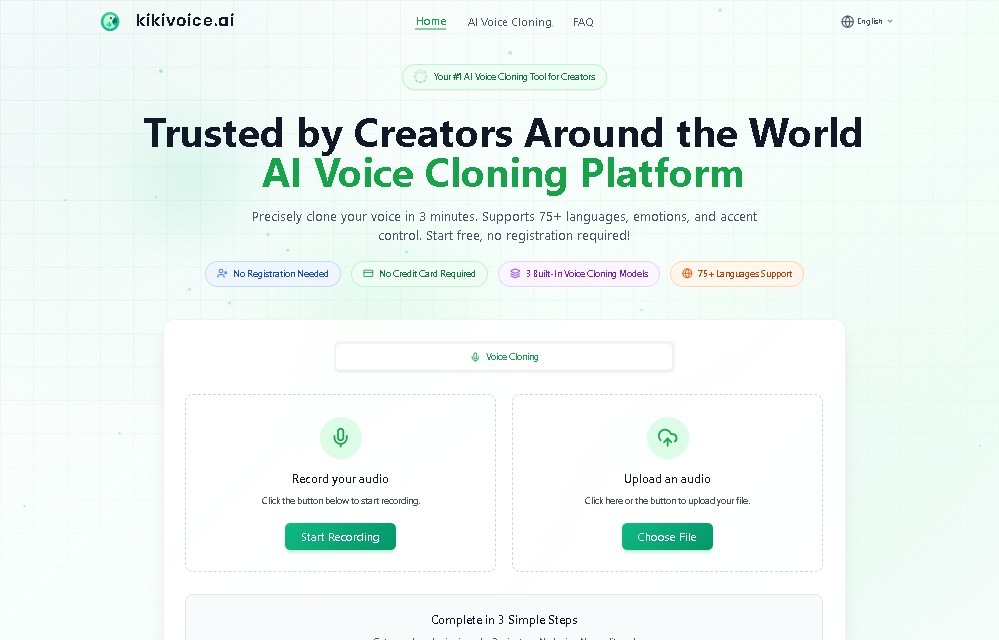
KikiVoice Screenshots
KikiVoice user reviews
Write a review
Checking your session...
KikiVoice Reviews
Loading reviews...
KikiVoice alternatives



TextInMyVoice
Clone your voice with a short sample to turn text into natural voiceovers. Generate and download MP3s in your own tone for free, no registration required.

SpeakCrate
Open-source API for local, private speech synthesis. Generate multilingual audio on your own servers with OpenAI standard compatibility.

Vidverse AI
Vidverse AI brings several AI video, image and voice models into one web and mobile app, so you can turn text or photos into clips, images and voiceovers.