Share
Multimodal AI video generator for cinematic clips from text, image, or audio. Features camera control, character consistency, and native sound in 2K.
What is Kinovi?
Kinovi is a multimodal AI video generator powered by the Seedance 2.0 model. This tool allows users to create high-quality cinematic clips from various inputs, including text, images, and audio tracks. Unlike conventional models, the system simultaneously processes visual and sound elements in a single pass, making it easy to create cohesive content without the need for complex external post-production. It is a solution designed for filmmakers, content creators, and marketing teams seeking precise control over visual storytelling.
The technology behind the application utilizes a Dual-Branch DiT architecture, which optimizes generation speed and delivers 2K resolution videos in under 60 seconds. Kinovi stands out for its multi-reference capability, allowing users to upload up to 9 images and 3 videos to guide style, composition, and movement. By using "@" tags, users can assign specific roles to each file within the prompt, such as defining the first and last frames or setting the visual rhythm through an audio track.
Key features include:
- Character Consistency: Maintains facial features, clothing, and proportions across different shots and camera angles.
- Advanced Camera Control: Enables zoom, pan, tilt, or orbit movements via natural language commands or video references.
- Native Audio and Synchronization: Automatically generates Foley effects, ambient sound, and lip-syncing in more than 8 languages.
- Natural Language Editing: Allows for the modification of existing clips by describing changes—such as replacing a character or adjusting an action—without regenerating the entire video.
The platform supports multiple aspect ratios, including 16:9, 9:16, 4:3, and 21:9, catering to both desktop and mobile formats. Generated clips range from 4 to 15 seconds, with the option to extend the duration to build longer sequences. Thanks to its practical and functional approach, Kinovi can be used to produce everything from trailers and short films to product ads and social media content with a professional, realistic, and highly personalized finish. The system allows users to lock the composition with a reference photo or direct exact movement by uploading a previous clip, providing superior flexibility in AI video creation.
Kinovi features and use cases
How to use Kinovi
Kinovi FAQ
What exactly is Kinovi?
It’s an AI video generator that lets you create cinematic clips using text, images, audio, and video references simultaneously.
Can I try Kinovi for free?
Yes. New users receive 200 free credits upon sign-up, so you can start generating your first videos without needing to enter a credit card.
What is the maximum length of the generated videos?
Individual clips can range from 4 to 15 seconds long. However, you can use the extension feature to stitch segments together and create longer stories.
Does Kinovi allow commercial use of the videos I create?
Yes. All videos generated with the tool can be used for commercial projects, including ads, social media, YouTube, or professional work for clients.
What types of files can I upload as a reference?
The platform allows you to upload up to 9 images, 3 video clips, and 3 audio tracks at once to precisely control the style, movement, and pacing of your scene.
Do Kinovi videos have watermarks?
No. Whether you are using the free version or a paid plan, videos are generated without watermarks to ensure a professional look.
What resolution are the videos exported in?
The tool generates high-definition content and supports resolutions up to 2K in various aspect ratios, such as 16:9, 9:16, or 1:1.
How does character consistency work in Kinovi?
The system locks in facial features and body proportions based on a reference image or video, ensuring the character remains identical across different shots.
Kinovi pricing and plans
Free
Price: 0 € (200 credits upon sign-up).
- 200 credits included.
- Generate approximately 1 5-second video in Seedance 2.0 Pro or Fast mode.
- Full access to all AI generation features.
- No watermark.
Starter Pack
Price: 17,99 $ (one-time payment).
- 3,000 credits.
- Generate approximately 15 Pro or 21 Fast 5-second videos.
- 2 simultaneous generations.
- No watermark.
- Credits never expire.
- 10-character limit and unlimited folders.
- API access.
XL Pack
Price: 114,00 $ (limited-time offer, previously 142,50 $ - one-time payment).
- 22,000 credits.
- Generate approximately 110 Pro or 157 Fast 5-second videos.
- 5 simultaneous generations.
- 4K resolution support.
- No watermark.
- Credits never expire.
- 100-character limit and unlimited folders.
- API access.
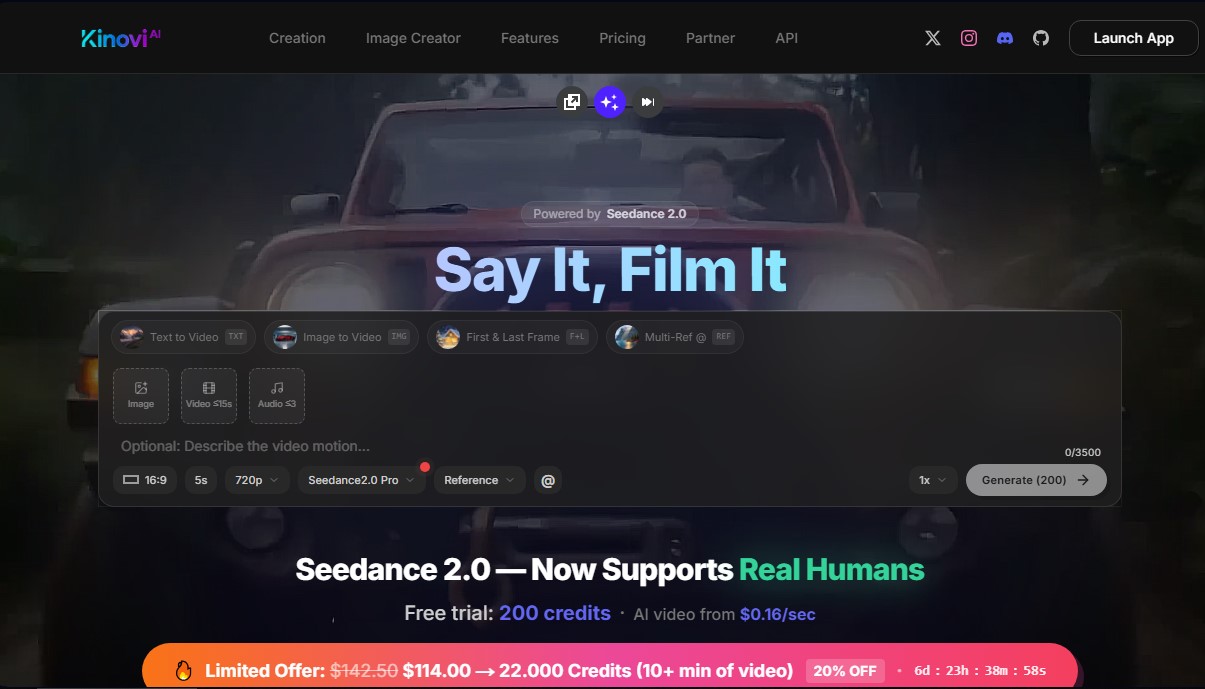
Kinovi Screenshots
Kinovi alternatives



Tesla Wrap Generator
Tesla Wrap Generator uses AI to paint designs onto the official UV template of each Tesla model for Paint Shop, with a 3D preview before you download.