Share
Generate 3D models from text or images. Includes texturing, part separation, rigging, and animation tools. View and convert files directly in your browser.
What is NovaGen3D?
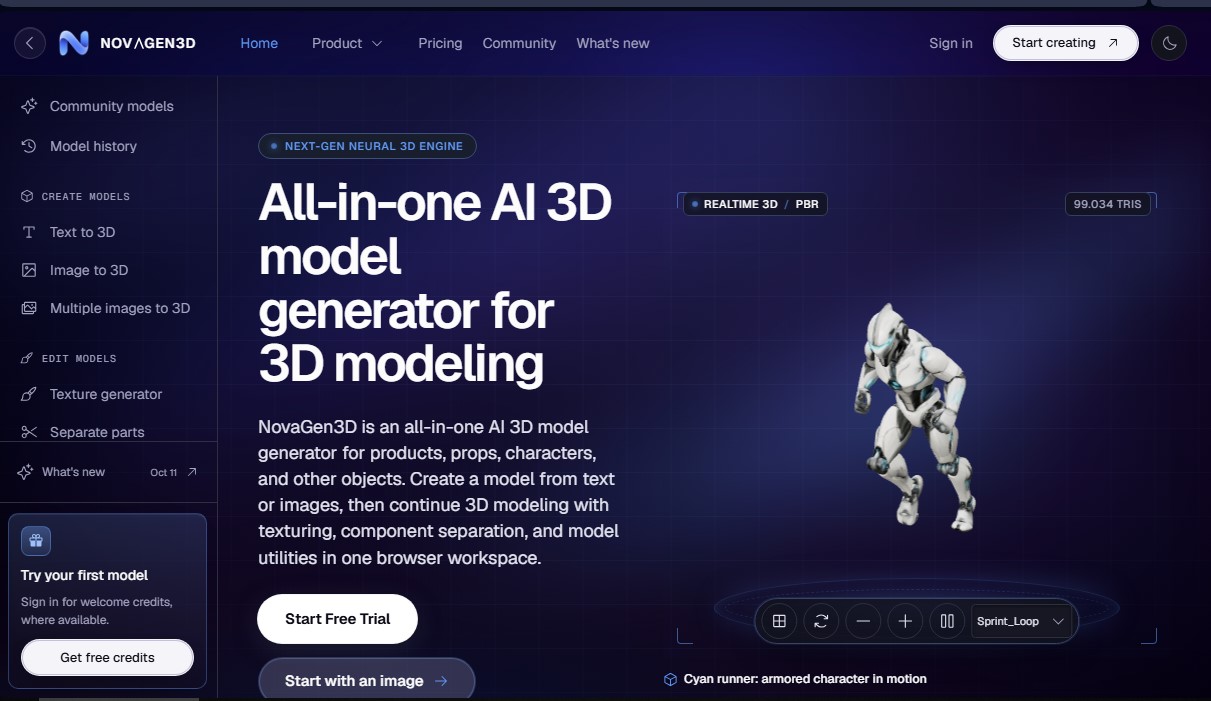
NovaGen3D is a comprehensive AI-powered 3D model generation platform designed to automatically create products, accessories, characters, and various objects. This tool runs directly in your browser, eliminating the need to install heavy software on your computer. Its Next-Gen Neural 3D Engine transforms text descriptions or static images into functional three-dimensional assets in seconds through cloud processing.
NovaGen3D's versatility lies in its ability to process various types of data inputs. The Text-to-3D module generates meshes from detailed prompts (up to 1,000 characters), while the Image-to-3D feature uses a single photograph to reconstruct geometry. For projects requiring higher precision, the Multi-view-to-3D option allows users to upload between 2 and 8 views of the same object, facilitating the creation of complex models with consistent textures.
The tool integrates several specialized AI models that users can select based on their needs:
- Hunyuan 3D: Ideal for obtaining meshes with PBR textures or geometry only.
- Tripo: Allows for independent selection of geometry and texture quality.
- Rodin: Offers high-fidelity modes for detailed finishes.
- Hitem3D: Specialized in creating objects and busts from images.
- Trellis: Optimized for generating robust models from a single visual reference.
Beyond initial creation, NovaGen3D offers advanced editing and post-processing utilities:
- Texture generator: Applies realistic finishes, illustrative styles, or metallic materials to existing GLB files.
- Separate parts: Deconstructs a model into individual selectable components, making it easy to edit specific pieces like wheels or modules.
- Auto-rigging: Automatically adds a skeleton and skin weights to humanoid characters in A- or T-poses.
- Apply animations: Allows for the application of up to 38 preset movements to rigged models for immediate visualization.
The ecosystem is rounded out by file management tools, such as a 3D viewer compatible with FBX, OBJ, STL, PLY, and 3MF formats, and a converter that transforms GLB files into GLTF, USDZ, or STL. It is a solution geared toward game developers, product designers, and digital artists who need to streamline their modeling workflow, enabling them to move from an idea to a 3D asset ready for refinement in game engines or external design applications. By centralizing generation, texturing, and animation into a single workspace, NovaGen3D simplifies digital asset creation without requiring prior technical experience in manual sculpting.
NovaGen3D features and use cases
How to use NovaGen3D
NovaGen3D FAQ
What types of objects can I create with NovaGen3D?
You can generate products, accessories, characters, and various 3D objects from text descriptions or reference images.
Is it possible to generate a 3D model from a single image in NovaGen3D?
Yes, the tool allows you to upload an image in PNG, JPG, JPEG, or WebP format to automatically create a GLB file.
How many photos are needed for the multi-view feature?
Depending on the selected AI engine, you can use between two and eight images from different angles of the same object.
Can I edit the textures of a model I have already created?
Yes, the texture generator accepts GLB files up to 100 megabytes to apply new finishes and materials without having to generate the model from scratch.
What animation features does NovaGen3D offer for characters?
The platform allows you to automatically add skeletons to humanoid models and apply various movements from a catalog of 38 presets.
What happens if I don't use all my monthly subscription credits?
Credits included in subscription plans expire at the end of each monthly period, while credits from one-time purchase bundles never expire.
Do I need to install any software to use NovaGen3D?
No, all creation, editing, and viewing tools work directly from your web browser via cloud processing.
What export formats are available for my projects?
In addition to the native GLB format, you can convert and download your files in GLTF, OBJ, STL, PLY, and static USDZ formats.
Do I need a paid subscription to download generated models?
Yes, although there are free welcome credits to try out the tool, downloading files and private generation require an active subscription.
How can I separate the parts of a complex model in NovaGen3D?
The part separation feature accepts GLB files up to 100 megabytes and breaks down the mesh into individual components that you can edit separately.
NovaGen3D pricing and plans
Free to start
Welcome credits for new accounts.
No credit card required.
Access to all AI tools for testing.
Restriction: Downloads and private generations require an active paid subscription.
Basic Plan
24,99 $ per month (or 12,99 $ per month billed annually)
600 monthly credits (allows for generating up to 60 models per month).
Private generations: user owns their assets.
PBR materials and model part splitting.
Auto-rigging and preset animations.
Downloads included in GLB, OBJ, and STL formats.
Studio Plan
42,99 $ per month (or 24,99 $ per month billed annually)
1,600 monthly credits (allows for generating up to 160 models per month).
Private generations and full asset ownership.
PBR materials and part splitting tools.
Auto-rigging and animation library.
Downloads included in GLB, OBJ, and STL formats.
Pro Plan
74,99 $ per month (or 50,99 $ per month billed annually)
3,600 monthly credits (allows for generating up to 360 models per month).
Private generations and asset ownership.
PBR materials and part splitting.
Auto-rigging and preset animations.
Downloads included in GLB, OBJ, and STL formats.
Credit Packs (One-time payment)
Starter Pack (9,99 $), Creator Pack (29,99 $), or Pro Pack (59,99 $)
Grants 350, 1,450, or 3,300 credits respectively.
Credits never expire and stack with subscription credits.
Works with all AI tools (Text to 3D, Image to 3D, Texture generator, etc.).
Restriction: These packs only add credits; downloads and model privacy still require an active subscription.
Credit costs per task (Usage limits)
Text to 3D / Image to 3D (Auto base): 10 credits.
Image to 3D (Auto Pro): 30 credits.
Texture generator: 30 credits.
Part splitting: 40 credits.
Auto-rigging: 20 credits.
Apply animations: 20 credits + 12 for each additional animation.
NovaGen3D Screenshots
NovaGen3D alternatives
Triverse AI
Triverse AI generates 3D models from an image or a text prompt, adds AI PBR textures and produces assets ready for games, 3D printing and XR.

ImageToSTL.org
Convert JPG and PNG images into STL files for 3D printing using AI. Generate detailed 3D models ready for instant download.

Image to 3D
Convert 2D images and sketches into textured 3D models using AI. Export in GLB, STL, or USDZ for video games, 3D printing, and augmented reality.