Share
Online AI photo editor to sharpen images, remove backgrounds, and erase watermarks. Includes artistic styles and 3 free daily credits with no registration required.
What is Huelift?
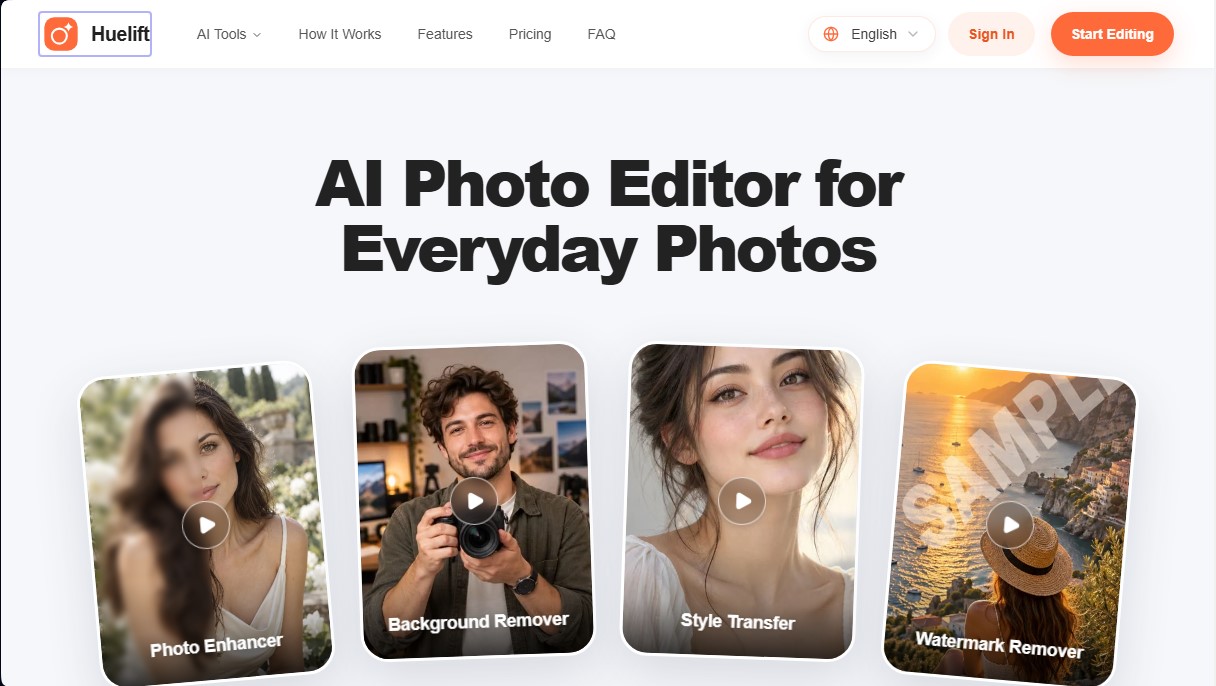
Huelift is an AI photo editor designed to quickly and easily optimize images directly from your browser. This tool is aimed at users who need to improve the visual quality of their everyday photos without resorting to complex professional software. Its web-based architecture allows you to process files from a computer or mobile device, facilitating a streamlined workflow for social media, e-commerce, or personal use.
Huelift operates on a three-step process: uploading the image (supporting JPG, PNG, and WebP formats up to 20 MB), editing with specialized tools, and downloading the final result. The platform uses generative artificial intelligence and computer vision models to interpret visual content and apply precise changes. One of its advantages is the ability to preview adjustments locally before confirming processing, allowing for a real-time before-and-after comparison to ensure the desired result.
The application's key features include:
- Sharpness and Detail Enhancement: Through the Photo Enhancer, the tool applies face restoration, noise reduction, and compression artifact removal. It is an effective solution for correcting slightly blurry or low-resolution photos.
- Background Removal: It allows you to isolate subjects, objects, or pets with high precision, handling difficult edges like hair or transparent surfaces to generate PNG files with transparent backgrounds.
- Watermark Remover: This feature reconstructs selected areas by analyzing the surrounding texture and color, naturally removing visual distractions or unwanted overlays.
- Artistic Style Transfer: It uses predefined styles such as oil painting, watercolor, or anime, while also allowing for custom descriptions to transform the image's aesthetic while preserving original features.
From a technical standpoint, Huelift stands out for its cloud-based image processing capabilities while maintaining an intuitive interface. The tool is particularly useful for creating product catalogs, where background removal and clarity are essential. Since it requires no additional app installation, it serves as an efficient alternative for AI photo retouching accessible from any modern browser, ensuring users maintain control over their edits through cropping tools and complementary manual adjustments. Its focus on privacy allows for local previews before sending the image to the server for advanced processing.
Huelift features and use cases
How to use Huelift
Huelift FAQ
What is Huelift, and what features does it offer users?
Huelift is an AI-powered photo editing platform that lets you sharpen images, remove backgrounds, apply artistic styles, and easily erase watermarks.
Do I need to register to start editing photos on Huelift?
You don't need to create an account or sign in to use the standard tools, as you can perform edits and downloads using your daily free credits.
How many images can I process for free each day?
The tool provides three free daily credits for basic features, though these credits expire if they aren't used within the same day.
Do I need to install any software on my computer to use the tool?
No installation is required because the editor runs directly in your web browser on both desktop computers and mobile devices.
Which file formats are supported by Huelift?
You can upload images in JPG, PNG, and WebP formats, provided the file size does not exceed 20 megabytes.
How does the watermark removal feature work on this platform?
Simply brush over the watermark, and the AI will reconstruct that area using information from the rest of the image to ensure a natural-looking result.
What is the difference between monthly credits and credit packs?
Subscription plan credits renew every month and do not roll over, whereas credits from one-time purchase packs never expire.
Are my images safe when I upload them to Huelift?
Photos are uploaded to private storage for processing, and local previews remain on your device until you choose to apply the AI changes.
Can I fix a very blurry photo with the image enhancer?
The tool significantly improves detail and clarity, but it cannot guarantee the full recovery of information in files that lack sufficient original detail.
What happens if I close my browser during the editing process?
If you aren't signed in, you could lose access to your current projects if you clear your cookies or close your browser's anonymous session.
Huelift pricing and plans
Free Plan: 0,00 $ forever.
3 free credits daily (valid for up to 3 images).
No sign-up required for standard tools.
Credits reset daily; unused credits expire.
Access to standard AI photo editing tools.
512 MB cloud storage.
Manual cropping, adjustments, and downloads included.
Starter Plan: 6,90 $ per month (or 5,75 $/mo billed annually).
20 credits per month (up to 20 images).
Monthly credits do not roll over (no rollover).
Includes all photo editing and Magic AI tools.
10 GB cloud storage.
Priority support.
Manual cropping, adjustments, and downloads.
Creator Plan: 18,90 $ per month (or 15,75 $/mo billed annually).
60 credits per month (up to 60 images).
Monthly credits do not roll over (no rollover).
Includes all photo editing and Magic AI tools.
10 GB cloud storage.
Priority support.
Manual cropping, adjustments, and downloads.
Studio Plan: 41,90 $ per month (or 34,92 $/mo billed annually).
150 credits per month (up to 150 images).
Monthly credits do not roll over (no rollover).
Includes all photo editing and Magic AI tools.
10 GB cloud storage.
Priority support.
Manual cropping, adjustments, and downloads.
Credit Packs (one-time payment): Starter (2,90 $ for 6 credits), Creator (26,90 $ for 60 credits), and Studio (59,90 $ for 150 credits).
Credits never expire.
Includes all AI and Magic tools.
10 GB cloud storage.
Priority support.
Manual cropping, adjustments, and downloads.
Huelift Screenshots
Huelift alternatives





BeautyPlus
BeautyPlus is an AI photo editor for web and mobile that retouches portraits, sharpens photos, removes backgrounds and objects, tries on hairstyles and makes images.