Share
Streamline B2B onboarding by centralizing tasks, milestones, and documents. Automate follow-ups with AI to accelerate activation and prevent bottlenecks.
What is LaunchBay?
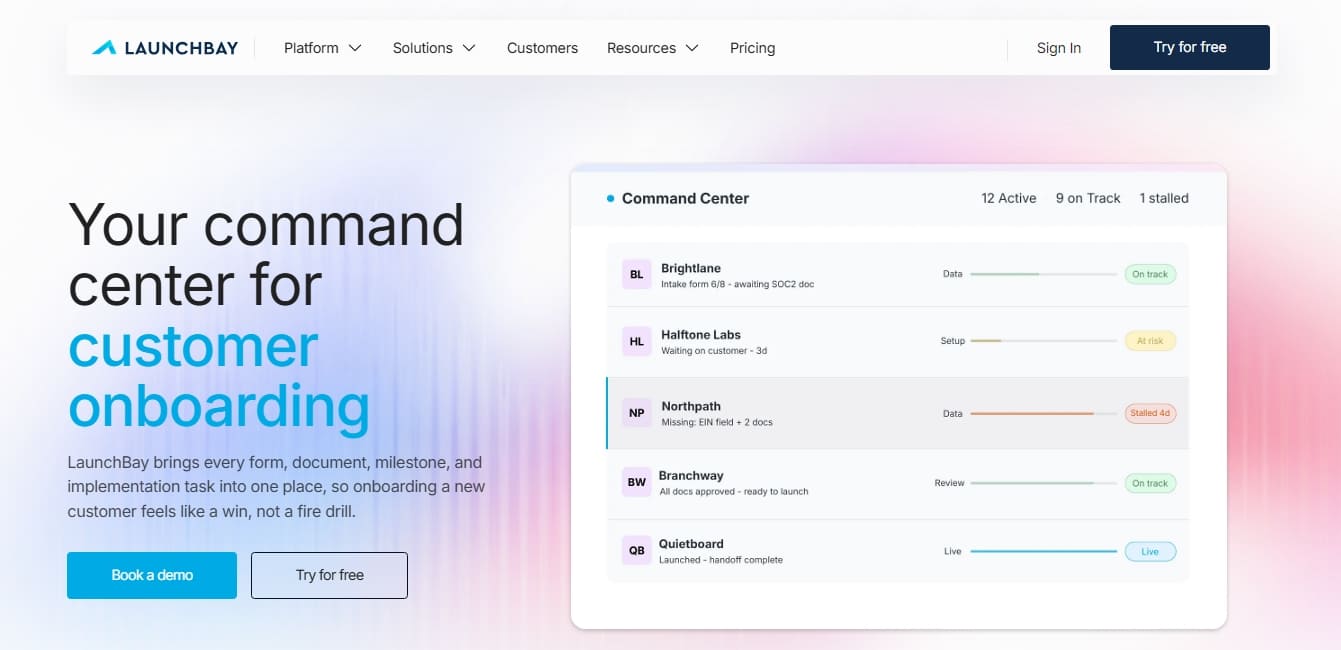
LaunchBay is a centralized management platform designed to optimize B2B customer onboarding. It functions as a command center that unifies forms, documents, milestones, and implementation tasks within a single workspace. Its primary goal is to accelerate time-to-value and eliminate the disorganization stemming from scattered spreadsheets and emails. This tool is essential for operations leaders and customer success teams who need to professionalize the post-sales phase and ensure every account reaches a successful and rapid launch.
The platform's operations are powered by workflow automation and advanced AI agents. These agents monitor each account's progress in real-time, analyzing sentiment and proactively detecting delays to alert the team before a project stalls or a client loses interest. LaunchBay technology leverages generative AI for the automatic creation of forms and projects, while also offering AI-driven meeting summaries. The system utilizes conditional logic and data validation to ensure that the information collected is accurate, replacing endless message chains with structured and validated processes.
Key capabilities and functional benefits include:
White-label customer portal: Provides a professional and personalized space where customers access their tasks via magic links without needing passwords, improving transparency and accountability.
Automated reminders and follow-ups: The software manages pending tasks autonomously, sending persistent notifications to clients until data or document requests are completed.
Standardized project templates: Allows the conversion of best-performing workflows into reusable playbooks that include digital contracts, intake forms, and specific task lists, eliminating repetitive manual work.
Full account status visibility: Detailed dashboards show exactly which specific task is blocking a launch and who is directly responsible for its execution.
Implementing this AI tool for customer management helps reduce onboarding cycles by 35% and accelerates the collection of necessary data by up to 70%. By centralizing communication, files, and approvals in a single location accessible from any computer, companies can quadruple their project management capacity. LaunchBay integrates natively with ecosystems like Slack, HubSpot, and Zapier, ensuring operations keep moving and allowing the team to focus on high-value tasks instead of manual follow-ups.
LaunchBay features and use cases
How to use LaunchBay
LaunchBay FAQ
What is LaunchBay and how does it help my business?
LaunchBay is a client onboarding command center that unifies forms, documents, and tasks to accelerate the time-to-launch for every account.
Do my clients need a password to access LaunchBay?
No. Clients access the platform through secure magic links that allow them to view their tasks and deadlines without needing to sign up or remember passwords.
Can I customize the portal with my company's branding?
Yes. LaunchBay offers white-label options so the client portal displays your logo and colors, removing all platform branding on advanced plans.
How does LaunchBay handle reminders for outstanding tasks?
The tool sends automated notifications and reminders to clients to ensure they complete their tasks on time, eliminating the need for your team to perform manual follow-ups.
What are the benefits of LaunchBay’s AI agents?
AI agents monitor the status of every account and automatically alert your team if a project stalls or is at risk of falling behind schedule.
Can I automate repetitive workflows?
Yes. You can create reusable templates that include project plans, contracts, and intake forms to standardize your client onboarding processes.
Which tools can I integrate with LaunchBay?
The platform integrates with external apps like Slack, Zapier, and HubSpot to simplify data syncing across your existing tech stack.
Is there a free trial available?
LaunchBay allows you to test its features for free so you can experience how it optimizes client management before choosing a subscription plan.
How does LaunchBay help reduce data collection time?
The platform uses structured forms with conditional logic that replace the chaos of traditional emails and spreadsheets.
What pricing tiers does LaunchBay offer for teams?
There are three plans Essentials, Standard, and Premium tailored to different team sizes and specific automation or white-labeling needs.
LaunchBay pricing and plans
Free Trial
LaunchBay offers a free trial so you can explore the platform's features before committing to a paid plan.
Essentials
$19 per team member per month (billed annually) or $29 (billed monthly). No user minimum.
Branded client portal.
Unlimited projects and clients.
Portal access via Magic Links (passwordless).
Intake forms.
AI-powered project and form builder.
Billing and payment management.
Limit: 5 digital contracts per month.
Restriction: Platform-branded subdomain.
Standard
$49 per team member per month (billed annually) or $59 (billed monthly). No user minimum.
Includes everything in the Essentials plan.
Workflow automations.
Zapier and Slack integrations.
Client request management.
Recurring tasks and time tracking.
Meeting features and custom project fields.
Detailed productivity and project reporting.
Limit: 20 digital contracts per month.
Support: Live chat, email, and phone.
Premium
$69 per team member per month (billed annually) or $79 (billed monthly). 3-team-member minimum required.
Includes everything in the Standard plan.
Removal of "Powered by LaunchBay" branding.
Custom sending domain and custom portal domain.
Password-protected portals.
HubSpot integration and MCP connector.
Access to LaunchAI Chat and LaunchAI Agents for account monitoring.
Limit: 40 digital contracts per month.
Implementation Services
Contact sales for a custom quote.
1:1 assistance for initial account setup.
Video calls with dedicated specialists.
Priority chat and email support.
Form and document migration.
Zapier workflow setup and custom template creation.
LaunchBay Screenshots