

Lection
Share
What is Lection?
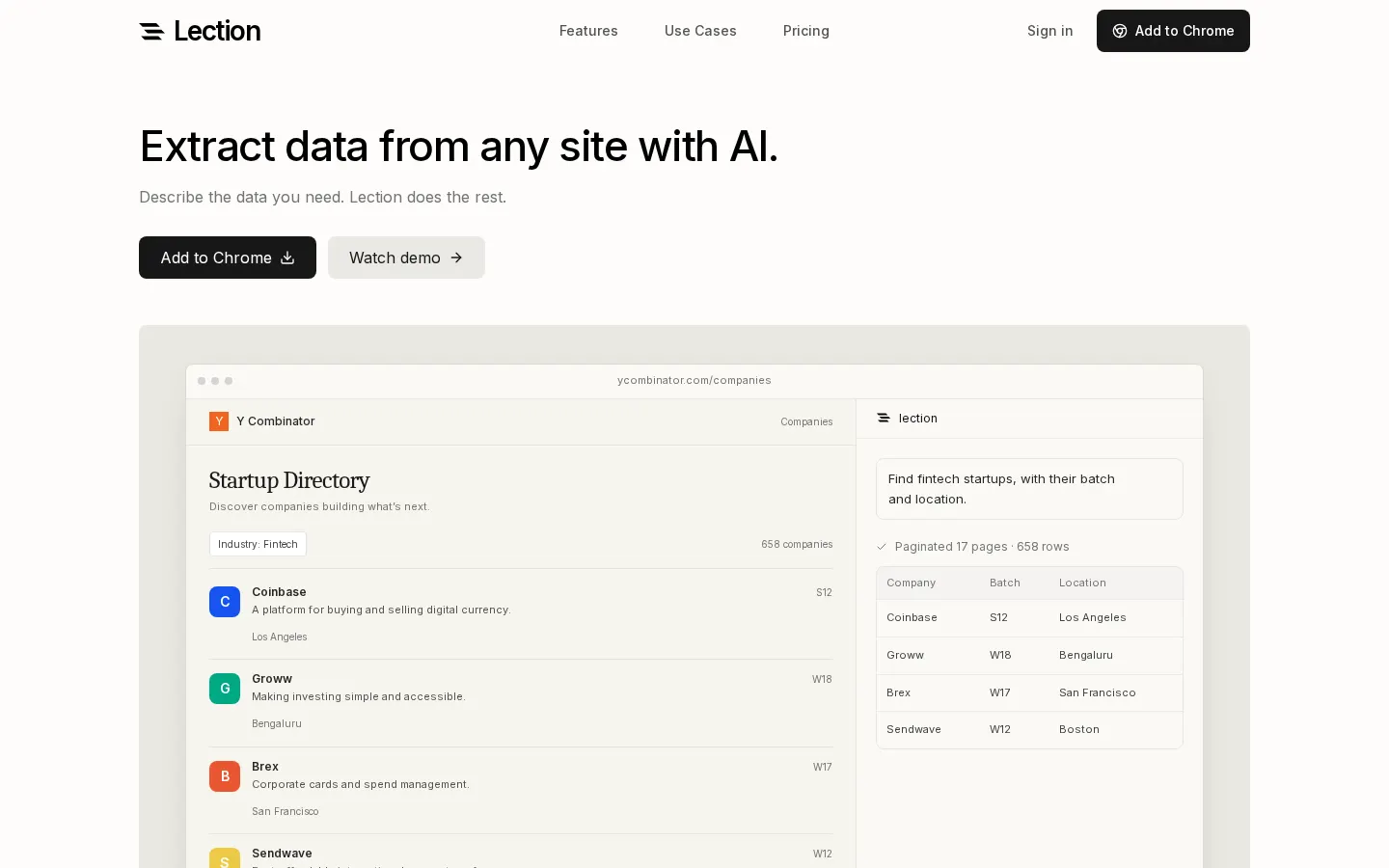
Lection is an AI web scraper that runs as a Chrome extension. You open a page, say in plain words which data you need, and it turns that into a table you can export. There are no CSS selectors to write and no coding project to set up just to pull a list of companies, products or profiles.
What it can scrape and how it navigates
It handles directories, marketplaces, search results and internal dashboards. Lection follows pagination and infinite scroll, opens the detail page behind each result and merges listing and detail data into one table. According to its own blog, it also works on pages where you're already logged in, since it runs inside your browser.
Scheduled runs and where the data goes
Any extraction can become a pipeline that repeats daily, hourly or every 15 minutes depending on your plan, and keeps running in the cloud after you close the browser. Results download as CSV, Excel or JSON, or flow into Google Sheets, Airtable, Notion or Supabase. It also connects to Zapier, Make, n8n and Pipedream, posts updates to Slack, Discord or Microsoft Teams, and supports custom webhooks. Paid plans add alerts when the data changes.
Who it suits
- Sales teams building and refreshing lead lists from company directories.
- Analysts tracking competitor prices, catalogs or listings.
- Operations staff who keep copying website data into spreadsheets.
To get going quickly there are 24 templates, including exporters for Instagram posts, X followers, GitHub stargazers, LinkedIn connections, YouTube search results and Google Maps businesses. The site also offers free single-purpose tools such as Amazon and Walmart search scrapers and an HTML table extractor. The company itself points out that public data still comes with privacy obligations and each site's terms of use.
Lection features and use cases
How to use Lection
Lection FAQ
Do I need to know how to code to use Lection?
No. You tell the chat which data you want and the extension finds it on the page. There are no selectors or scripts to write.
Does it work on sites with many pages of results?
Yes. It can follow pagination, infinite scroll and links to each detail page, then combine everything into one table.
Can I schedule automatic scrapes?
Yes. Pipelines run in the cloud even with your browser closed: daily on Free, hourly on Standard and every 15 minutes on Pro.
Which export formats are available?
CSV, Excel and JSON. You can also send rows straight to Google Sheets, Airtable, Notion, Supabase or a webhook.
Does it connect to Zapier, Make or n8n?
Yes. It integrates with Zapier, Make, n8n and Pipedream, and can notify Slack, Discord or Microsoft Teams.
Which browser do I need?
Lection is a Google Chrome extension.
How are credits used?
Starting an AI chat costs 1 credit and each cloud run costs 1 credit per 20 pages processed. Runs that fail before starting aren't charged.
Is there a free trial of the paid plan?
Yes. Standard comes with 30 days free for first-time subscribers, though a card is required. The Free plan doesn't need one.
Is it legal to scrape websites with Lection?
It depends on the site and how you use the data. Lection itself notes that public information is still covered by privacy rules and each site's terms, so check those first.
Lection pricing and plans
Reference price: 29 USD / month. Source · Verified: October 19, 2026
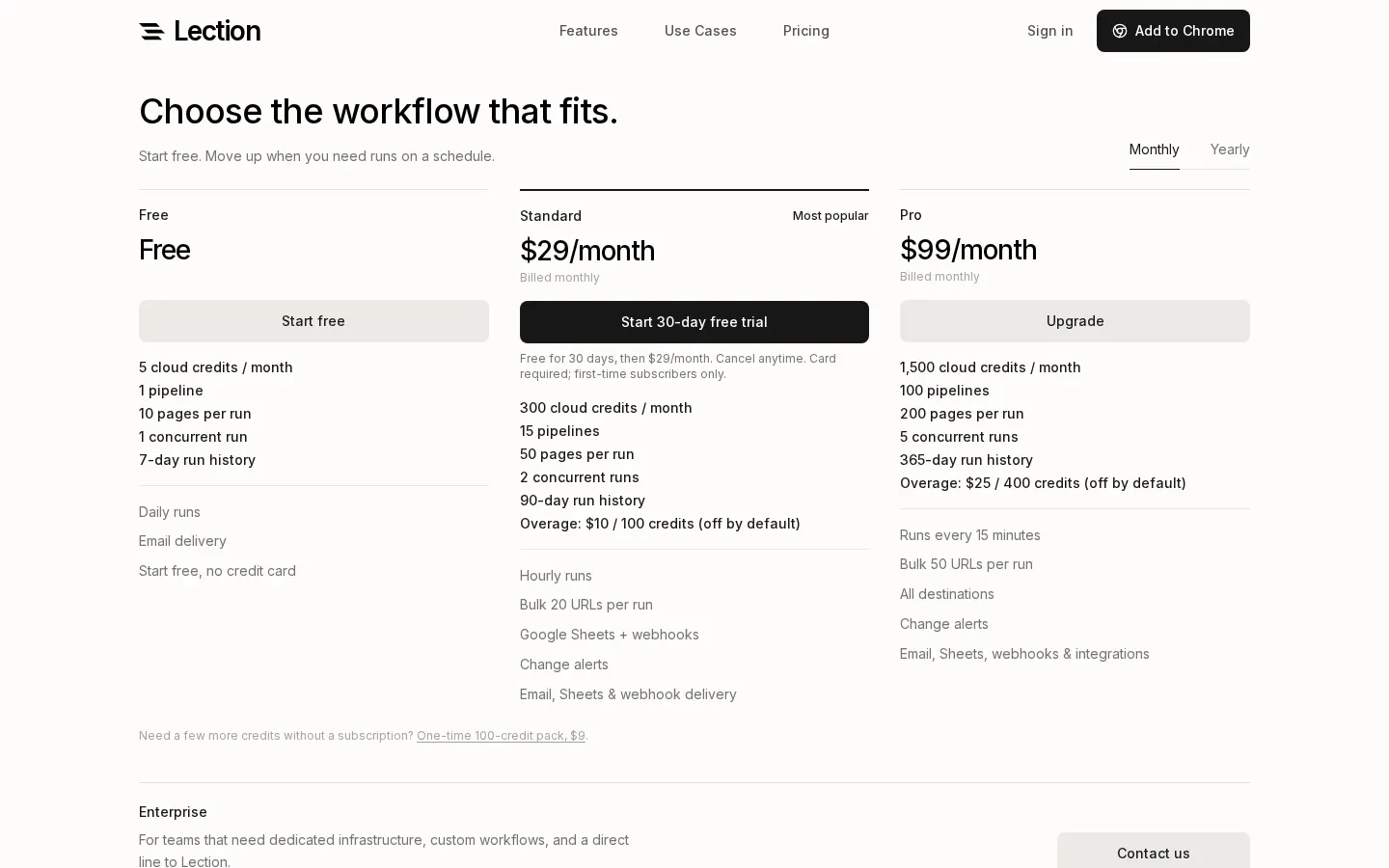
Prices in US dollars (USD), billed monthly, checked on the official website on 19/10/2026.
Free: $0
- 5 cloud credits a month, 1 pipeline, 10 pages per run and 1 concurrent run.
- Daily runs, 7-day run history and email delivery. No card needed.
Standard: $29/month
- 30-day free trial for first-time subscribers (card required).
- 300 credits a month, 15 pipelines, 50 pages per run, 2 concurrent runs and 90-day history.
- Hourly runs, bulk runs of 20 URLs, Google Sheets, webhooks and change alerts.
- Overage: $10 per 100 credits (off by default).
Pro: $99/month
- 1,500 credits a month, 100 pipelines, 200 pages per run, 5 concurrent runs and 365-day history.
- Runs every 15 minutes, bulk runs of 50 URLs and every destination.
- Overage: $25 per 400 credits (off by default).
Enterprise: custom pricing with SSO, roles, SLA and invoicing.
One-off 100-credit pack with no subscription: $9. Starting an AI chat uses 1 credit; cloud runs use 1 credit per 20 pages. Runs that fail before starting are free, and free credits reset on the 1st of each month. Yearly billing is offered, but the version of the page we checked didn't list the amount.
Lection Screenshots
Lection alternatives

shipsite.sh
Deploy static sites for AI agents with a single API call. No Git or configuration needed—upload files and get a public URL instantly.


Maestro.dev
Automate mobile app UI testing with AI using readable flows. Simplify continuous integration and run tests locally or in the cloud.

Apper-App & Website Builder
Build professional apps and websites with your ChatGPT or Claude subscriptions. Includes enterprise security, databases, and payments without paying for AI credits.