LTX Studio
Share
LTX Studio
Professional AI video production studio to create scripts, storyboards, and clips with full camera control and consistent characters and visual styles.
General Information about LTX Studio
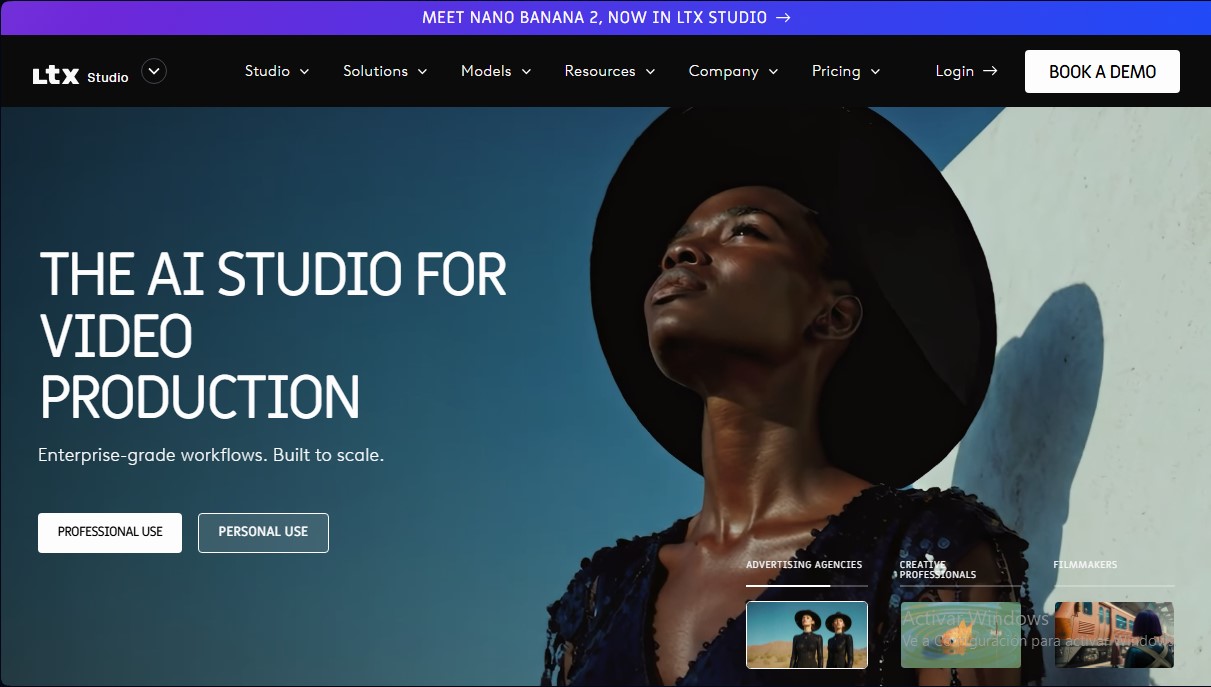
LTX Studio is an AI video generation platform designed to cover the entire audiovisual production cycle, from initial concept to final edit. It defines itself as a comprehensive creative studio that allows filmmakers, advertising agencies, and visual professionals to transform ideas into high-quality cinematic pieces. Unlike basic generators, this tool offers an enterprise-grade workspace designed to scale content creation through structured, professional workflows.
The technology powering LTX Studio is based on advanced multimodal models. It utilizes its own open-source model, LTX-2, along with integrations from leading engines such as FLUX.2 Pro, Kling, and Nano Banana 2. This approach enables the processing of various input sources, offering text-to-video, image-to-video, and video-to-video functionality. The system stands out for its ability to interpret complex prompts and maintain visual consistency throughout the project, ensuring the user retains total creative control over the production.
The tool is organized around precision and functional control. Key capabilities include:
- Dynamic Storyboard Generator: Automatically creates visual sequences from an uploaded script or a described concept, facilitating project previsualization.
- Camera and Motion Control: Allows for precise shot direction, adjusting camera angles and defining movement through the use of keyframes.
- Element Consistency: Through the AI Characters and objects feature, it ensures that protagonists and visual styles remain identical across different scenes.
- Timeline Editor and Sound Design: Facilitates integrated post-production, allowing users to adjust clip pacing and add sound layers without leaving the platform.
The workflow in LTX Studio is highly flexible. Users can start a project by uploading a script, using a single reference image, or providing text descriptions. For teamwork, the platform includes real-time collaboration features, shared asset management, and tools to automatically generate movie pitch decks. As a cloud-based application, it is accessed directly via a desktop browser, as it is currently unavailable for mobile devices.
For users, the primary benefit is the drastic acceleration of the creation and prototyping process. LTX Studio allows for the immediate iteration of visual ideas, which is essential for professional creatives who need to present solid visual proposals in record time. It is a robust solution for those seeking AI video production tools that offer genuine technical control over the final result, avoiding the randomness of conventional video generators.
Features and Use Cases of LTX Studio
How LTX Studio Works
Frequently Asked Questions about LTX Studio
What is LTX Studio?
It is a generative AI platform designed for professional video production that allows you to control the entire creative process, from the script to the final edit.
Do I need to download any software to use LTX Studio?
No software installation is necessary. It is a web-based tool that you can access directly through a desktop browser.
Can LTX Studio be used on mobile devices?
The platform is designed exclusively for desktop use and is currently not available for mobile phones, nor does it have a dedicated mobile app.
Does LTX Studio offer a free option?
Yes, there is a free plan that provides 800 one-time credits to test the image and video generation features at no cost.
Can I use videos created in LTX Studio for commercial purposes?
Commercial use is only permitted with the Standard, Pro, and Enterprise paid plans. The Free and Lite plans are limited to personal use only.
How is character consistency maintained in LTX Studio?
The tool allows you to save specific elements, such as characters and objects, to ensure they maintain a consistent visual appearance across all scenes in a project.
What options are available to start a project in LTX Studio?
You can start your production by uploading a script, describing a concept, using a reference image, or uploading a video to transform it using AI.
Does LTX Studio allow for collaboration between multiple users?
Yes, higher-tier plans like Pro and Enterprise include collaboration tools for sharing projects, managing assets, and receiving feedback in a shared environment.
What camera controls does LTX Studio offer?
The platform includes precision tools for directing each shot, allowing you to control camera movement and define animation using keyframes.
LTX Studio Pricing
Free Plan
- Price: 0 € per month.
- 800 credits (one-time payment).
- Image and video generation with LTX-2 and Z-image models.
- Advanced camera controls.
- Blank storyboards.
- Audio-to-video generation.
- Personal use license.
Lite Plan
- Price: 15 € per month (12 € per month billed annually).
- 8,000 credits per month.
- LTX-2 video generation and Z-image models.
- Advanced camera controls and blank storyboards.
- Audio-to-video generation.
- Image and video upscaling tools.
- Editing toolkit.
- Personal use license.
Standard Plan
- Price: 35 € per month (28 € per month billed annually).
- 28,000 credits per month.
- Access to advanced models: FLUX.2 Pro, Nano Banana Pro, Nano Banana 2, Veo 2, and Kling 2.6 Pro.
- Save and create consistent assets (characters, objects, logos).
- AI-generated storyboards.
- Pitch deck generator.
- Option to purchase additional credits.
- Commercial use license.
Pro Plan
- Price: 125 € per month (100 € per month billed annually).
- 110,000 credits per month.
- Includes all Standard plan features.
- Access to the Veo 3.1 video model.
- Up to 3 collaborators per project.
- Commercial use license.
Enterprise Plan
- Price: Contact Sales.
- Custom credits tailored to organizational needs.
- Unlimited access to all features and unlimited collaborators per project.
- Personalized training and a dedicated account manager.
- Priority support and Service Level Agreements (SLAs).
- Custom LTX-2 model training options.
- Single Sign-On (SSO) and regulatory compliance (GDPR, ISO, SOC 2).
- Multi-language video versioning for global distribution.
- Commercial use license.
LTX Studio Screenshots