

Share
Comprehensive AI platform for creating songs with vocals and instruments. Remix, extend tracks, separate stems, and edit MIDI with commercial use rights.
What is LumiMusic?
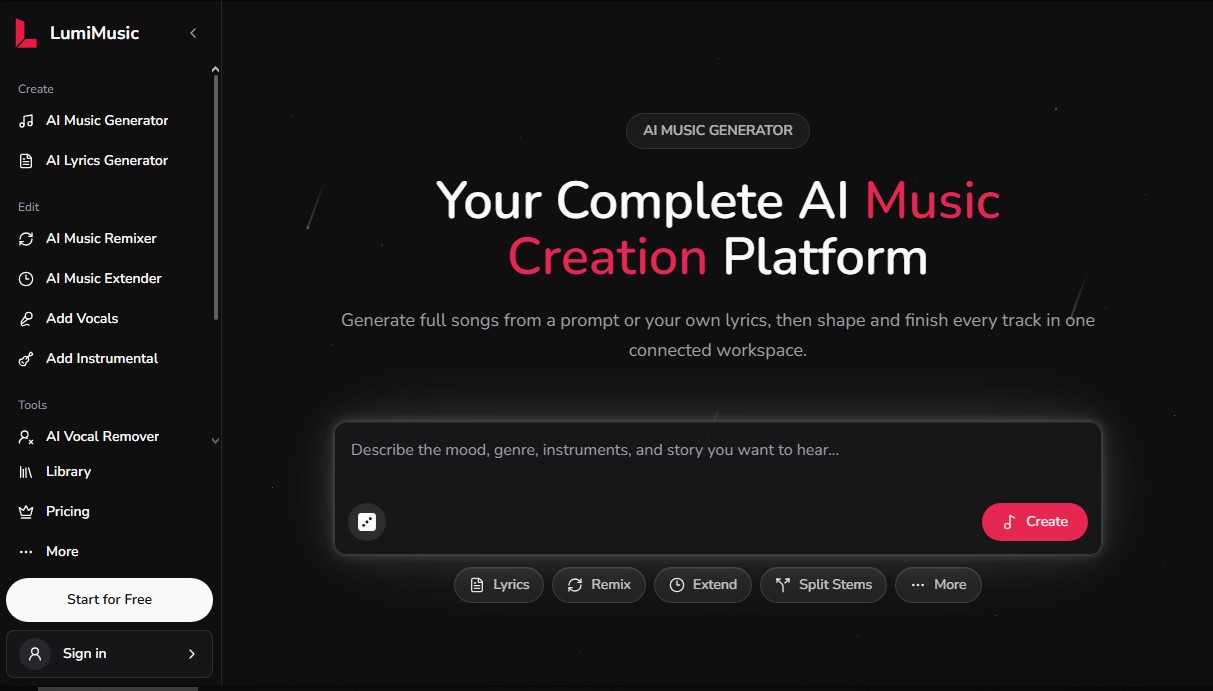
LumiMusic is a comprehensive AI music creation platform designed to transform text-based ideas or lyrics into complete, polished songs. This connected workspace allows both beginners and professionals to generate high-quality vocal and instrumental tracks without needing advanced music production knowledge. The tool uses cutting-edge AI models—specifically versions V5 and V5.5—to achieve a rich, expressive sound covering a wide variety of genres, from synth-pop and R&B to indie rock and cinematic trap.
The LumiMusic experience is built on a seamless workflow that integrates generation, refinement, and audio file management in one place. Users can start the process using an AI music generator that interprets descriptions of mood, instrumentation, and style. Additionally, it includes an AI lyric generator capable of structuring original compositions from a basic idea. One of its most notable capabilities is the option to upload your own audio files to work on them, allowing you to add vocals to instrumental tracks or build complex arrangements around an existing vocal recording.
Within its ecosystem of advanced tools, LumiMusic offers specific features for technical sound processing:
- AI Music Remixer: Allows you to rework the style and arrangement of an existing song to explore new sounds.
- AI Music Extender: Uses algorithms to extend the length of a track while maintaining musical coherence.
- AI Stem Splitter: Divides a finished track into its individual components or stems, facilitating independent editing of instruments and vocals.
- Audio to MIDI Conversion: Transforms audio recordings into editable MIDI notes via a MIDI editor built directly into the browser.
- AI Music Analyzer: Automatically analyzes any track to reveal technical data such as tempo, key, structure, and genre.
For content creators and industry professionals, the platform makes it easy to obtain royalty-free music with commercial licenses available through its subscription plans. All projects are managed from a centralized cloud library, allowing access from any computer and offering optimized playback pages for sharing final results. Thanks to additional features like the AI vocal remover, this tool positions itself as a versatile solution covering everything from the initial creative phase to technical audio post-production.
LumiMusic features and use cases
How to use LumiMusic
LumiMusic FAQ
What is LumiMusic, and what can I create using the platform?
LumiMusic is a comprehensive AI-powered music creation platform that allows you to generate complete songs—including both vocals and instrumentals—from text prompts or your own lyrics.
Can I use my own lyrics to generate a song in LumiMusic?
Yes, the tool allows you to input your own lyrics, which the AI then transforms into a musical composition based on the style, genre, and mood you select.
Do I have commercial use rights for the music I create?
Commercial use rights are available to users subscribed to the Pro or Unlimited plans, or through one-time payment options, subject to the current licensing terms.
What advanced editing tools does LumiMusic offer?
The platform includes features for stem separation, vocal removal, style remixing, extending track length, and converting audio recordings into editable MIDI files.
Do I need any prior music production experience?
No technical experience is required. A simple description is all you need to get professional results, though the platform offers advanced tools for those who want more control.
Does LumiMusic offer a free option to try the service?
Yes, there is a free plan that includes fifteen welcome credits, allowing you to generate your first songs and explore the generator’s basic features.
Can I upload my own audio files to work with?
Yes, you can upload audio files for which you own the rights to use analysis tools, stem separation, and remixing, or to add new vocal and instrumental parts.
How do credits work in the subscription plans?
Each plan provides a specific number of monthly or annual credits that are used when generating new songs, allowing you to choose the level that best fits your production needs.
Can I download my songs in different formats?
Paid plan users can download their creations, including full tracks, individual stems, or MIDI files generated during the editing process.
Where are my creations and projects stored?
All your songs, lyrics, analysis reports, and processed tracks are securely stored in your personal library within the platform, so you can access them at any time.
LumiMusic pricing and plans
Free
15 sign-up credits (equivalent to 2 songs).
Basic AI music generator.
AI lyric generator.
Music downloads.
7-day cloud storage.
No commercial use rights.
Starter: $19 per month (or $8.30 per month with $99 annual billing)
1,000 credits per month (approx. 200 songs).
Access to advanced models (V5 and V5.5).
Pro music and lyric generator.
AI music editing tools.
1,000 download limit.
Email support.
No commercial use rights.
Pro: $39 per month (or $25 per month with $300 annual billing)
2,500 credits per month (approx. 500 songs).
Access to advanced models (V5 and V5.5).
Commercial license included.
Unlimited downloads.
Pro generation and editing tools.
Priority email support.
Unlimited: $99 per month (or $59 per month with $708 annual billing)
Unlimited credits and songs.
Access to advanced models (V5 and V5.5).
Commercial license included.
Unlimited downloads.
Pro generation and editing tools.
Priority email support.
One-time payment (Credit Packs)
5,000 credits (approx. 1,000 songs): $100.
12,000 credits (approx. 2,400 songs): $200.
35,000 credits (approx. 7,000 songs): $500.
All packs include: commercial license, access to advanced models, Pro editing tools, unlimited downloads, and priority support.
LumiMusic Screenshots
LumiMusic alternatives



MusicGenerater.com
Generate songs with vocals and music from descriptions or lyrics. Create any genre, extend tracks, and easily separate vocals from instruments.

Personalized Gifts
Create personalized gift songs. Add personal details and AI crafts a unique track with lyrics and music to surprise loved ones on birthdays, weddings, or anniversaries.


Image to Music AI
Transform your photos into original music. This tool analyzes color, light, and mood to automatically create a track that reflects the image's atmosphere.