Lykos AI
Share
Lykos AI
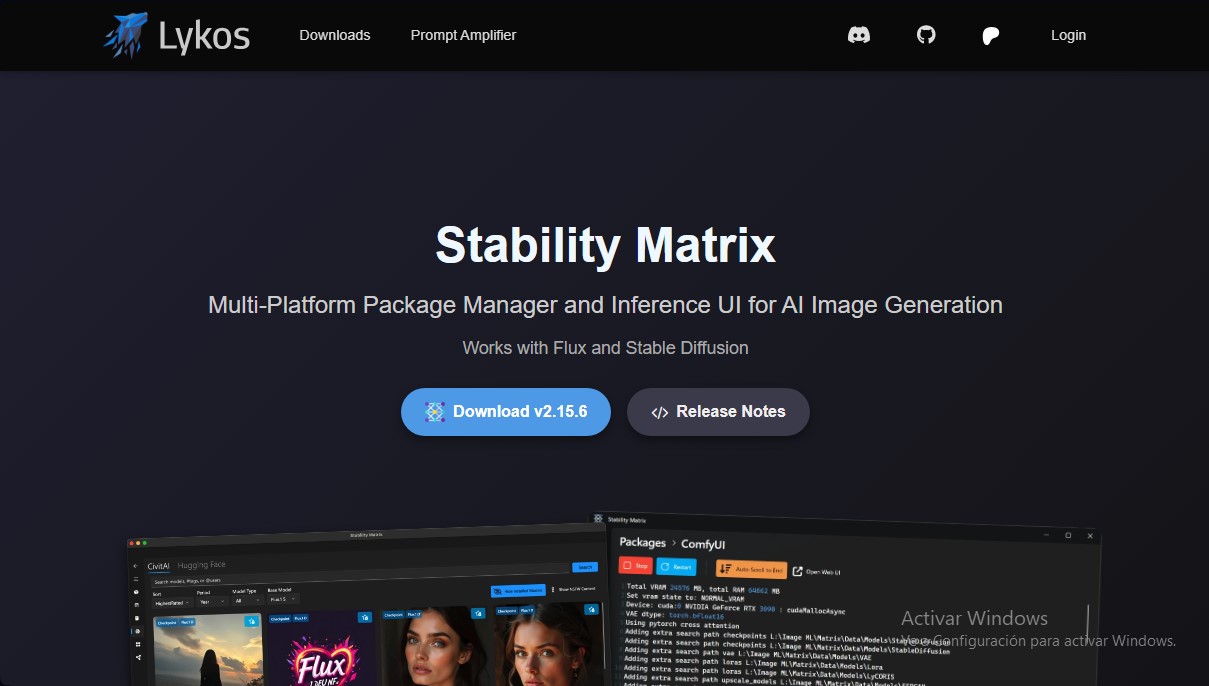
AI image package manager and interface. Install environments like Flux or Stable Diffusion, centralize shared models, and simplify setup with one-click configuration.
General Information about Lykos AI
Stability Matrix, developed by Lykos AI, is a powerful cross-platform package manager and inference interface designed to simplify AI image generation. This tool acts as a comprehensive control center that allows you to install, organize, and run various Stable Diffusion and Flux environments without the usual technical headaches of manual installations.
Its primary goal is to lower the barrier to entry for users seeking high-level performance without having to deal with complex Python dependencies. Thanks to its one-click installation system, the software automatically configures everything needed to start creating visual content on your computer. It is an ideal solution for both digital artists and developers who need to switch between different web user interfaces (WebUIs) quickly and efficiently.
One of the most notable technical features of Stability Matrix is its shared model folder. Unlike traditional installations where each interface duplicates files, this tool centralizes checkpoints, LoRAs, and VAEs. This saves a significant amount of hard drive space, as all installed interfaces access the same resource library. Additionally, it streamlines organization through a drag-and-drop feature for importing existing collections along with their respective metadata.
The Lykos AI ecosystem offers deep integration with CivitAI. Through a browser extension and an internal browser, users can download models directly into the appropriate folder, making it easy to keep the library up to date. Compatible interfaces that can be managed and updated from the application include:
- Stable Diffusion WebUI (Automatic1111 and Forge).
- ComfyUI for advanced node-based workflows.
- Fooocus and InvokeAI for a more accessible user experience.
- StableSwarmUI, SD.Next, and VoltaML.
- Specialized training tools like kohya_ss and OneTrainer.
Regarding hardware, the application is compatible with Windows 10/11, Linux, and macOS (specifically optimized for Apple Silicon). It requires a minimum of 12 GB of RAM and a graphics card with at least 4 GB of VRAM, supporting NVIDIA and AMD GPUs (the latter is currently in the experimental phase). Once the initial installation is complete, the tool allows for offline use, ensuring privacy by not leaking generated content and only logging technical errors for system improvement. Its architecture also allows for extension management and customization via command-line arguments, providing a professional and highly scalable workflow.
Features and Use Cases of Lykos AI
How Lykos AI Works
Frequently Asked Questions about Lykos AI
What exactly is Lykos AI's Stability Matrix?
It is a cross-platform package manager and inference interface for AI image generation that is compatible with Flux and Stable Diffusion.
What are the minimum system requirements to use Lykos AI?
You need Windows 10 or 11, Linux, or macOS, at least 12 GB of RAM, 20 GB of SSD space, and an NVIDIA, AMD, or Apple Silicon graphics card with 4 GB of VRAM or more.
Is adult content filtered in Stability Matrix?
No, the tool does not filter adult content, and the user is solely responsible for the images they choose to generate.
Do I need an internet connection to use Lykos AI?
An internet connection is only required for the initial installation, model downloads, and updates, as regular use can be performed offline.
Do I have to install Python before I start using Stability Matrix?
No prior Python installation or complex dependency management is necessary, thanks to its one-click installation system.
How does Stability Matrix manage hard drive space for models?
It uses a shared folder for all web interface packages, which saves space by eliminating the need to duplicate models across different tools.
Which image generation interfaces can I install with Lykos AI?
You can easily install several popular options, such as Automatic1111's Stable Diffusion WebUI, ComfyUI, Forge, InvokeAI, or Fooocus.
Does Stability Matrix feature CivitAI integration for downloading models?
Yes, it includes direct integration that allows you to conveniently download the latest models, and it features a browser extension to simplify the process.
What kind of personal information does Lykos AI collect?
The tool only logs system errors and crashes without storing any identifiable information or the content of the images generated by the user.
Lykos AI Pricing
Free Version (Stable):
Price: Free.
- One-click installation with no need for manual Python or dependency configuration.
- Cross-platform package manager compatible with Flux and Stable Diffusion.
- Shared model folder across all interfaces to optimize disk space.
- CivitAI integration to download models and metadata directly.
- Access to multiple user interfaces (ComfyUI, Automatic1111, InvokeAI, Fooocus, and more).
- Works offline after the initial installation.
- No NSFW content filtering.
Patron Plan:
Price: See official website (requires Patreon subscription).
- Access to stable "Preview" versions with early-access features for early adopters.
- Access to "Development" versions featuring the latest technical innovations and experimental features.
- Exclusive perks and support for the tool's development.
Lykos AI Screenshots