
Share
All-in-one AI solution for creators to generate scripts, design thumbnails, and write copy. Includes a content calendar and ideation tools.
What is MakerSuite?
MakerSuite is a comprehensive AI-powered solution specifically designed to optimize the workflow of digital content creators. The platform covers everything from the initial ideation phase to final launch preparation, acting as a versatile assistant for professionals ranging from bloggers to social media marketing specialists and video producers.
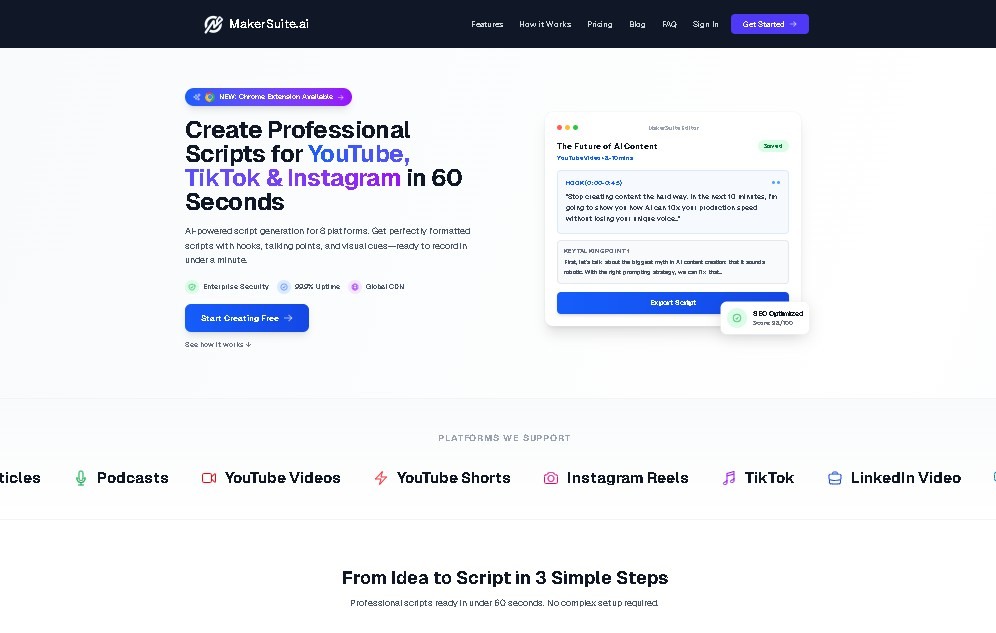
MakerSuite’s core functionality lies in its AI script generation capabilities. This tool allows users to efficiently structure narratives for videos and presentations, saving time during the writing phase. A notable technical advantage for those filming on-camera content is the ability to export scripts to compatible teleprompter formats, such as PDF, Word, TXT, and JSON, making it easier to read from a computer or mobile device.
In terms of visuals and audience engagement, the application includes an automated thumbnail creator. This feature is essential for improving content performance on platforms where initial visual impact is crucial for attracting viewers. Additionally, the tool assists with copywriting and written content, making it useful for generating clear and coherent descriptions, articles, or social media posts.
For strategic management and production organization, MakerSuite integrates several functional capabilities:
- Content Idea Generator: Uses AI algorithms to suggest creative topics and approaches.
- Content Calendar: Enables structured post planning to maintain consistency.
- Advanced Analytics: Provides relevant metrics and data for content creation optimization.
This AI tool is focused exclusively on the digital content environment. While it centralizes much of the creative process, it is important to note that it does not offer text-to-speech (TTS) features, multilingual support, real-time collaboration tools, or automated post scheduling. However, its focus on AI-driven assistance for script creation and graphic elements positions it as a practical resource for centralizing production from a single dashboard, preventing the need to juggle multiple applications.
MakerSuite features and use cases
How to use MakerSuite
MakerSuite FAQ
What exactly is MakerSuite, and who is it for?
MakerSuite is an all-in-one AI-powered solution designed for content creators to streamline tasks from initial ideation to final launch.
What formats can I use to export scripts generated in MakerSuite?
You can export your scripts in several teleprompter-compatible formats, including PDF, Word, TXT, and JSON.
How much does a subscription cost, and what is the payment model?
MakerSuite follows a freemium model, with a paid option available for $9 per month, billed monthly.
Is there a refund policy if I decide to cancel my subscription?
Under the company's current billing policy, no refunds are issued under any circumstances.
Does MakerSuite support multiple languages for content creation?
The tool currently lacks multilingual support and focuses primarily on a single language.
Does the platform include any features to help organize my posts?
Yes, MakerSuite features a built-in content calendar to help you efficiently plan and organize your content strategy.
Can I collaborate with a team on the platform?
At this time, the tool does not offer collaboration features for working with other users on the same project.
What kind of content can I create with MakerSuite?
You can use this tool to generate video scripts, design thumbnails, write blog or social media copy, and brainstorm new content ideas.
Does the tool have a text-to-speech feature for scripts?
No, the platform does not currently offer automatic text-to-speech functionality.
Can I schedule my posts directly through the app?
No, MakerSuite does not include scheduling features for publishing content directly to social media.
MakerSuite pricing and plans
Free Version
MakerSuite offers a freemium model that provides initial access to basic ideation and content creation features at no cost.
Paid Plan: $9 per month
Monthly billing subscription (no refund policy) that includes the following features:
- AI-powered script generator.
- Script exports to PDF, Word, TXT, and JSON formats.
- Thumbnail creation tool.
- Content idea generator and copywriting tools.
- Integrated content calendar.
- Access to advanced analytics.
MakerSuite Screenshots
MakerSuite user reviews
Write a review
Checking your session...
MakerSuite Reviews
Loading reviews...
MakerSuite alternatives

RightBlogger
RightBlogger bundles AI tools for bloggers: keyword research, article writing, automatic publishing, social sharing and SEO reporting in one place.

Autoblogging.ai
Autoblogging.ai turns titles or keywords into SEO-ready blog posts, up to 500 per batch, and can push them straight to WordPress or other platforms.