
Share
Turn text into editable digital maps. Quickly and easily plan trips, locate historical landmarks, and find places by their vibe.
What is MapsGPT?
MapsGPT is a generative AI tool designed to instantly transform text prompts into custom digital maps. Developed by Proxi, this application allows users to create interactive geographic visualizations without needing technical cartography skills, making it easy to organize spatial information through natural language. The platform's primary goal is to simplify locating points of interest and itinerary planning by using algorithms that process descriptive requests.
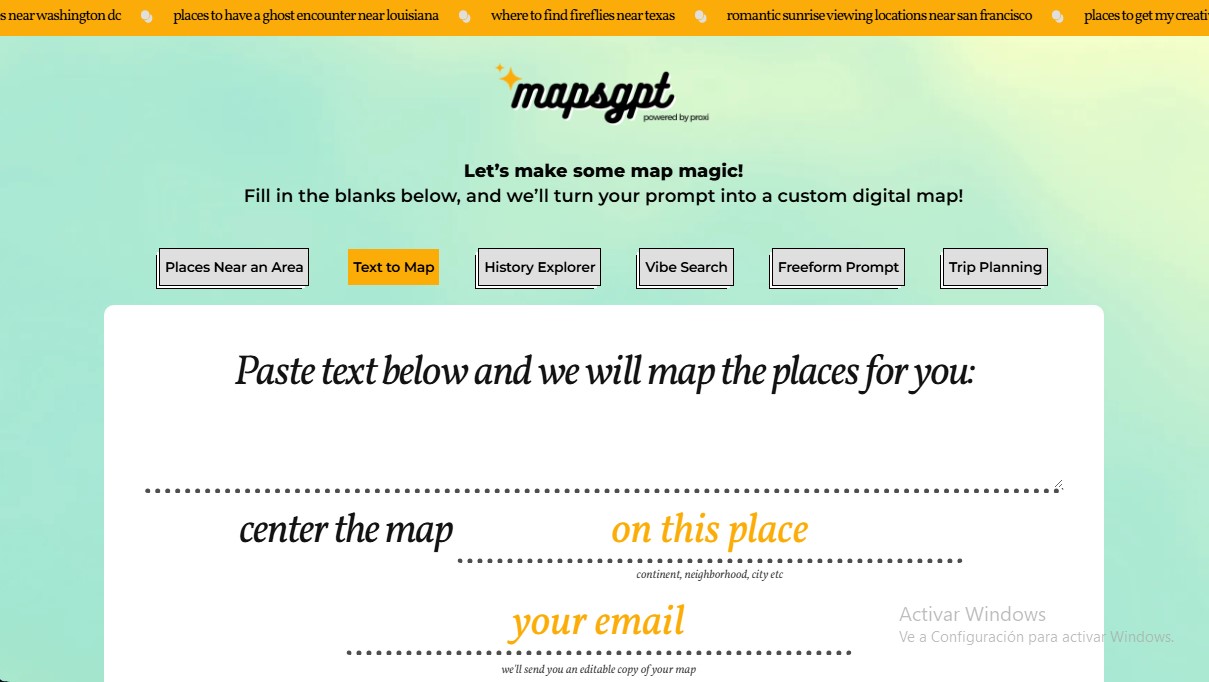
The functionality of MapsGPT is based on several specialized modules that use natural language processing (NLP) to interpret user needs. By entering a description or selecting specific parameters, the AI tracks and organizes relevant locations on a map interface. Once generated, the system sends an editable copy of the map to the user's email, allowing them to view and customize it from any computer or mobile device.
Key capabilities of this smart mapping tool include:
- Text to Map and Trip Planning: Allows you to paste blocks of text, such as articles or travel lists, so the AI can automatically identify locations and place them on the map.
- Vibe Search: An atmosphere-based search feature that finds locations based on their mood, allowing users to filter by concepts like "artsy," "chill," "spooky," or "healthy" near a specific area.
- History Explorer: Specialized in historical exploration, this module maps places related to specific events or eras in any city, neighborhood, or even along railway lines.
- Freeform Prompt: Offers total freedom to describe types of places (such as family activities or cocktail bars) near a specific geographic location, ranging from a neighborhood to an entire country.
MapsGPT is highly useful for travelers, event planners, and professionals who require rapid geographic data visualization. The tool uses aggregated data to generate its recommendations, providing a functional foundation for discovering new environments. Furthermore, the ecosystem is complemented by additional Proxi features, such as converting spreadsheets to maps, transforming PDFs or images into interactive maps, and an extension that turns travel blog URLs directly into visual guides.
This AI mapping solution optimizes local information searches by eliminating the need to look up each site individually. By centralizing information into a visual and editable resource, users can manage their routes and discoveries efficiently and professionally. While accuracy depends on the available aggregated data, the platform positions itself as an advanced assistant for place curation and data-driven urban exploration.
MapsGPT features and use cases
How to use MapsGPT
MapsGPT FAQ
What is MapsGPT and what is it used for?
MapsGPT is an AI-powered tool that allows you to create custom digital maps based on text descriptions or specific categories.
How do I receive my map once MapsGPT generates it?
You need to enter your email address into the form so the system can send you an editable copy of the map you created.
What kind of places can I find with MapsGPT?
The tool allows you to find everything from kids' activities and cocktail bars to places with a specific vibe or historical points of interest.
Is it possible to create a map in MapsGPT from existing text?
Yes, the text-to-map feature lets you paste a description, and the tool will automatically plot the mentioned locations on the map.
What does the "search by atmosphere" option in MapsGPT offer?
This feature locates establishments based on their vibe, allowing you to filter for artistic, quiet, healthy, or uniquely styled spots.
Is the data shown by MapsGPT completely accurate?
The information is pulled from aggregated data and total accuracy is not guaranteed, so we recommend verifying details directly with the venues.
Can I use MapsGPT to plan a travel itinerary?
Yes, the tool includes a specific travel planning feature that organizes your destinations and points of interest on an interactive map.
What other options are available if MapsGPT doesn't meet my needs?
Proxi offers additional tools to convert images, spreadsheets, or website links directly into digital maps.
Does MapsGPT allow for historical searches?
Yes, the historical explorer lets you map locations related to specific events or eras in any geographic area you choose.
MapsGPT pricing and plans
MapsGPT Access Plan: Check official website
- Create custom digital maps using free-text prompts.
- "Text to Map" feature to convert text descriptions into geolocated points.
- "History Explorer" to map locations based on specific historical events or eras.
- "Vibe Search" to find locations based on their atmosphere (artistic, laid-back, healthy, etc.).
- Trip planner to organize points of interest in specific areas, cities, or neighborhoods.
- Receive an editable copy of the generated map directly in your inbox.
- Access to Proxi’s complementary tools to transform images (PNG, JPG, PDF), spreadsheets, and URLs into interactive maps.
MapsGPT Screenshots
MapsGPT alternatives



Astrocartography Calculator
Find ideal places to move or travel by projecting your birth chart onto the world map. Analyze planetary influence on your career, relationships, and personal growth.


Muse AI by Meta
Personal AI agent that automates errands, books appointments, and shops for you. It integrates with your apps to securely complete complex tasks.