
Share
Convert PDFs, Word documents, and web pages into hierarchical and editable mind maps. Organize long texts with direct references to the original source to verify data.
What is MindMapAny?
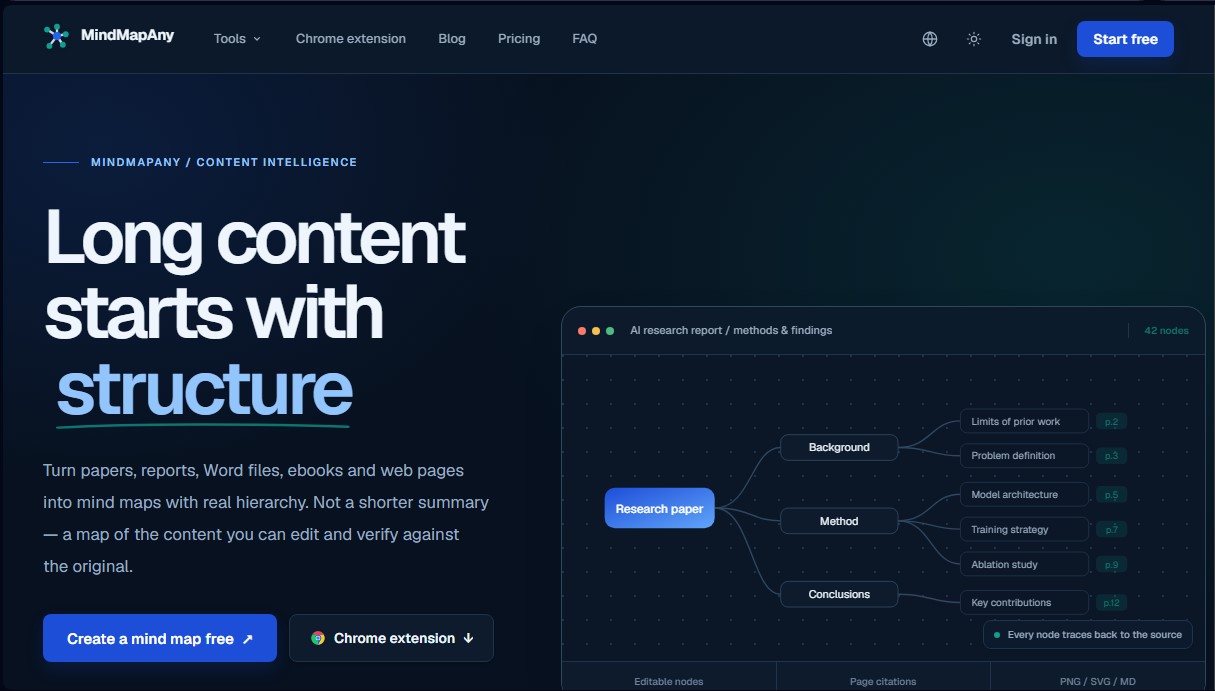
MindMapAny is an advanced artificial intelligence solution designed for knowledge organization and the comprehension of long documents. Its primary function is to convert complex files—such as research reports, technical manuals, and digital books—into editable mind maps with a deep logical hierarchy. This tool goes beyond generating a simple text summary; it builds a visual representation of the content that allows users to efficiently navigate the information structure on their computer.
The technical process behind MindMapAny stands out for its precision and reliability. When processing a file, the system performs data extraction followed by a chunking and source anchoring process. This means that every node in the map is directly linked to its origin, whether it is a page number in a PDF or a specific slide in a PowerPoint presentation. This deterministic citation approach ensures that users can verify any data within the original document, eliminating the risk of "hallucinations" or fabrications by the language model.
The tool's versatility is reflected in its compatibility with multiple formats, including DOCX, EPUB, PPTX, plain text, Markdown, and web page links. Key functional features include:
- Map generation with up to 5 levels of depth and a maximum of 110 nodes, providing a detailed view of complex topics.
- Processing capabilities in more than 30 languages, facilitating the translation and structuring of international content regardless of the source language.
- A dynamic editing interface that allows users to modify, add, or reorganize branches using keyboard shortcuts, such as using the Tab key to create child nodes.
- Professional export options in PNG, SVG, and Markdown formats for seamless integration into other documentation workflows.
- Public sharing via links, allowing third parties to view the map interactively without requiring registration.
MindMapAny is especially useful for professionals who manage large volumes of information, such as analysts, academics, and project managers. By transforming flat content into a visual structure, it helps quickly identify key points and the relationships between concepts. Additionally, it features a Chrome extension that streamlines the workflow directly from the browser, allowing users to convert web articles or technical documentation into structured knowledge almost instantaneously. It is a tool designed for those who need to read and organize information with rigor, prioritizing hierarchy and traceability over simple text synthesis. Therefore, it is an essential utility for improving productivity in long-form content analysis.
MindMapAny features and use cases
How to use MindMapAny
MindMapAny FAQ
What is MindMapAny and what type of content can it process?
It is a content intelligence tool that transforms long texts, PDF, Word, and EPUB files, PowerPoint presentations, and web pages into hierarchical and editable mind maps.
Can I edit the mind map once MindMapAny has generated it?
Yes. Since the map is not a static image, you can double-click to rename nodes, use the Tab key to add subnodes, or press Enter to create sibling nodes.
How does MindMapAny ensure that the information in the map is accurate?
Each generated node includes precise references to the original source, such as page numbers in PDF files or slide positions in PowerPoint, so you can quickly verify the data.
What languages are MindMapAny's results available in?
The tool supports over thirty output languages, allowing you to process a document in one language and automatically generate the mind map in another.
What export formats does the platform offer?
You can download your mind maps in PNG or SVG image formats for presentations, or in Markdown format if you prefer working with the text outline in other applications.
Do I need to register to use MindMapAny?
Yes, you must create a free account using your email or Google account to receive thirty initial credits and start generating your first maps.
Why can't I process some web pages with the tool?
MindMapAny cannot extract content from websites that require a login, have bot protections, or rely exclusively on JavaScript to load elements.
Who owns the mind maps created on MindMapAny?
Ownership of the maps belongs entirely to the user, who has full control to export them, delete them, or choose to activate a public link for sharing.
What are the limitations of the MindMapAny free plan?
The free plan includes thirty credits to test text and web inputs, allowing for the use of fast AI models and basic editing and export features.
How do credits work within the app?
Credits are consumed for each generation, and the cost varies depending on the file type, the selected AI model, and the total length of the processed document.
MindMapAny pricing and plans
Free (0 $ forever)
- 30 welcome credits upon sign-up.
- Fast AI model.
- Limit of up to 60,000 characters.
- PDFs up to 30 pages.
- Support for text, documents, ebooks, and web pages.
- Includes editing, exporting, and public sharing tools.
Basic (8,99 $ per month)
- 1,000 credits per month.
- Fast AI model.
- Limit of up to 150,000 characters.
- PDFs up to 60 pages.
- Access to all available input types.
- Save, share, and export features in all formats.
Pro (17,99 $ per month)
- 2,000 credits per month.
- Access to fast and high-quality AI models.
- Limit of up to 800,000 characters.
- PDFs up to 200 pages.
- Detailed map mode.
- Ability to process long and complex documents.
Unlimited (26,99 $ per month)
- Unlimited credits (subject to fair use policy).
- Access to fast and high-quality AI models.
- Limit of up to 2,000,000 characters.
- PDFs up to 200 pages.
- Includes all Pro plan features.
MindMapAny Screenshots
MindMapAny user reviews
Write a review
Checking your session...
MindMapAny Reviews
Loading reviews...
MindMapAny alternatives

Mel By Skymel
Tracks open-web signals to build knowledge graphs. Generates intelligence reports and databases, and monitors relevant changes for any target.



Optimus by Iacon Autonomics
Autonomous researcher designing experiments and evaluating algorithms to train AI models. Automates improvement cycles for LLMs, robotics, and various complex systems.

AutoDock Vina
Automated molecular docking web server. Analyze protein-ligand binding without installing software, featuring affinity reports and 3D pose downloads.