

Share
Generate professional songs from text or lyrics. Create covers, isolate vocals, and extend audio tracks. High-quality, royalty-free results.
What is Musci.io?
Musci.io is an advanced AI music generation platform designed to create professional tracks from simple text descriptions. This tool allows any user, regardless of technical knowledge or music theory, to produce complete songs featuring vocals, instrumentation, and professional mixing in a matter of seconds. Its technology is powered by state-of-the-art deep learning models, integrating powerful engines like Suno, Udio, Mureka, and ElevenLabs, which ensures original compositions with studio-quality sound.
The workflow of Musci.io is intuitive and follows a straightforward process. Users enter a text prompt detailing the desired genre, mood, or instruments. The system allows for style customization across more than 100 options and provides advanced parameter adjustments like BPM (tempo), key, and song structure. Once the track is generated, the AI engine analyzes the data to deliver a unique, royalty-free audio file ready for commercial use on platforms like YouTube, podcasts, or video games.
Key features of this application include:
- Text to Song and Lyrics to Song: Transforms descriptions or your own lyrics into fully produced songs with natural-sounding vocals and dynamic arrangements.
- AI Song Cover: Allows you to upload an existing track to change its genre, tempo, or voice type, making it easy to create personalized versions.
- Vocal Remover and Isolation: Accurately separates vocals from instrumentation in any audio file, ideal for creating karaoke tracks or remixes.
- Music Extension and Section Replace: Editing tools that allow you to extend a track while maintaining musical consistency or regenerate specific sections, such as a chorus, without altering the rest of the work.
- AI Singing Photo: A creative feature that animates portraits to sync their lips and expressions with the generated music.
Musci.io is especially useful for content creators looking for original soundtracks, musicians needing to prototype ideas quickly, and developers requiring background music. The tool supports a wide variety of genres, from pop and rock to lo-fi and cinematic scores. Additionally, it offers high-fidelity downloads in formats like MP3, WAV, and MIDI, ensuring full compatibility with any professional editing software or mobile device. As a cloud-based solution, processing is extremely fast, delivering final results in under 30 seconds, making it one of the most efficient options in today’s AI audio tool market.
Musci.io features and use cases
How to use Musci.io
Musci.io FAQ
What is Musci.io and how does its music generator work?
Musci.io is an AI-powered platform that creates professional songs from text descriptions, analyzing musical patterns to generate original tracks in seconds.
Can I use the songs created on Musci for commercial purposes?
Yes, all generated music is royalty-free and comes with a commercial license, so you can use it in videos, games, podcasts, and other professional projects.
Does Musci.io allow me to turn my own lyrics into a produced song?
Absolutely. Just paste your lyrics and select a style, and the tool will generate a complete track featuring realistic vocals and professional instrumentation.
Do I need musical knowledge to use Musci.io?
No prior experience or instrumental skills are required, as the system is designed for anyone to create music using simple, everyday language.
What options does Musci offer to edit or extend a generated song?
The tool allows you to extend track length, replace specific sections you aren't satisfied with, and adjust advanced parameters like tempo or key.
How can I separate vocals from music using Musci.io’s tools?
The platform includes a vocal removal feature that cleanly separates vocals from instruments in any audio file you upload.
How long does it take to generate a music track with Musci?
The process is highly efficient, and the generator typically delivers a fully produced song in about twenty to thirty seconds.
What types of plans and pricing does Musci.io offer?
We offer monthly subscriptions with different generation capacities, as well as a pay-as-you-go option through credit packs that don’t require a recurring subscription.
What is the "singing photo" feature included in Musci?
This tool allows you to upload a portrait and sync it with a song to create an animation where the face appears to sing naturally to the beat.
Does Musci.io support different musical styles?
Yes, the generator supports over a hundred different genres—from pop and rock to jazz, classical, and electronic—allowing you to customize the mood and structure.
Musci.io pricing and plans
Free Version / Trial
- Includes initial credits upon registration to test basic features.
- Cost of 10 credits per generation.
- Access to music creation via text or lyrics.
Starter Plan: $9.99/mo
- 80 generations (equivalent to 160 songs).
- Music generation from text or lyrics and AI lyrics generator.
- AI features for covers, vocal removal, and virtual singer (up to 2 minutes).
- Custom voice model creation (limit of 100).
- Allows uploading your own music and 1 simultaneous generation.
- 365-day cloud storage.
- Private generations, commercial license, and priority support.
- File downloads in MP3, WAV, and MIDI formats.
Standard Plan: $29.99/mo
- 300 generations (equivalent to 600 songs).
- AI virtual singer with an extended 10-minute limit.
- Unlimited custom voice models.
- Up to 10 simultaneous generations.
- Unlimited cloud storage.
- Includes all creation tools, editing features, and commercial licensing from the Starter plan.
Premium Plan: $99.99/mo
- 1,200 generations (equivalent to 2,400 songs).
- Unlimited simultaneous generations.
- Unlimited cloud storage.
- Includes all advanced features, AI tools, and commercial rights from previous plans.
Pay As You Go Plans
- 600 credits (60 generations / 120 songs): $9.99 valid for 90 days.
- 2,500 credits (250 generations / 500 songs): $29.99 valid for 90 days.
- 8,000 credits (800 generations / 1,600 songs): $99.99 valid for 90 days.
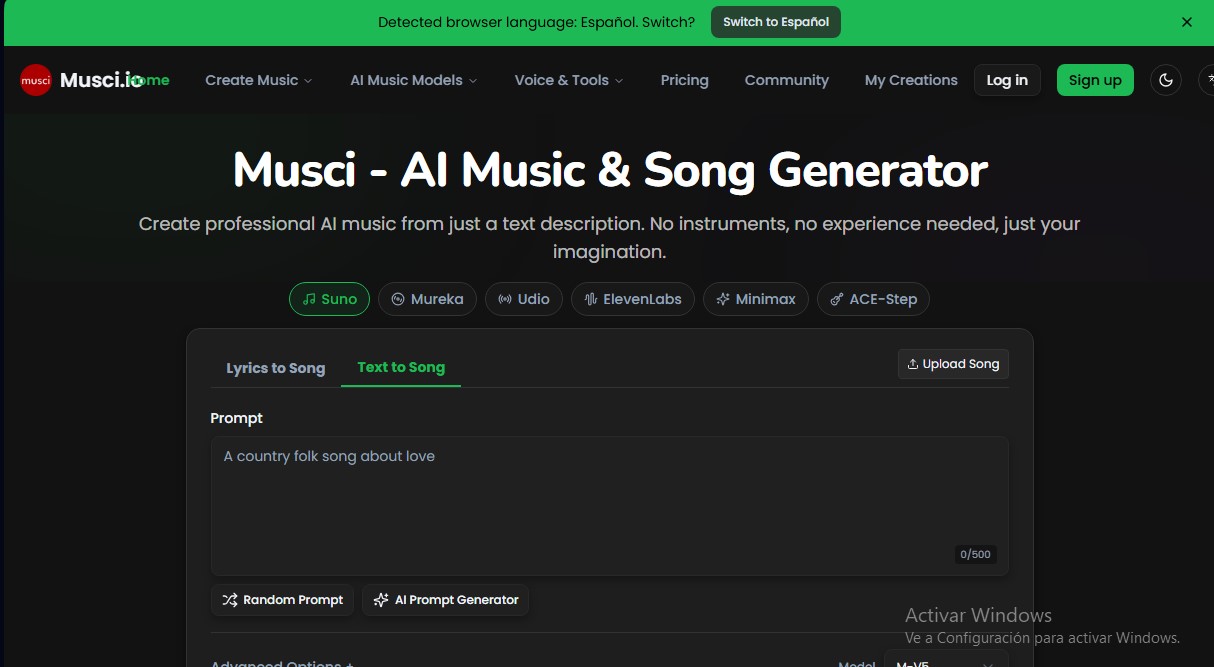
Musci.io Screenshots
Musci.io alternatives



MusicGenerater.com
Generate songs with vocals and music from descriptions or lyrics. Create any genre, extend tracks, and easily separate vocals from instruments.

Personalized Gifts
Create personalized gift songs. Add personal details and AI crafts a unique track with lyrics and music to surprise loved ones on birthdays, weddings, or anniversaries.


Image to Music AI
Transform your photos into original music. This tool analyzes color, light, and mood to automatically create a track that reflects the image's atmosphere.