

Share
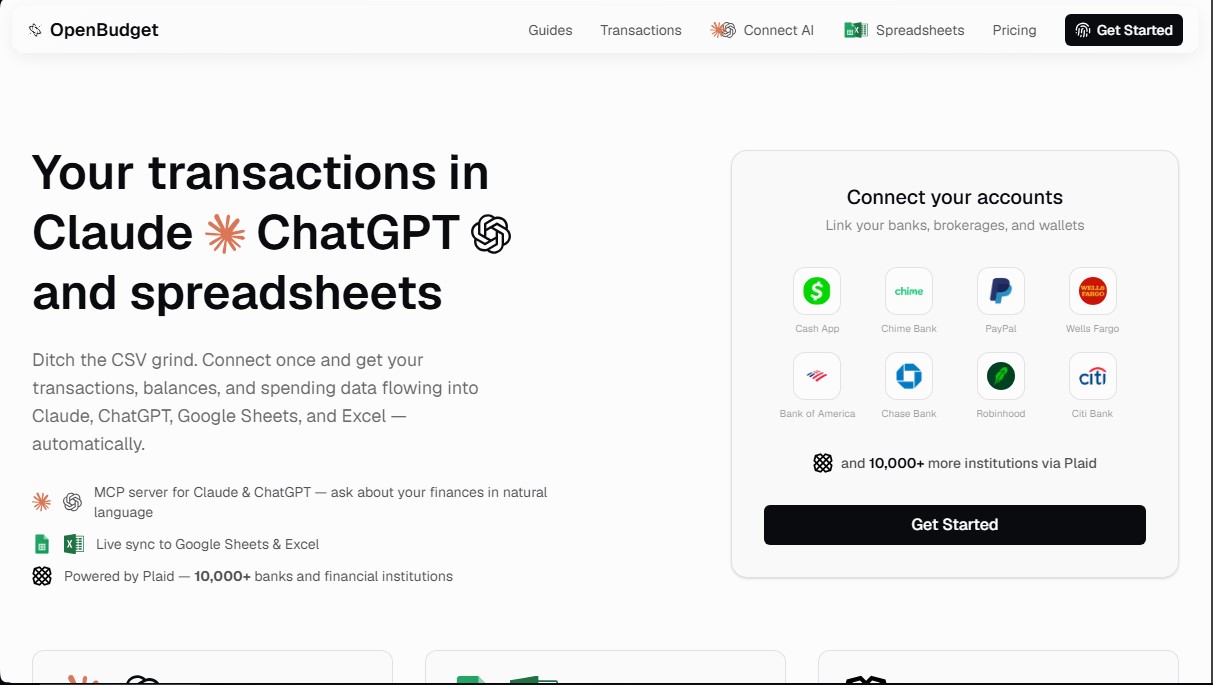
Sync your bank accounts with ChatGPT, Claude, Excel, and Google Sheets to automate expense tracking and analyze your finances with AI.
What is OpenBudget?
OpenBudget is a financial management platform designed to automate the flow of banking data into AI tools and spreadsheets. Its primary function is to eliminate the manual workload of exporting CSV files, allowing banking transactions, balances, and spending data to sync automatically with Claude, ChatGPT, Google Sheets, and Microsoft Excel. This tool is geared toward users looking for comprehensive control over their personal or professional finances through the use of advanced financial technology.
OpenBudget's architecture is powered by Plaid, a security infrastructure that facilitates connections with over 10,000 financial institutions, including traditional banks, investment portfolios, and digital platforms like PayPal. For integration with language models, the tool uses an MCP server (Model Context Protocol). This protocol enables applications like Claude and ChatGPT to access financial data in real time, transforming static information into a dynamic data source for natural language queries.
Thanks to this approach, users can interact with their finances conversationally. Instead of manually analyzing rows and columns on a computer, you can directly ask the AI about spending trends, budget compliance, or account status. Artificial intelligence acts as a financial analyst capable of building reports piece by piece, detecting consumption patterns, and providing immediate answers regarding the user's financial health.
Key capabilities and practical benefits include:
- Live synchronization of transactions and balances without the need for periodic manual intervention.
- Automatic categorization of every bank transaction into groups such as groceries, subscriptions, or transportation, facilitating immediate organization.
- Use of natural language to request complex analyses, monthly comparisons, or specific spending summaries through AI.
- Absolute flexibility in spreadsheets, allowing data to populate custom templates, proprietary formulas, and tailored charts in Excel or Google Sheets.
- The ability to generate custom financial reports from scratch simply by describing what is needed to the AI assistant.
OpenBudget stands out by not imposing rigid structures. By integrating data directly into the user's workflow—whether in a spreadsheet or an AI chat—it offers an adaptable solution that adjusts to how each individual manages their money. It is an essential tool for those who want to leverage financial automation and the power of language models to gain a clear and actionable view of their economic situation.
OpenBudget features and use cases
How to use OpenBudget
OpenBudget FAQ
What exactly is OpenBudget, and what is it used for?
OpenBudget is a platform that connects your bank accounts directly to AI assistants and spreadsheets to automate your personal finance management.
How many financial institutions can I connect to my OpenBudget account?
You can link over 10,000 different financial institutions, including banks and credit cards, through Plaid’s secure connection.
Do my transactions automatically sync with my spreadsheets?
Yes, all your bank transactions are automatically pushed to Google Sheets or Microsoft Excel, so you never have to download or import CSV files again.
How does OpenBudget use AI to help me manage my spending?
The tool lets you ask AI assistants like Claude or ChatGPT about your spending habits or budget status using natural language.
Does OpenBudget automatically categorize my expenses?
Yes, the system automatically assigns categories such as groceries, subscriptions, or transportation to each transaction as soon as it syncs.
How much does an annual OpenBudget subscription cost?
An annual subscription costs $5 per month, billed as a single annual payment. This saves you 50% compared to the monthly rate.
Can I create custom reports using AI?
Yes, you can ask the AI to build any type of detailed report or chart in your spreadsheet based on your actual financial data.
Do I need technical skills to use OpenBudget?
No, the tool is designed so anyone can easily connect their bank accounts, start receiving data in their spreadsheets, and chat with the AI.
OpenBudget pricing and plans
Monthly Plan ($9.95 per month)
MCP Server for Claude and ChatGPT for natural language financial analysis.
Automatic transaction synchronization with Google Sheets and Excel.
Unlimited bank and credit card connections via Plaid.
Automated transaction categorization.
Access to over 10,000 financial institutions.
No commitment; cancel anytime.
Annual Plan ($5 per month, billed as $60 per year)
Save 50% off the monthly price.
MCP Server for Claude and ChatGPT for natural language financial analysis.
Automatic transaction synchronization with Google Sheets and Excel.
Unlimited bank and credit card connections via Plaid.
Automated transaction categorization.
Access to over 10,000 financial institutions.
OpenBudget Screenshots
OpenBudget alternatives


PropHours-Material Participation
Track rental tasks and material participation hours with AI. Attach evidence and generate reports to maximize tax deductions.

FactorialHR
AI platform centralizing HR, finance, and IT. Automate payroll, time tracking, and expenses to streamline management and boost your company's productivity.


Bank Statement Converter
Convert PDF bank statements and images to Excel or CSV. Securely edit transactions and validate balances against the original without sharing login credentials.