

Share
Create scientific figures and graphical abstracts for publications. Convert text or sketches into high-quality, editable professional diagrams for journals and reports.
What is PaperFig?
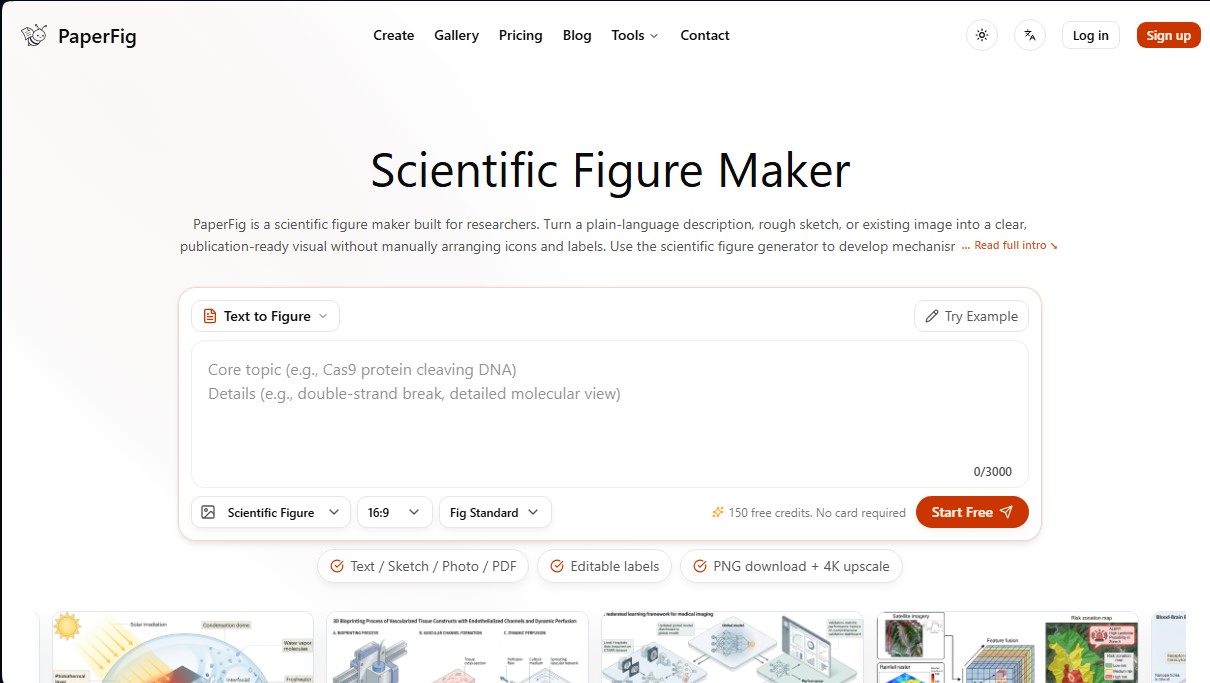
PaperFig is an advanced artificial intelligence tool specifically designed for creating high-quality scientific figures. Its primary function is to help researchers, academics, and science professionals transform natural language descriptions, hand-drawn sketches, or reference images into publication-ready illustrations for specialized journals. Unlike generic image generators, this platform has been trained on figures from real publications, ensuring a visual style consistent with the academic standards of disciplines such as biomedicine, materials science, energy, engineering, and environmental sciences.
The operation of PaperFig is based on simplifying the technical design of complex diagrams. Users can generate graphical abstracts, mechanism diagrams, or experimental workflows without having to manually arrange icons or labels on a computer. The tool offers several input methods to adapt to any phase of research:
- Text to Figure: Generates a complete visual representation from a detailed description of a scientific concept.
- Sketch to Figure: Converts hand-drawn schematic drawings into clean, professional drafts.
- Photo and Reference to Figure: Allows the use of PDFs, photos, or previous images as a base to generate new and improved versions.
- Figure Enhancer: Optimizes the visual quality and clarity of existing figures.
A fundamental technical capability of this solution is its post-editing system. Thanks to its OCR (Optical Character Recognition) technology, the system detects and allows for the modification of text labels directly on the generated image. This ensures that researchers maintain full control over scientific accuracy, enabling them to correct technical terms or adjust nomenclature without having to regenerate the entire image.
In terms of export and compatibility, PaperFig allows users to download files in high-resolution PNG format, with 4K scaling options to ensure the sharpness required for final manuscripts. After editing labels, the system provides files in editable formats such as SVG and PPTX, facilitating their integration into slide presentations, conference posters, or educational materials.
This tool is particularly useful for streamlining the scientific paper review process, where reviewers frequently request quick changes to figure panels. By automating the most repetitive graphic tasks, PaperFig allows researchers to focus on the narrative of their study, ensuring that visual communication remains clear and professional at all times.
PaperFig features and use cases
How to use PaperFig
PaperFig FAQ
What is PaperFig, and what type of research is it designed for?
PaperFig is a scientific figure generator that allows you to create diagrams, workflows, and graphical abstracts from text descriptions or sketches for fields such as biomedicine, engineering, and chemistry.
In what formats can I export the images created in PaperFig?
Figures can initially be downloaded in PNG format. After refining them, you can obtain high-resolution 4K versions or export editable files in SVG and PPTX formats.
How can I correct the text or labels on a generated figure?
The tool includes an OCR-powered editor that allows you to detect and modify text labels directly on the image before the final download.
What does the PaperFig free plan include?
The free plan offers 150 initial credits upon registration and 10 additional daily credits to try out text-to-figure generation and basic editing.
Who owns the copyright to the images?
The user retains ownership of the generated figures and can use them in manuscripts, presentations, teaching materials, or commercial research without the platform claiming authorship.
Is it necessary to inform scientific journals about the use of PaperFig?
We recommend checking each journal's specific guidelines, although it is generally sufficient to include a simple mention stating that the figures were prepared with the assistance of artificial intelligence.
Can I use my own hand-drawn sketches to generate a professional figure?
Yes, the sketch-to-figure feature allows you to upload manual drawings so the tool can transform them into clean graphics ready for publication in scientific journals.
How does the platform's credit system work?
Each figure generation or image enhancement consumes approximately 50 credits, while exports in editable formats like SVG require 150 credits.
What scientific fields does PaperFig cover?
The tool is optimized for disciplines such as biomedicine, materials science, energy, environmental sciences, computer science, and geosciences, adapting the aesthetic to the standards of each field.
Is my research data secure when using the tool?
Projects are private and linked to the user's account, though we recommend not uploading confidential patient data or restricted institutional material.
PaperFig pricing and plans
Free
0 $
- 150 initial sign-up credits.
- 10 daily claim credits.
- Text-to-figure generation.
- Basic PNG export and text editing.
- Restriction: Extended use requires the purchase of credit packs.
Scholar
16 $ per month (or 120 $ per year)
- 2,000 monthly credits (valid for 30 days).
- Generation via text, sketches (sketch-to-figure), and image enhancement.
- OCR text editor to modify any label.
- PNG downloads and editable SVG and PPTX exports.
- 4K upscaling included.
- Estimated capacity of 40 figures per month.
Pro Scholar
27 $ per month (or 192 $ per year)
- 4,500 monthly credits (valid for 30 days).
- All generation modes, enhancement, and label correction.
- Editable exports for manuscript and presentation workflows.
- 4K upscaling for high-resolution images.
- Estimated capacity of 90 figures per month.
Lab Pro
72 $ per month (or 528 $ per year)
- 14,500 monthly credits (valid for 30 days).
- Access to all advanced creation and export tools.
- Priority email support for technical and billing inquiries.
- Estimated capacity of 290 figures per month, ideal for labs and high-volume workloads.
Credit Packs (Add-ons)
From 45 $ to 270 $ (one-time payment)
- Light Pack (45 $): 3,000 credits.
- Standard Pack (90 $): 6,500 credits.
- Heavy Pack (180 $): 15,500 credits.
- Mega Pack (270 $): 24,500 credits.
- Restriction: Credits from these packs expire after 12 months (unlike monthly plans which last 30 days).
Credit costs per action (applicable to all plans):
- Figure generation, enhancement, label correction, or 4K upscaling: 50 credits per action.
- Editable exports in SVG or PPTX format: 150 credits per download.
PaperFig Screenshots
PaperFig user reviews
Write a review
Checking your session...
PaperFig Reviews
Loading reviews...
PaperFig alternatives

Sprite Fusion
Generate and animate professional pixel art for games using AI. Create sprites, character sheets, and normal maps with direct export to Unity and Godot.

AI Comic Builder
A platform to create comics and webtoons from text. Generate panels with consistent characters and diverse art styles—no drawing skills required.

Panel & Ink
Create comic series from an idea. Generate consistent characters, design panels in various styles, and get narrated episodes ready to publish. No drawing skills required.

ColorCraft
Create Amazon KDP books. Generate coloring pages, stories, puzzles, and print-ready full covers, plus promotional mockups in a single workflow.


Tesla Wrap Generator
Tesla Wrap Generator uses AI to paint designs onto the official UV template of each Tesla model for Paint Shop, with a 3D preview before you download.