
Share
What is Pexo?
Pexo is an AI video agent that starts from what you tell it or hand it and returns a finished video, with visuals, audio and captions. It is aimed at product teams, marketers and creators who need launch clips, ads or shorts without cutting every shot by hand.
What is Pexo used for?
It is used to brief a finished video from a conversation or from material you already have. It accepts a URL or a file (PDF, image, audio, clip or script) and runs the workflow of visuals, voice, captions and editing. That covers a launch video, a product ad, a short or an animated piece, depending on the request.
How does Pexo work?
Pexo reads the brief, picks models for each shot and does not stop at a single text prompt. The site lists models such as Kling, Seedance, Seedream, Veo, Claude, Gemini, GPT, Grok and ElevenLabs, with selection per shot. Advertised formats include explainers, ads, talking-head videos, music, anime, UGC and shorts. A CLI and an MCP interface are also listed for people who want it in their workflow.
Who is Pexo for?
- Product or marketing teams that publish video often and do not want to jump between several generation tools.
- Creators who already have a landing page, a podcast or a still and want a finished clip.
- Anyone who needs commercial use and an export with no watermark, as described later in this entry.
Pexo pros and cons
It stands out for assembling the piece with several models and for accepting files or URLs as a starting point, not only text. On the downside, how much video you can generate depends on a credit allowance, and limits that the official site does not publish are left out here. The unpaid start also has a usage cap.
Pexo features and use cases
How to use Pexo
Pexo FAQ
What is Pexo?
It is an AI agent that takes a brief or a file and returns an edited video, with visuals, voice and captions, aimed at launches, ads and shorts.
Is Pexo free?
There is a free start. If you need more credits, paid plans are listed in the pricing section of this page.
What can I start from?
You can talk to the agent or begin with a URL, a PDF, an image, an audio clip, a reference video or a written script.
Which AI models does it use?
The site lists Kling, Seedance, Seedream, Veo, Claude, Gemini, GPT, Grok and ElevenLabs, among others, and says it picks a model for each shot.
Do the videos have a watermark?
On paid plans the pricing page says there is no watermark and that commercial-use rights are included.
What kinds of video can it make?
The company lists explainers, ads, talking-head videos, music, anime, UGC and shorts, among other gallery formats.
Can I use it outside the browser?
Yes. The site mentions a command-line interface and an MCP server so you can hook it into other tools.
What if I run out of credits?
Paid plans allow credit top-ups and plan changes; the amounts for each tier are in the pricing section.
Do I need video-editing skills?
It is not a classic timeline editor: you describe what you want or hand in source material, the agent builds the clip, and you can then adjust it.
Where are the prices listed?
On Pexo official pricing page; the date of this check and the amounts appear in the pricing section of this entry.
Pexo pricing and plans
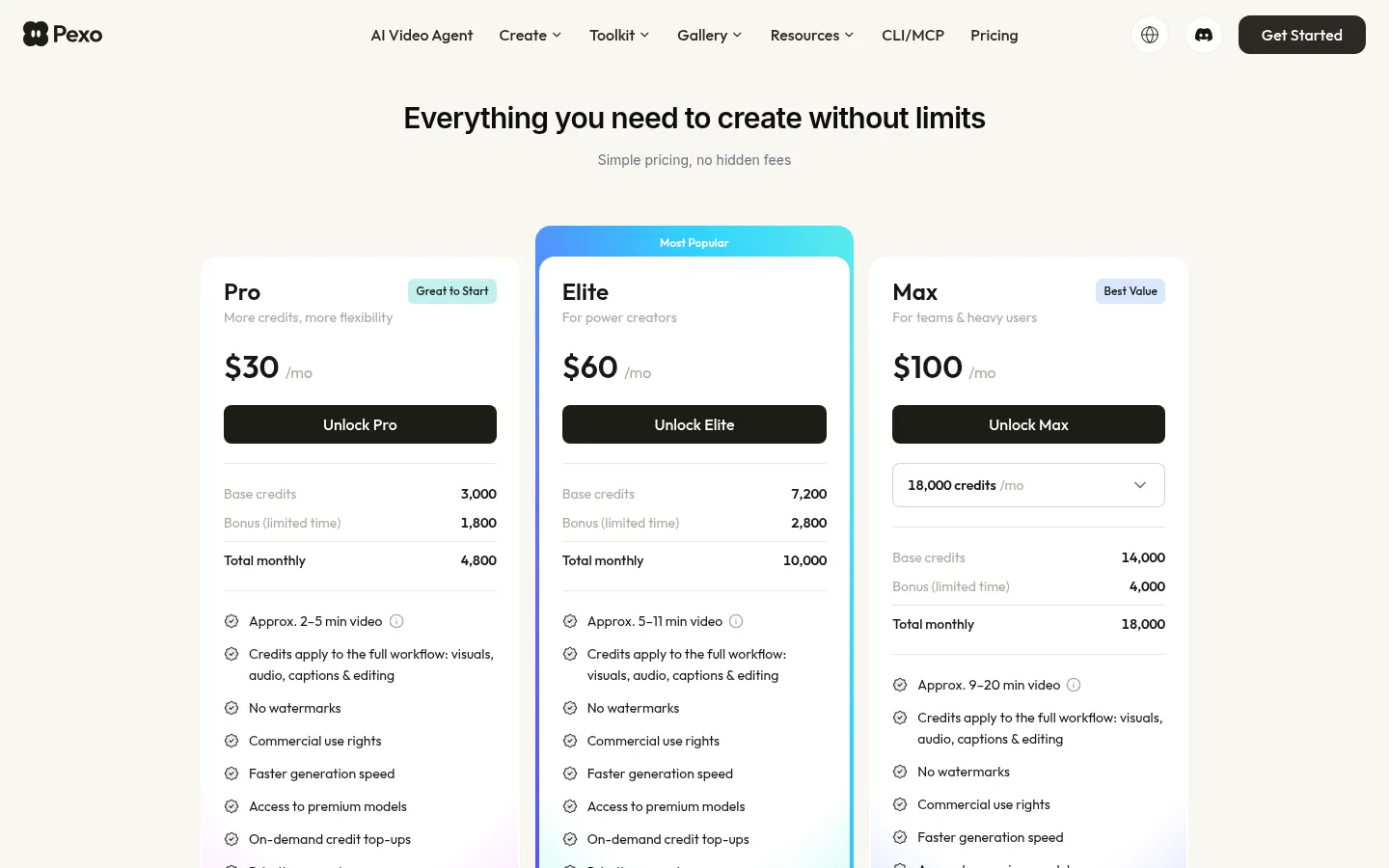
Reference price: 30 USD / month. Source · Verified: November 10, 2026
Checked on: 10/11/2026. There is a free start. Paid plans shown on pexo.ai/pricing are Pro at 30 USD/month (3,000 base credits and, in the limited-time bonus at the time of the check, 1,800 extra; about 2–5 minutes of video), Elite at 60 USD/month (7,200 + 2,800 bonus) and Max at 100 USD/month (14,000 + 4,000 bonus, 18,000 total). All three include per-shot model selection, commercial use, no watermark, faster generation, premium models, credit top-ups and priority support.
Pexo Screenshots

Pexo user reviews
Write a review
Checking your session...
Pexo Reviews
Loading reviews...