

Share
Analyze your photos with AI for professional critiques on composition and lighting. Improve your technique with instant ratings and expert tips.
What is PhotoMentor?
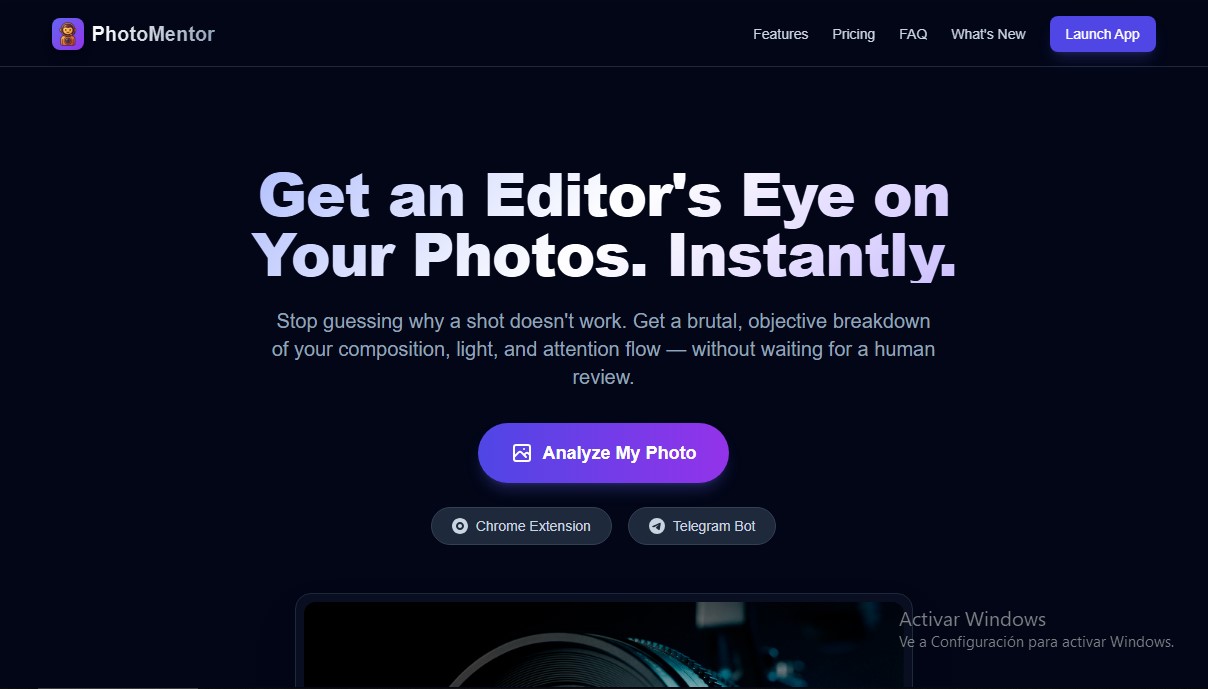
PhotoMentor is an AI-powered photo analysis tool designed to provide instant objective and technical evaluations of any image. It acts as a virtual mentor that offers a professional photography critique, analyzing key elements that often go unnoticed by the untrained eye. This app allows users to upload JPEG or PNG files to receive a detailed breakdown of composition, lighting, and visual flow, eliminating the uncertainty of why a shot isn't working.
The platform's technology utilizes advanced computer vision models trained on the fundamental principles of professional photography. When processing an image, the system automatically identifies the genre—whether it’s portrait, landscape, architecture, wildlife, or street photography, supporting over 30 categories—and applies specific criteria for that style. PhotoMentor goes beyond a superficial review; it employs algorithms to detect distractions and "dead zones" that diminish visual impact. Additionally, its AI can distinguish between technical errors and deliberate artistic choices, differentiating, for example, stylistic grain from a poorly lit photo or intentional motion blur from camera shake.
Key features and technical capabilities include:
- Composition Debugger: Checks framing against professional standards such as the rule of thirds, leading lines, and visual balance.
- Objective Scoring: Generates a score from 1 to 10 based on technical execution, color harmony, and emotional impact.
- Visual Bounding Boxes: Overlays indicators on the image to highlight specific areas that require attention or improvement.
- Lighting Analysis: Evaluates light quality and how it affects the photograph's narrative.
- Actionable Feedback: Offers practical tips to correct mistakes and build better habits from the very beginning.
This AI tool is particularly useful for various user profiles. Beginner photographers can accelerate their learning through immediate critiques, while hobbyists find a safe and neutral space to receive constructive feedback without the subjectivity of social media. For professionals, it serves as a quick second opinion for culling images or validating technical decisions before final delivery.
PhotoMentor is accessible across different environments, including a web app, a Chrome extension, and a Telegram bot, allowing users to work comfortably from a computer or mobile device. Regarding privacy, the tool ensures that photos are processed securely, are not shared with third parties, and are not used to train external models, allowing users to manage their history at all times. It is, in essence, an advanced AI image analysis solution for efficiently perfecting photographic technique.
PhotoMentor features and use cases
How to use PhotoMentor
PhotoMentor FAQ
What is PhotoMentor and how can it help me improve my photos?
PhotoMentor is a tool that instantly analyzes your images to provide professional feedback on composition, lighting, and the visual impact of your shots.
Can I use PhotoMentor for free?
Yes, the free plan includes three welcome credits and one additional analysis every day, allowing you to try the tool with no strings attached.
What happens if I intentionally break photography rules?
PhotoMentor is trained to distinguish between a technical error and a deliberate artistic choice, such as intentional motion blur or the stylistic use of grain.
Are my photos safe and private on the platform?
Your images are processed securely and are only saved for your personal history; they are never shared with third parties or used to train external systems.
What devices or apps can I use PhotoMentor on?
You can get feedback on your photos through the web version, the Chrome browser extension, or the dedicated Telegram bot.
What types of photography genres can PhotoMentor analyze?
The tool supports over thirty different genres, including portraits, landscapes, architecture, wildlife, sports, macro, and street photography.
What exactly does the detailed photo analysis include?
You will receive a score out of ten, a compositional breakdown with visual guides, an evaluation of color and light, and practical tips to improve your photography habits.
Is PhotoMentor suitable for professional photographers?
Yes, professionals can use it as a quick, objective second opinion to help narrow down their work before the final delivery.
PhotoMentor pricing and plans
Free Plan
$0
• 3 welcome analyses.
• 1 free analysis every day.
• Basic composition score.
Telegram Pro Plan
500 Telegram Stars/month
• Bot integration included.
• Fully synced web access.
• Direct payment via Telegram.
Pro Plan
$5/month or $30/year
• Unlimited analyses.
• Visual bounding boxes.
• Detailed lighting and color critique.
• History and progress statistics.
Lifetime Plan
$49 (one-time payment)
• Everything included in the Pro plan.
• Lifetime access to the tool.
• All future updates included.
• Priority support.
PhotoMentor Screenshots
PhotoMentor user reviews
Write a review
Checking your session...
PhotoMentor Reviews
Loading reviews...
PhotoMentor alternatives
Rock Identify
Identify rocks, crystals, and minerals using photos. Analyze features like texture and grain to suggest types, explain properties, and answer geological questions.



The Muse Shop
Turn Pinterest photos and boards into a personalized shop. This AI identifies your aesthetic to offer real clothes and accessories you can buy directly.

PhotoKeyworder
Generate AI titles, descriptions, and keywords for photos, videos, and vectors. Automate microstock metadata and streamline your workflow with batch processing.