

Share
Transform text, PDFs, and videos into editable presentations. Logically organize content and refine each slide with custom prompts.
What is PPT Maker?
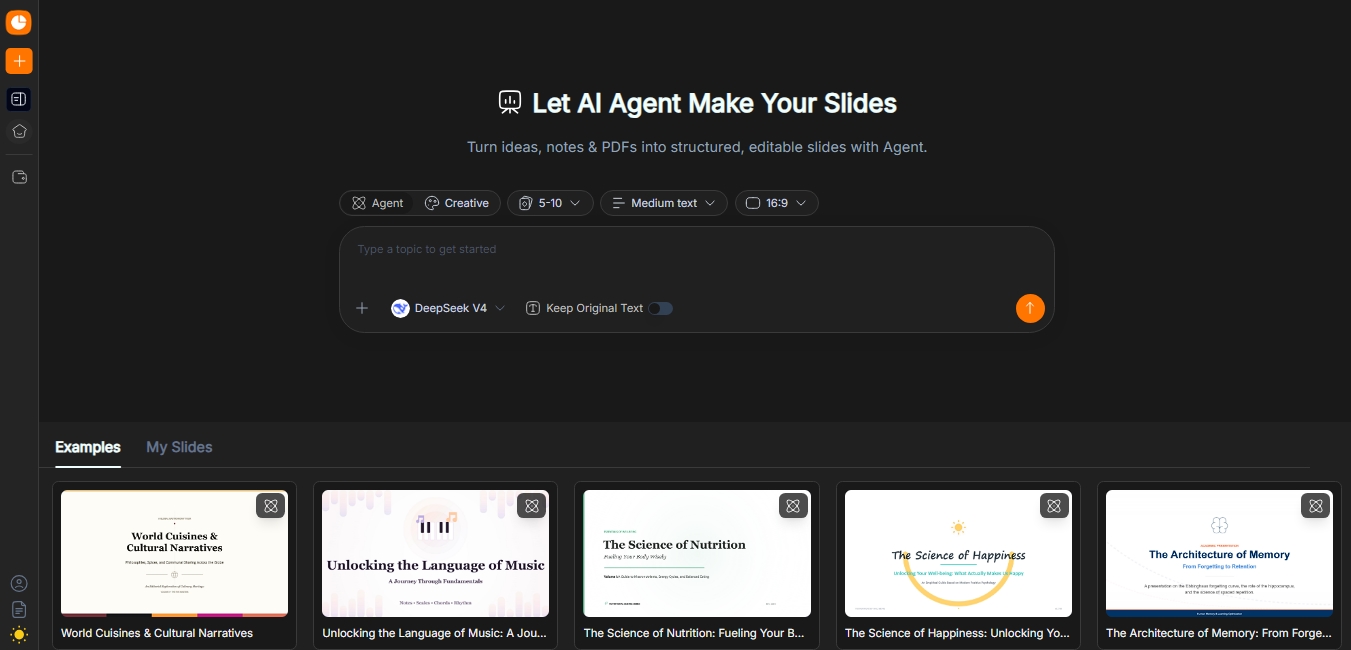
PPT Maker is an AI-powered tool designed to automatically create professional presentations from various types of content. This application allows you to transform ideas, notes, PDF documents, web articles, and videos into structured, fully editable slides. Its primary function is to streamline the design and writing process, enabling students, educators, and professionals across various industries to go from a raw concept to a final presentation in just minutes using a computer or any compatible device.
The platform utilizes advanced language and generation models, integrating technologies such as DeepSeek V4, GPT-5.5, Claude Opus, and Gemini 3.5 Flash. These AI engines allow the tool to not only design but also understand the context of the provided information. Users can choose between two main operating modes: Agent mode, which specializes in analyzing content to shape a narrative and organize a logical slide deck, and Creative mode, focused on producing visually rich slides with layouts that avoid repetitive structures.
PPT Maker operates on a three-step workflow:
Content Input: The user enters a topic, pastes text, or uploads files (PDFs, articles, or videos) and selects their preferred generation mode.
Outline Review: The AI organizes the information into a preliminary outline. At this stage, you can edit key points, reorder sections, or add and remove parts to fine-tune the narrative before final generation.
Generation and Refinement: Once the slides are created, the tool allows you to refine each page using prompts. If a specific slide isn't quite right, the user can describe the desired changes, and the AI will regenerate it individually without altering the rest of the project.
Among the most notable capabilities of this AI tool is its versatility in exporting work in standard formats such as PPTX, PDF, Keynote, and PNG. Additionally, it offers beautify features to automatically enhance visual style and supports multiple languages and aspect ratios, such as the 16:9 format.
PPT Maker is especially useful for those who need high-quality presentations without spending hours on manual design. By automating the structure and visual content, it helps overcome creative block and ensures information is presented clearly and professionally, whether for an academic setting, a business meeting, or corporate training. It is a practical solution that combines content planning and graphic design within a single, intuitive interface.
PPT Maker features and use cases
How to use PPT Maker
PPT Maker FAQ
What is PPT Maker and what is it used for?
It is an AI-powered tool that transforms text, PDFs, articles, and videos into structured, professional presentations that are ready to use.
What kind of content can I use to create my slides?
You can enter a general topic, paste text directly, or upload PDF files, web articles, and even video links.
What is the difference between Agent and Creative modes in PPT Maker?
Agent mode analyzes content to create a logical and structured narrative, while Creative mode focuses on generating slides with a more visually striking design.
Can I review the outline before generating the final slides?
Yes, the tool allows you to review and edit the story structure to add, delete, or reorder sections before creating the final design.
Can I modify a single slide without changing the rest of the presentation?
Absolutely. You can use specific prompts to regenerate or refine an individual page without affecting the rest of the document.
What formats can I export my PPT Maker projects in?
You can download your presentations as PowerPoint-compatible PPTX files, as well as PDF, Keynote, and PNG image formats.
Is there a free version to try out the tool?
PPT Maker offers a free plan that includes 50 monthly credits to create presentations with a limit of up to 10 slides per project.
What happens to my unused subscription credits?
Credits renew every month and do not roll over, meaning any unused credits expire at the end of each monthly billing cycle.
What are the benefits of the paid plans compared to the free plan?
The Basic and Pro plans allow you to remove watermarks, offer higher slide limits, and provide access to advanced AI models such as GPT-5.5 or Claude Opus.
Is the payment process on PPT Maker secure?
The platform guarantees completely secure card payments, following user protection principles and transparent subscription policies.
PPT Maker pricing and plans
Free Plan
0 $ per month (free forever).
50 credits per month (non-rolling).
Up to 10 slides per presentation.
Access to basic models in Agent Slides and Creative Slides.
Export to PPTX, PDF, Keynote, and PNG formats.
Outline downloads.
Presentation style enhancement feature.
Basic Plan
$4.90 per month (or $3.90 per month billed annually at $46).
500 credits per month.
Increased slide limit per presentation.
Access to advanced AI models (GPT-5.5, Claude Opus 4.7, Gemini 3.5 Flash, and Deepseek V4).
Access to creative image models (GPT Image 2, Nano Banana Pro, and Nano Banana 2).
Watermark removal.
Multi-format export and outline downloads.
Presentation style enhancement feature.
Pro Plan
$19.90 per month (or $9.90 per month billed annually at $119).
2,500 credits per month.
Higher slide limit per presentation.
Access to all advanced AI and image models.
No watermarks.
Export to PPTX, PDF, Keynote, and PNG.
Outline downloads and advanced styling tools.
PPT Maker Screenshots
PPT Maker user reviews
Write a review
Checking your session...
PPT Maker Reviews
Loading reviews...
PPT Maker alternatives

MagicSlides
MagicSlides generates AI slide decks from a topic, documents, links or videos and exports them to PowerPoint, Google Slides or PDF.



MockLive AI
AI platform to practice interviews, exams, and presentations with real-time voice. Includes realistic simulations, response analysis, and detailed feedback.

image2slides
Convert screenshots and photos into editable PowerPoint slides. Extract text and graphics to modify and export them in PPTX format.