
Share
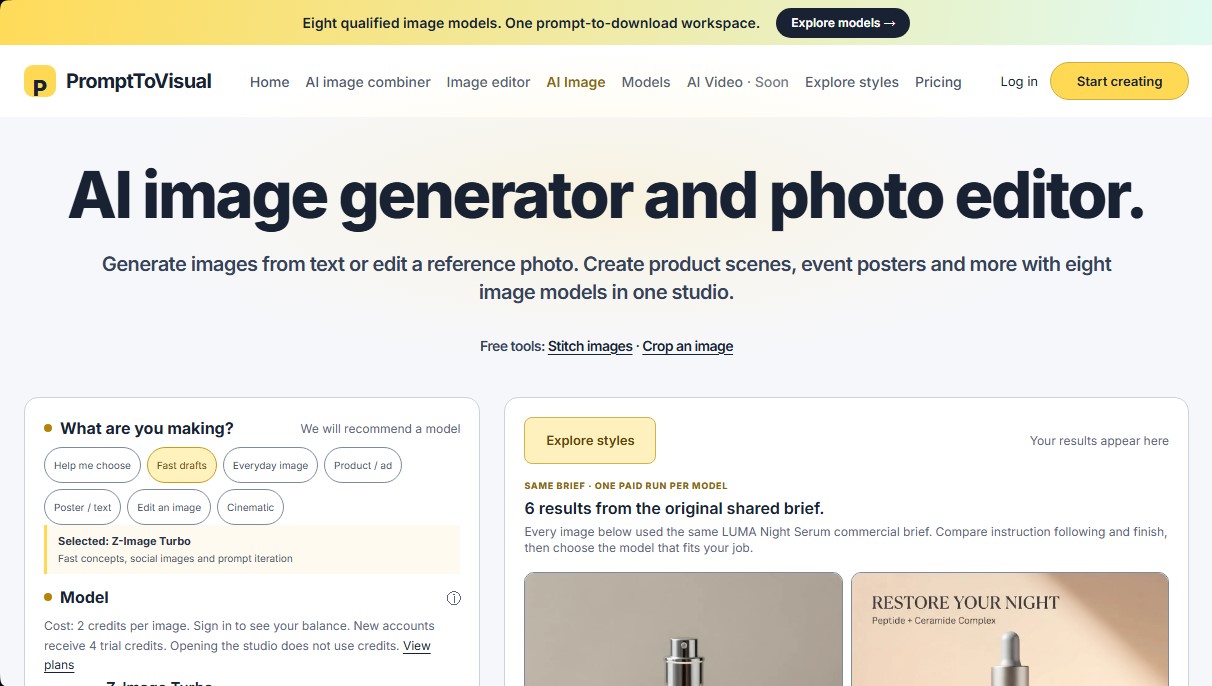
Image generator and editor with eight AI models. Create high-quality posters, product scenes, and visual compositions from text or reference photos.
What is PromptToVisual?
PromptToVisual is an advanced AI image generation and photo editing platform that integrates eight specialized models into a single workspace. This tool allows users to create visual content from scratch using text or transform existing reference photos, streamlining complex graphic design tasks and product photography without the need to install heavy software on their computer.
PromptToVisual operates on a multi-model system where users select the most appropriate technology based on their project goals. The workflow is direct: enter a text description (prompt), choose a model, and optionally upload a reference image. The platform processes the request using cutting-edge neural networks to deliver results ranging from quick drafts to high-fidelity commercial compositions.
Among its standout features is the AI image combiner, designed to merge a specific object with a new background. By uploading two separate references—the subject and the setting—the AI interprets the composition to generate a cohesive scene, preserving the product's identity while projecting natural shadows and reflections. It also includes a specialized editor to modify text on posters, allowing users to replace words within an image while maintaining the original visual aesthetic.
The tool's versatility is showcased through its catalog of integrated models:
- Z-Image Turbo: Optimized for rapid concepts, prompt iteration, and social media content.
- Qwen Image 3 Pro: Specialized in handling multilingual text and product layouts, perfect for menus and signage.
- GPT Image 2 (including Flare and Sunburst versions): Focused on commercial detail, diagrams, and high-quality product photography.
- Nano Banana 2: Excellent for reference-based editing and maintaining character consistency across campaign sets.
- Grok Imagine Image 2: Oriented toward cinematic results, editorial portraits, and expressive creative concepts.
PromptToVisual is particularly valuable for content creators, marketing agencies, and designers requiring a commercial use workflow. The platform ensures the privacy of all creations and offers additional free tools that run locally in the browser, such as a simple image combiner (Stitch), cropping, and collage creation. By centralizing various artificial intelligence models into one interface, it allows users to compare results under the same brief, optimizing visual production time and ensuring every project leverages the most efficient technology for its specific purpose.
PromptToVisual features and use cases
How to use PromptToVisual
PromptToVisual FAQ
What is PromptToVisual and what is it used for?
It is a creative studio that allows you to generate images from text or edit reference photos using eight different artificial intelligence models.
How many image models does PromptToVisual offer?
The platform features eight specialized models ranging from quick sketches to detailed product photography and cinematic scenes.
Is PromptToVisual free to use?
New accounts receive four free trial credits, and there are local tools—such as image merging or cropping—that are available at no cost.
How does the platform's credit system work?
Each model has a specific cost ranging from two to six credits per generated image, depending on the complexity of the selected engine.
Can I edit the text on a poster with this tool?
Yes, you can upload a design and specify the original and replacement text so that the Qwen Image 3 Pro model can perform the edit.
How can I combine two different images in PromptToVisual?
You must upload the subject as the first reference and the base scene as the second so the system can create a new, integrated composition.
What happens if an image generation fails?
Credits are reserved for the task, and failed or blocked generations follow the system's established refund process.
Are my images and creations kept private?
When you log in, your results are saved to your personal account history, and you are provided with a private download path for your files.
What is the difference between the Creator and Pro plans?
The Creator plan offers 400 monthly credits, while the Pro plan provides up to 1,400 credits with the option to roll them over for one month.
Can I use the generated images for commercial purposes?
Paid subscription plans include a workflow suitable for the commercial use of images created on the platform.
PromptToVisual pricing and plans
Free
0 $
- 4 trial credits (one-time use).
- Ability to generate up to 2 successful images (depending on the model used).
- Access to eight qualified image models.
- Private creation history.
- Commercial use workflow.
- Trial credits expire after 30 days.
Creator
29 $ per month (or 290 $ per year)
- 400 credits per month.
- Access to eight qualified image models.
- Private creation history.
- Commercial use workflow.
- Credits renew monthly and do not roll over.
Pro
79 $ per month (or 790 $ per year)
- 1,400 credits per month.
- Access to eight qualified image models.
- Private creation history.
- Commercial use workflow.
- Allows unused credits to roll over for one additional month.
PromptToVisual Screenshots
PromptToVisual user reviews
Write a review
Checking your session...
PromptToVisual Reviews
Loading reviews...
PromptToVisual alternatives
Sprite Fusion
Generate and animate professional pixel art for games using AI. Create sprites, character sheets, and normal maps with direct export to Unity and Godot.
AI Comic Builder
A platform to create comics and webtoons from text. Generate panels with consistent characters and diverse art styles—no drawing skills required.
Panel & Ink
Create comic series from an idea. Generate consistent characters, design panels in various styles, and get narrated episodes ready to publish. No drawing skills required.

ColorCraft
Create Amazon KDP books. Generate coloring pages, stories, puzzles, and print-ready full covers, plus promotional mockups in a single workflow.

Tesla Wrap Generator
Tesla Wrap Generator uses AI to paint designs onto the official UV template of each Tesla model for Paint Shop, with a 3D preview before you download.