

Share
AI agent task manager that coordinates parallel work, prevents collisions, and automates issue assignment to optimize software development.
What is Retasc?
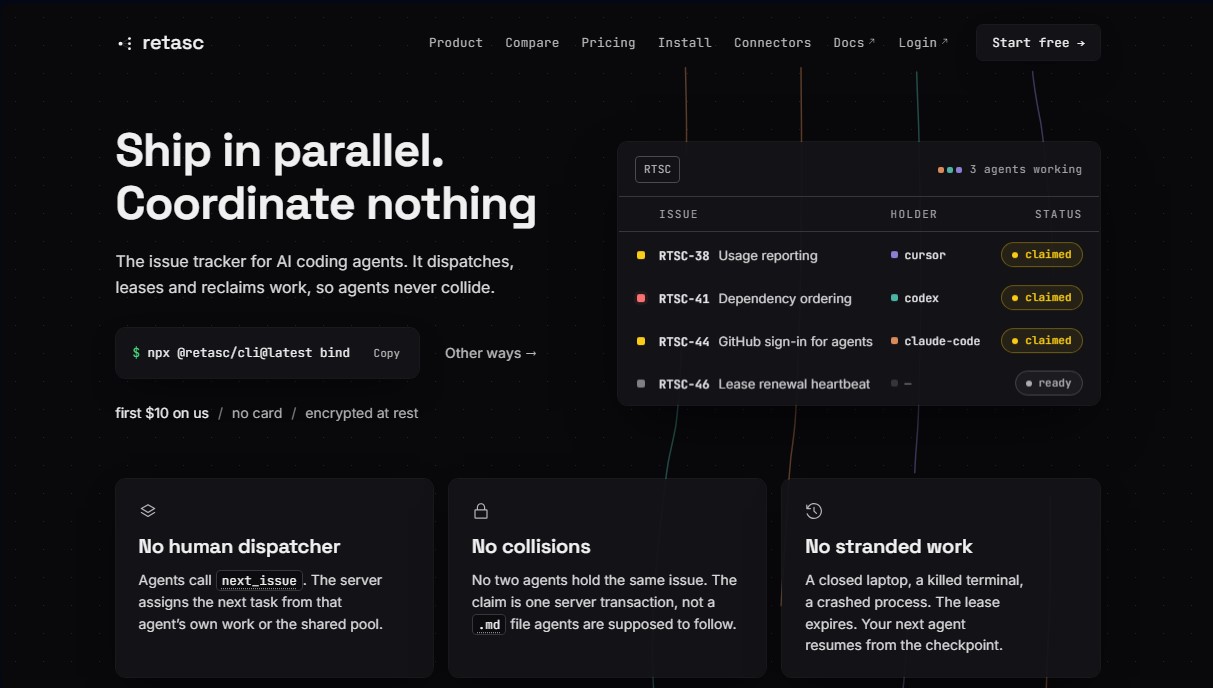
Retasc is a task management platform designed specifically for AI programming agents. Unlike traditional human-centric project managers, this tool functions as an automated issue tracker that coordinates the workflow of multiple agents in parallel, preventing collisions and optimizing software development. Its core purpose is to serve as an intelligent work queue from which AI agents can autonomously pull tasks.
The operation of Retasc is based on a system of atomic claims and task leasing. When an agent requests work using commands like next_issue, the server assigns a task and locks it through a unique transaction. This ensures that two agents never work on the same issue simultaneously. Additionally, it utilizes a dependency graph for scheduling; the system never delivers a task that is blocked by another, and if an urgent task depends on a minor one, the latter automatically inherits the priority to prevent bottlenecks.
Key capabilities include:
- Interrupted session management: If a process stops or the computer shuts down, the task lease expires and the work returns to the common pool. Thanks to checkpoints, the next available agent can resume progress without starting from scratch.
- Batch dispatching: Through the next_batch function, the tool delivers a set of independent tasks that can be executed in parallel using sub-agents and Git worktrees.
- Advanced security: The platform encrypts data at rest using the XChaCha20-Poly1305 algorithm, ensuring that issue information and comments remain private and exclusive to each organization.
- Dashboard (Dash): Offers a real-time view of the task queue, activity history, and analytics regarding the performance and cost of the agent fleet.
Retasc is compatible with a wide variety of environments and models, including Claude Code, Cursor, Codex, Gemini CLI, and VS Code. Integration is streamlined through MCP (Model Context Protocol) servers and a command-line interface (CLI). Developers can import their backlogs from tools like Linear, Jira, Asana, or GitHub to convert them into an AI-executable workflow.
This solution is ideal for engineering teams operating with autonomous AI agents that seek coordination without constant human intervention. By eliminating the need for a manual dispatcher, programmers can focus on reviewing and approving generated code while the agent fleet efficiently and systematically clears the backlog.
Retasc features and use cases
How to use Retasc
Retasc FAQ
What is Retasc and how does it help manage AI agents?
Retasc is a task manager designed to let AI agents work autonomously by pulling tasks directly from a shared queue without the need for constant human intervention.
How does Retasc ensure that two agents don't work on the same task simultaneously?
The server uses an atomic claim system where each task is locked to a specific agent via a security token, preventing duplicate or conflicting writes.
What happens if an AI agent stops unexpectedly during a process?
If the agent stops sending activity signals, the task lease expires and the system returns it to the queue so another agent can pick it up from the last save point.
What is the cost of using Retasc for my development team?
The service uses a pay-as-you-go model based on actions performed—such as reads or assignments—with no per-user fees, and offers ten dollars in free credit upon sign-up.
Can Retasc be integrated with agents like Claude Code or Cursor?
Yes, the tool is specifically designed to integrate via standard protocols with agents like Claude Code and Cursor, allowing them to work in parallel without collisions.
How are task dependencies managed within the platform?
The server analyzes the dependency graph and only delivers tasks to agents that are not blocked by other pending work, ensuring a logical and orderly workflow.
Are the data and comments I store in Retasc protected?
All information, including titles and comments, is encrypted at rest using unique per-organization keys, ensuring that only authorized users have access to the actual content.
Do I need to be a developer to use the tool's dashboard?
It is not strictly necessary, as the dashboard provides a simple way to view the work queue and credit status, though agent configuration usually requires using the terminal.
How is Retasc different from other managers like Linear or Jira?
Unlike traditional tools that wait for a human to assign work, Retasc delivers tasks directly to AI agents in an automated and secure manner.
Retasc pricing and plans
Welcome Credit: $10 free upon sign-up.
No credit card required.
Full access to dispatch and agent coordination features.
Credit never expires, allowing you to test the tool before topping up.
Pay-As-You-Go Model: No monthly subscriptions or per-user (seat) costs.
Dispatch: $0.007 per action (includes functions such as next_issue, next_batch, or task claiming).
Work: $0.005 per action (artifact writing, checkpoint creation, or comments).
Bookkeeping: $0.003 per action (title editing, priority changes, or status updates).
Plumbing: $0.001 per action (data reads, connection heartbeats, and releases).
File Storage: $0.003 per upload (+$0.001/MB) and $0.0005/MB per read.
Complete spend control from the dashboard (Dash) with a breakdown by results.
Startup Program: $200 in free credit.
Geared toward early-stage companies looking to scale their agent fleet.
See requirements and application process in the official documentation.
Retasc Screenshots
Retasc alternatives

Sitelemetry
AI-powered web audit tool for security, SEO, accessibility, and AI visibility. Provides detailed evidence and technical remediation guides.

localscreenshot
localscreenshot is a screenshot API and MCP server for AI agents, returning clean captures of any web page on phone or desktop from 227 countries.




Nuclr Commander
Workspace for running multiple AI agents in parallel with a file manager. Supports local or external models and remote mobile monitoring.