SalesArmor
Share
SalesArmor
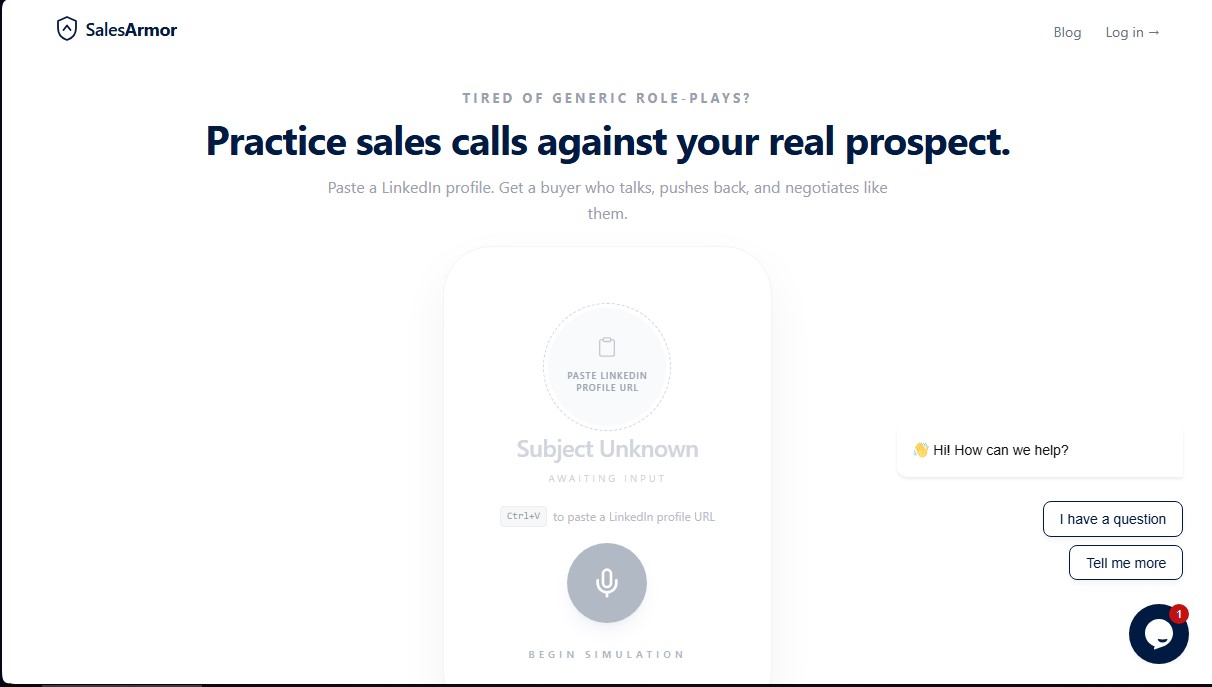
Practice sales calls using LinkedIn profiles. Handle objections and negotiate with an AI mimicking your client to perfect your technique before the actual meeting.
General Information about SalesArmor
SalesArmor is an advanced AI-driven sales training platform designed to help sales professionals practice their calls with real prospect profiles. Unlike traditional role-playing, this tool allows users to generate dynamic simulations using specific LinkedIn data. By pasting a professional profile URL, the application configures a virtual buyer that replicates the job title, company, and potential objections of the actual prospect, allowing the user to practice in a safe environment before the actual meeting.
The functionality of SalesArmor is powered by cutting-edge language models that process customer context and the selected sales methodology. The system allows users to customize the buyer’s persona, with options to choose between hostile, friendly, distracted, or time-crunched profiles. The technology integrates up-to-date company information, recent news, and press releases to add realism to the interaction. Additionally, users can input their own notes from previous meetings or email threads, providing the sales simulation AI with full account context.
Key capabilities and practical features include:
- Sales Stage Simulation: Practice everything from cold opens and discovery calls to product demos and closing negotiations.
- Methodology-Based Training: The tool applies recognized frameworks such as SPIN, MEDDIC, The Challenger Sale, or Sandler to guide the conversation and improve qualification.
- Real-Time Coaching: During the call, the system provides live suggestions and prompts on when to push, when to listen, or which key questions to ask based on the buyer's behavior.
- Post-Call Analysis and Evaluation: After the session, the platform generates a scorecard based on eight dimensions, identifying moments of weakness and offering more effective response alternatives.
This solution is especially useful for SDRs and Account Executives looking to reduce ramp time and improve conversion rates. By providing a deliberate practice environment, SalesArmor helps eliminate nerves and perfect objection handling without risking real opportunities with high-value clients. It serves as a strategic tool for complex sales sectors such as B2B SaaS, financial services, logistics, or cybersecurity, where personalization is critical.
The platform also generates roadmaps and cheat sheets featuring specific talking points, recommended openers, and phrases to avoid. This ensures that sales reps enter the real call with a validated action plan, increasing confidence and communication effectiveness. By using SalesArmor, companies can standardize the quality of their sales processes and ensure that every team member masters best practices before interacting with the market.
Features and Use Cases of SalesArmor
How SalesArmor Works
Frequently Asked Questions about SalesArmor
What exactly is SalesArmor, and how does it help improve sales results?
It is a training platform that uses artificial intelligence to simulate conversations with real prospects based on their LinkedIn profiles, providing real-time feedback.
How does SalesArmor use a LinkedIn profile to create a practice scenario?
You simply paste the profile link, and the tool generates an AI persona with that specific person's job title, company, and likely objections to ensure the rehearsal is realistic.
Can I try SalesArmor for free before signing up for a paid plan?
Yes, there is a free version available that includes three total practice sessions with access to real LinkedIn buyers and all available methodologies.
Which sales methodologies are integrated into the platform?
The tool allows you to apply seven different methodologies, including well-known systems like SPIN, MEDDIC, Challenger, and Sandler, to guide your conversations during the session.
What kind of feedback do I receive after finishing a SalesArmor session?
You get a readiness score based on eight key dimensions, an analysis of your weak points, and a roadmap with recommended talking points for the actual call.
Is it possible to adjust the buyer's attitude during the simulation?
Yes, you can configure the persona's behavior to be distracted, hostile, friendly, or short on time, allowing you to train for different difficulty levels and scenarios.
How do subscriptions and the cancellation policy work?
Plans start at $29 per month for the basic tier, are managed securely through Stripe, and you can cancel your subscription at any time with no hidden fees.
Does SalesArmor offer live assistance during practice calls?
The platform includes an "in-ear" coaching system that provides real-time suggestions on when to listen, when to push, or what specific questions you should ask based on your chosen methodology.
What sets SalesArmor apart from traditional sales simulators?
Unlike generic role-playing, this tool uses real data from actual prospects and companies, eliminating the awkwardness of practicing with coworkers and providing an immediate, objective evaluation.
SalesArmor Pricing
Free
0 $ forever
3-session total limit.
Buyers based on real LinkedIn profiles.
Access to all 7 sales methodologies.
Live coaching during the call.
Starter
29 $ per month
50-session monthly limit.
Everything in the Free plan.
Pre-call cheat sheets.
Post-call evaluation rubric.
Email support.
Pro
79 $ per month
150-session monthly limit.
Everything in the Starter plan.
Priority Gemini Live quota.
Recent company news in the cheat sheet.
Priority support.
Team
Coming Soon (Inquire about early access availability)
Designed for SDR and AE teams.
Everything in the Pro plan.
Team analytics.
SSO and admin features.
Dedicated Success Manager.
SalesArmor Screenshots