

Share
Create videos from text or images with various AI models. Adjust camera motion, resolution, and visual style for professional-grade results.
What is SnapGen?
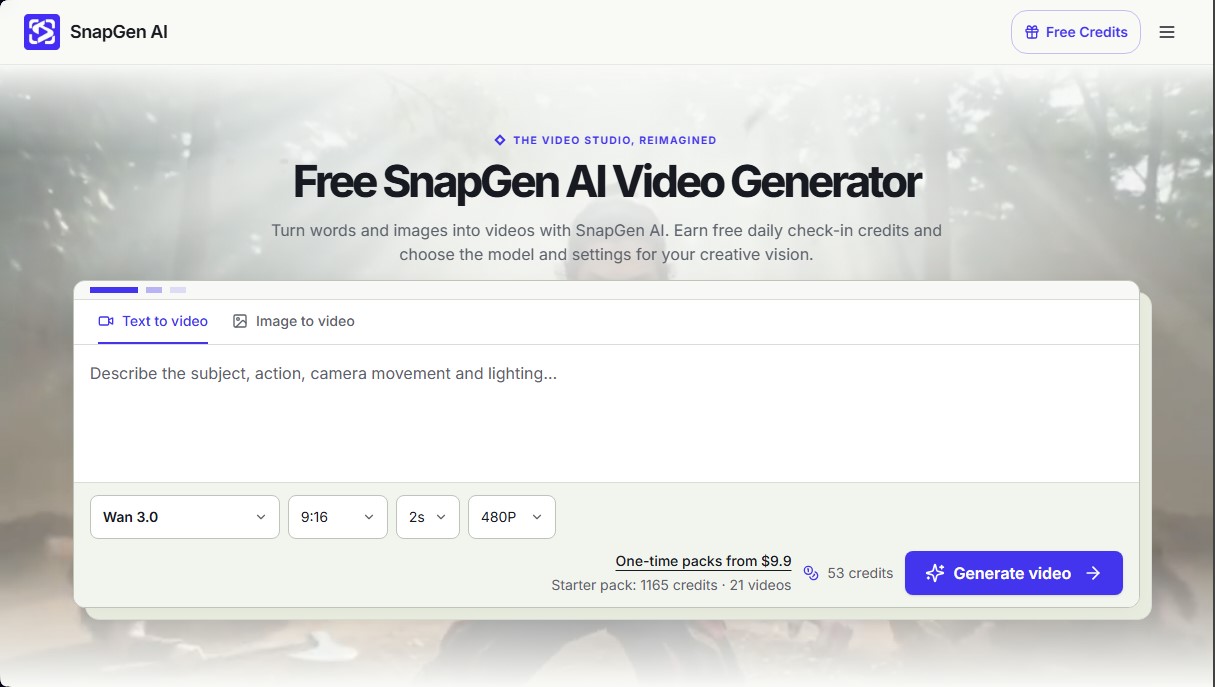
SnapGen is an advanced AI video generation platform designed to transform text descriptions and static images into high-quality dynamic clips. This tool functions as a virtual video studio where the user has full creative control, allowing them to choose from various cutting-edge AI models such as Veo 3.1, Kling 3.0, Wan 3.0, MiniMax H3, Seedance, and Grok Imagine. Its primary focus is to streamline the creation of visual content for social media, product concepts, or creative experiments without the need for complex filming equipment or advanced technical editing skills.
The SnapGen workflow is based on a structured three-step process. First, the user enters a detailed text prompt or uploads an initial image in formats such as PNG, JPEG, or WebP. At this stage, it is essential to define the subject, action, camera movement, and lighting to guide the AI precisely. Second, technical parameters are selected, where the resolution (480p, 720p, 768p), aspect ratio, and clip duration—which varies by model—can be adjusted. Finally, the tool generates a preview that allows the user to refine the result by adjusting specific parts of the original instruction to achieve the perfect framing.
One of the most notable capabilities of SnapGen AI is its technological and functional versatility:
- Text-to-video: Generation of full cinematic scenes starting exclusively from natural language.
- Image-to-video: Animation of photos or illustrations to provide depth and realistic movement.
- Parameter control: Adjustment of duration and format adapted for mobile devices or widescreen displays.
- Audio support: Automatic sound integration in compatible models for an immersive experience.
- Resource transparency: The system displays the exact credit cost before starting generation, allowing for efficient budget management.
This tool is particularly useful for marketing professionals, content creators, and designers looking to speed up the workflow from concept to final cut. SnapGen makes it possible to explore urban atmospheres, natural landscapes, or sci-fi scenes with a level of detail that includes complex reflections and ambient lighting. Additionally, the platform offers a reward system through daily logins that allows users to test the features of the various models. When downloading the results, users receive footage that is ready to be assembled in any professional video editor, making SnapGen AI a strategic ally for modern visual production.
SnapGen features and use cases
How to use SnapGen
SnapGen FAQ
Can I use SnapGen for free?
Yes, you can earn free credits through daily check-ins, accumulating up to 64 credits for every seven consecutive days of access.
How are the required credits calculated in SnapGen AI?
The cost varies based on the chosen model, duration, resolution, and whether the video includes sound. The exact amount is displayed before you confirm the creation.
How do I create a video from a photo in SnapGen?
Select the image-to-video option and upload a file in a compatible format, then provide a detailed description of the movement you want to apply.
Are credits refunded if the video generation fails?
Credits are automatically returned to your account as long as the system confirms that the task failed or was successfully canceled.
What elements should a good text prompt include in SnapGen AI?
It is recommended to clearly describe the subject, the primary action, the camera movement, and the lighting type to achieve precise results.
Where can I download and save my SnapGen creations?
You should download clips directly from the platform after previewing them, as provider storage links may expire over time.
Does SnapGen AI offer technical support for billing inquiries?
You can contact the support team via the official email address to resolve any issues related to your subscription plans or payments.
Do all videos generated with the tool include sound?
Sound is automatically enabled on compatible models, although specific generators like Veo 2 produce only silent video sequences.
SnapGen pricing and plans
Free Version: 0 $
Daily login reward system (check-in).
Accumulate up to 64 free credits after 7 consecutive days.
Accumulated credits do not expire and can be used for video generation.
Starter Plan: Starting at $7.17/mo (billed annually) or $9.00/mo (billed monthly)
11,285 credits included with annual billing.
Access to models: Veo, Seedance, Grok, MiniMax, Wan, and Kling.
Video history and downloads.
Email support.
Restrictions: Credit costs vary by model and settings (e.g., Veo 3.1 Lite consumes 210 credits/video; Kling 3.0 consumes 331 credits/video).
Pro Plan: Starting at $23.17/mo (billed annually) or $29.00/mo (billed monthly)
36,820 credits included with annual billing.
Access to all available models (Veo, Seedance, Grok, MiniMax, Wan, and Kling).
Video history and downloads.
Email support.
Estimated capacity: Generate up to 175 videos with Veo 3.1 Lite or 111 videos with Kling 3.0.
Enterprise Plan: Starting at $79.17/mo (billed annually) or $99.00/mo (billed monthly)
126,200 credits included with annual billing.
Full access to all models and generation tools.
Video history and downloads.
Email support.
Estimated capacity: Generate up to 600 videos with Veo 3.1 Lite or 381 videos with Kling 3.0.
One-time Starter Pack: $9.9 (one-time payment)
1,165 one-time credits.
Access to all AI models (Veo, Seedance, Grok, MiniMax, Wan, and Kling).
Video history and downloads.
Email support.
One-time Pro Pack: $19.9 (one-time payment)
2,495 one-time credits.
Access to all available AI models.
Video history and downloads.
Email support.
One-time Enterprise Pack: $99.9 (one-time payment)
13,135 one-time credits.
Access to all available AI models.
Video history and downloads.
Email support.
SnapGen Screenshots
SnapGen user reviews
Write a review
Checking your session...
SnapGen Reviews
Loading reviews...
SnapGen alternatives




Osmo Studio
AI animation studio for professional motion graphics and videos. Control every detail, collaborate with teams, and export with transparent backgrounds.

Victoria Secret Runway
Create fashion show videos by integrating your face into real scenes. Just upload a photo to replace professional models and walk the runway.
