

Spacely AI
Share
What is Spacely AI?
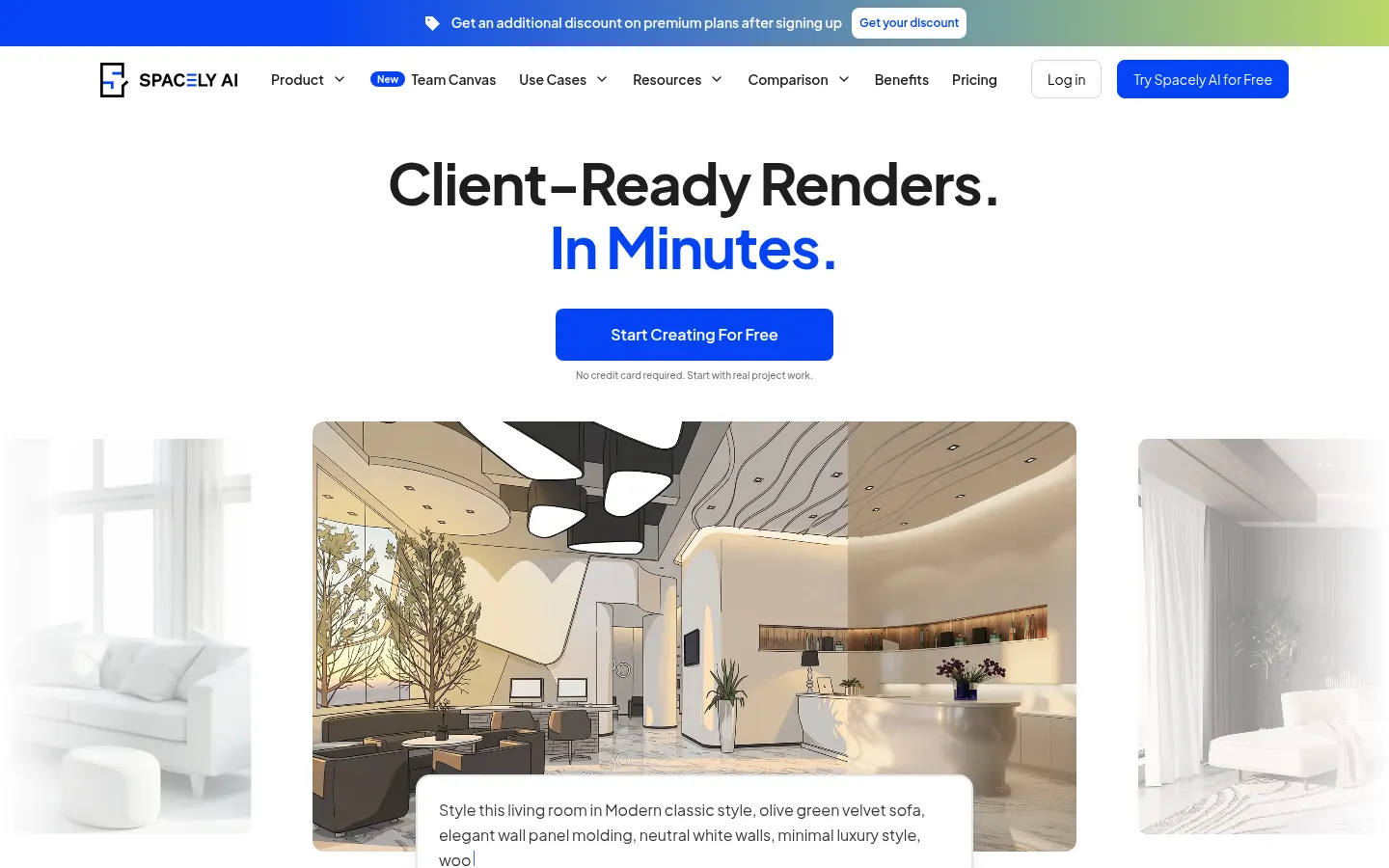
Spacely AI is an AI interior design and rendering tool that turns a sketch, a 3D model or a photo of a room into a photorealistic render in under a minute while keeping the original geometry and materials. Interior designers, architects, realtors and homeowners use it to show a proposal without outsourcing renders to a visualization studio.
What is Spacely AI used for?
It gets you from an idea to an image a client can understand. You upload the starting image, describe the style ("minimalist Japandi, light wood, warm lighting") and the AI returns several options. You can then change just one part of the result: relight the scene, furnish an empty room, swap a material with Point and Edit, empty the space, extend the view or generate new angles. It handles interiors and exteriors, homes, cafés, restaurants and retail spaces.
How does Spacely AI work with SketchUp and teams?
Besides the web app there's a SketchUp extension, installed from Extension Warehouse, that renders your model without leaving SketchUp; depending on the tier it also connects to Revit, AutoCAD and Rhino. Team Canvas lets several people work on the same canvas, see edits live and leave feedback inside the project, with shared credits and projects. Higher tiers add API access.
Who is Spacely AI for?
- Interior designers preparing mood boards and alternative looks for a room.
- Architects communicating spatial intent at concept stage.
- Realtors who need virtual staging for an empty listing.
- Homeowners who want to see a renovation before paying for it.
Spacely AI pros and cons
Speed is the big win, along with revisions that adjust the render rather than forcing you to rebuild the file, and commercial use is allowed. On the downside, every render uses credits, the queue is slower on entry tiers, and features such as 4K downloads or advanced editing aren't available on every tier. The output is a visualization, not a technical drawing.
Spacely AI features and use cases
How to use Spacely AI
Spacely AI FAQ
Is Spacely AI free?
There's a free plan with 40 trial credits to test every feature; ongoing use requires a paid plan (see pricing).
Can I use Spacely AI renders commercially?
Yes. A commercial license is included even on the free plan, so you can use the images with clients and in listings.
Does Spacely AI work inside SketchUp?
Yes. A free extension on SketchUp Extension Warehouse renders the selected model without leaving SketchUp.
What files can I upload to Spacely AI?
Sketches, screenshots or exports of 3D models, and real photos of interiors or exteriors; the AI builds on that image to keep the geometry.
How long does a render take?
The site quotes under 60 seconds per render; on entry plans the standard queue can take a few minutes longer.
Can it do virtual staging?
Yes. It can furnish an empty room automatically or clear out a furnished one, which is handy for property listings.
Can several people work on one project?
Yes. With Team Canvas teammates see edits live and comment inside the canvas; the seat count depends on the plan.
Does Spacely AI have an API?
Yes, the Agency plan includes a private API key for plugging it into other workflows.
Do Spacely AI credits expire?
Top-up credits never expire; monthly credits come with the subscription, and paid plans mention credit stacking.
What are some Spacely AI alternatives?
In our directory you can compare Interior AI, Collov AI and Planner 5D, which also generate interior design concepts with AI.
Spacely AI pricing and plans
Reference price: 25 USD / month. Source · Verified: November 11, 2026
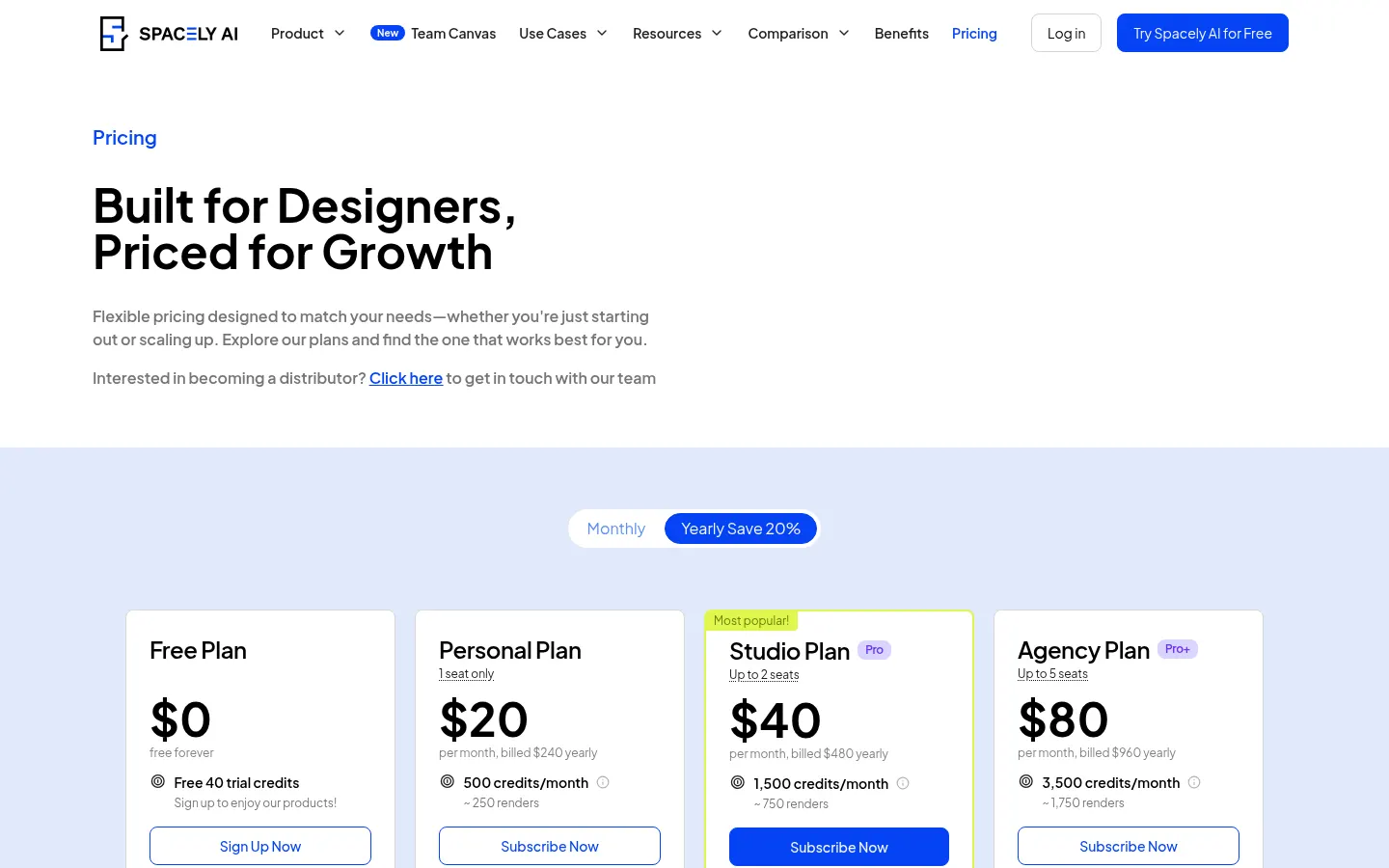
Prices in US dollars from the official website (Checked on: 11/11/2026). Annual billing saves 20%.
Free: $0, 40 trial credits, high-resolution downloads, private mode, commercial license and no watermark.
Personal (1 seat): $25/month billed monthly or $20/month billed $240 yearly. 500 credits a month (about 250 renders), standard queue, SketchUp, Revit, AutoCAD and Rhino integrations.
Studio (up to 2 seats): $50/month monthly or $40/month billed $480 yearly. 1,500 credits a month (about 750 renders), Pro features, 4K downloads, priority queue and team collaboration.
Agency (up to 5 seats): $100/month monthly or $80/month billed $960 yearly. 3,500 credits a month (about 1,750 renders), fastest queue and a private API key.
Top-ups (subscribers only, never expire): 200 credits for $9, 1,000 for $35 and 5,000 for $150. An education plan applies with an academic email, and custom plans are available.
Spacely AI Screenshots
Spacely AI user reviews
Write a review
Checking your session...
Spacely AI Reviews
Loading reviews...
Spacely AI alternatives

Virtual Staging AI Studio
Virtual Staging AI Studio is an AI tool that furnishes and styles empty property photos for listings, with one free image a day and watermark-free downloads.


ImagineMyHouse
ImagineMyHouse is an AI home design tool that turns photos, sketches and floor plans into interior, exterior, garden and virtual staging concepts.



ReimagineHome
ReimagineHome is an AI platform for interior design and virtual staging, with room redesign, exteriors and tools for agents and real-estate teams.