Share
AI assistant that automates workflows by connecting your tools. Manage meetings, write code, and update processes with your company’s real context.
What is Stilla?
Stilla is an AI platform for businesses designed to act as another team member, integrating directly into the daily workflow. Unlike conventional virtual assistants, this tool is defined as an "all-in-one" solution that learns an organization's specific context to execute tasks autonomously. Its primary function is to automate operational processes by connecting with over 3,000 software tools, allowing users to delegate technical and administrative responsibilities simply by using natural language.
Stilla's technology is based on configurable AI agents that require no programming or complex workflow builders. The system uses a real-time context approach, extracting relevant information from meetings, Slack threads, Linear issues, or Notion documents. Being SOC2 Type II certified and GDPR compliant, the tool ensures that corporate data is protected and not used to train external models, providing a secure environment for deploying intelligent automation.
Among Stilla’s most notable functional capabilities are:
- Advanced meeting management: Performs real-time transcriptions without intrusive bots, generates collaborative notes, and automatically extracts action items.
- Software development agent: Capable of writing code, opening and reviewing Pull Requests (PRs) on GitHub, and keeping repositories synced with decisions made during meetings.
- Ecosystem synchronization: Automatically updates Linear tickets, edits documentation pages, and sends status updates via Slack or email.
- Secure environment execution: Each task is processed in a virtualized computer (sandbox), allowing for isolated and secure data analysis and code execution.
This tool is especially useful for product, engineering, and management teams that need to reduce communication overhead. By operating from the computer through native integrations, users can invoke the AI by mentioning Stilla in their usual channels. This makes it easy for the tool to write drafts, schedule reviews, or perform metrics analysis without the employee ever having to leave their primary work platform.
The practical value of Stilla lies in its ability to transform conversations into tangible results. Thanks to its shared memory, the AI remembers previous agreements across different tools, preventing information silos. It is worth noting that it allows for granular permission control, offering everything from a draft mode—where the user supervises every action—to total autonomy to accelerate project delivery in high-performance environments.
Stilla features and use cases
How to use Stilla
Stilla FAQ
What is Stilla, and how can it help my team with our day-to-day work?
Stilla is an AI-powered coworker that learns about your business to autonomously perform tasks across more than 3,000 different tools.
Which apps and services does Stilla integrate with?
The tool connects with thousands of popular apps like Slack, GitHub, Linear, Notion, Google Drive, and Gmail to manage end-to-end workflows.
How does Stilla’s meeting note-taking feature work?
Stilla listens directly from your device without requiring a bot to join the video call, generating real-time transcriptions and summaries with clear action items.
Is it safe to use Stilla with my company’s sensitive data?
Yes. The platform is SOC2 Type II certified and GDPR compliant, ensuring that your data is never used to train AI models.
What kinds of tasks can Stilla agents handle?
Agents can write code, open pull requests in GitHub, create tickets in Linear, send Slack updates, and keep Notion documentation current.
Can I try the tool before committing to a paid plan?
Stilla offers a free trial that includes $100 in credits to explore all its features—no credit card required.
How does Stilla differ from other assistants like ChatGPT or Claude?
Unlike other assistants, Stilla has real-world context of your business by reading your Slack threads and documents. It also has the ability to execute direct actions within your tools.
Which languages does Stilla support for transcription and task execution?
The platform is multilingual and offers full support for English, Spanish, French, German, Italian, and Portuguese, among other international languages.
How can I control permissions and what Stilla is allowed to do?
You can granularly configure which repositories, channels, and teams each agent has access to, allowing them to work autonomously or in a "draft mode" for your review.
What’s included in the Stilla Team plan?
The Team plan includes 40,000 monthly credits, access to coding agents, automated meeting notes, and support for up to 29 members per organization.
Stilla pricing and plans
Free Trial
- Includes $100 in free credits.
- No credit card required.
Team - $50 per organization per month ($40 billed annually)
- 40,000 monthly credit limit.
- Limited to a maximum of 29 members per organization.
- Includes $100 in free welcome credits.
- AI agents to automate workflows with meeting context and tools.
- Coding agent to write, open, and review Pull Requests (PRs).
- AI meeting notes compatible with Zoom, Microsoft Teams, Google Meet, and Webex.
- Native integration with Slack, Linear, and GitHub.
- Access to 3,000+ integrations and unified search across connected tools.
- Secure execution environment (sandboxed computer) for tasks.
- Shared memory and MCP server to extend functionality.
- Domain verification and privacy guarantee (data is not used for training).
Enterprise - Contact Sales for pricing
- Unlimited members.
- Includes all Team plan features.
- Dedicated Success Manager and priority support.
- SAML SSO authentication and SCIM provisioning.
- Custom data retention and audit logs.
- Enterprise-grade integrations and advanced security controls.
- Granular sharing controls.
- Invoicing.
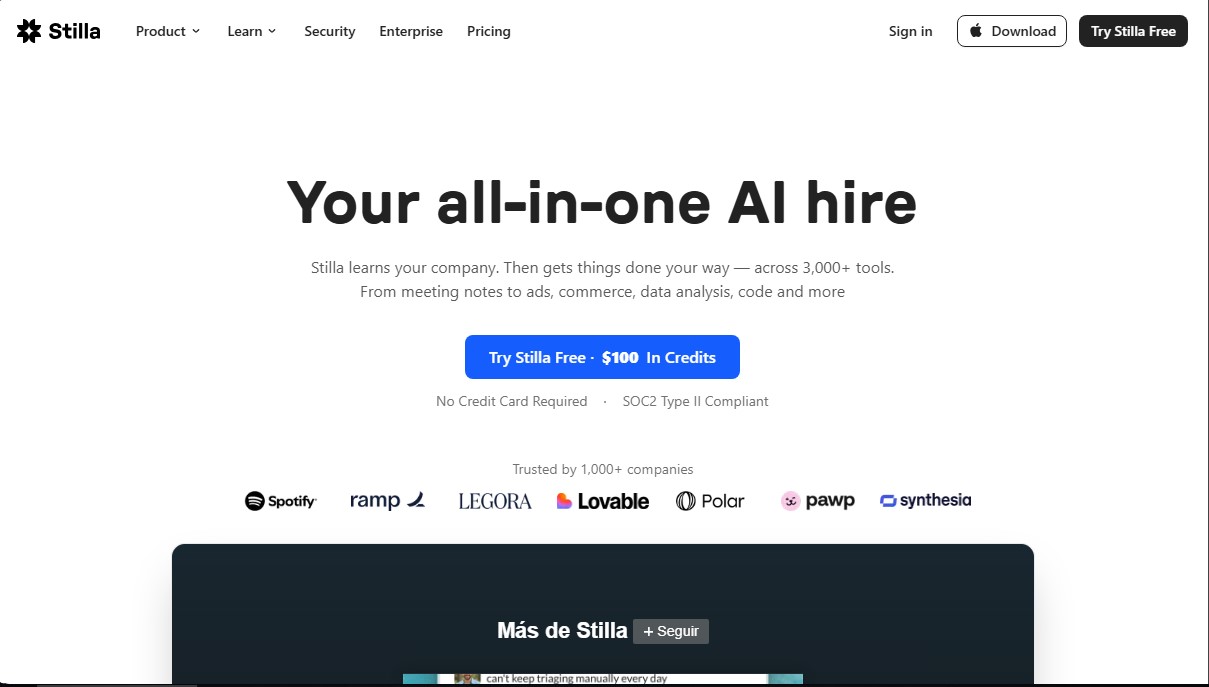
Stilla Screenshots
Stilla alternatives

localscreenshot
localscreenshot is a screenshot API and MCP server for AI agents, returning clean captures of any web page on phone or desktop from 227 countries.


Nuclr Commander
Workspace for running multiple AI agents in parallel with a file manager. Supports local or external models and remote mobile monitoring.