

Share
Optimize financial modeling with AI. Build, audit, and format spreadsheets using natural language, and extract data from PDF files.
What is Tracelight Excel Add-in?
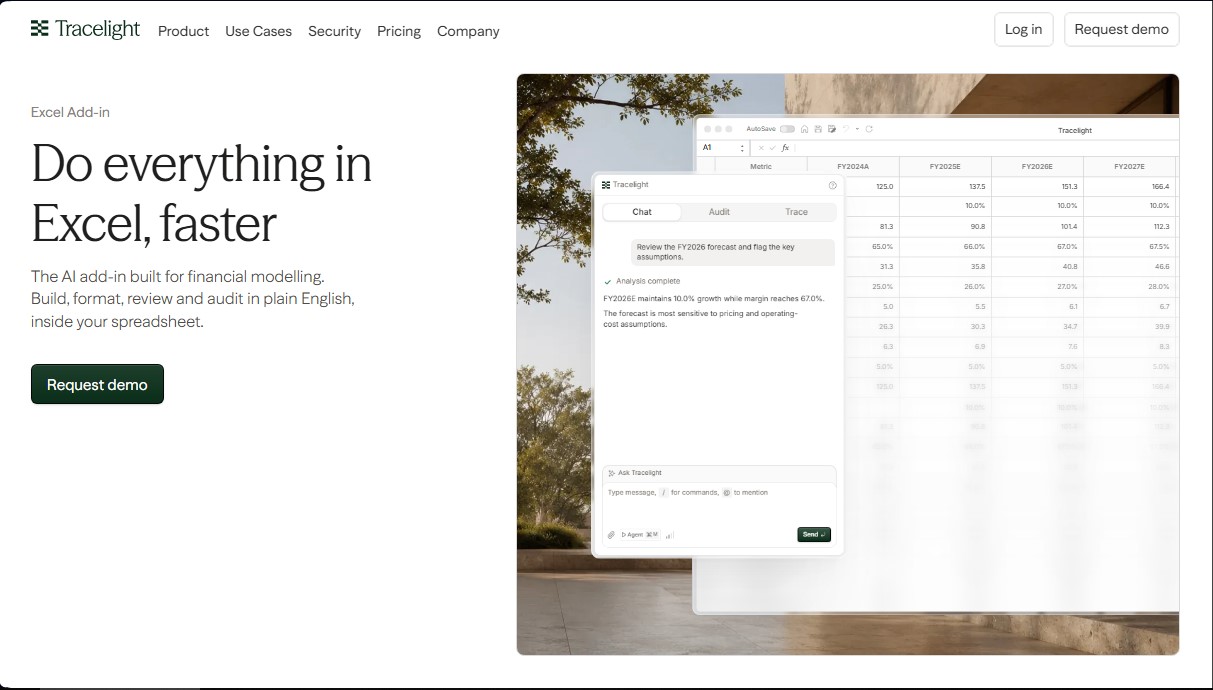
Tracelight Excel Add-in is an artificial intelligence extension designed specifically for advanced financial modeling within Microsoft Excel. This tool allows analysts and finance professionals to build, format, review, and audit complex models using natural language. Its primary function is to streamline spreadsheet workflows, enabling the execution of technical tasks through simple instructions from a computer.
The technology behind the Tracelight Excel Add-in is based on a proprietary spreadsheet engine that processes data in the background. Before making any permanent changes to the workbook, the AI verifies edits, recalculates scenarios, and ensures the results are consistent. This approach guarantees that model integrity remains intact, avoiding common manual errors in large data structures and maintaining a compressed view of the entire file's logic.
Among its key capabilities is the Trace feature, which explains any complex formula in plain language. Instead of just showing cell addresses, it identifies key drivers by their labels and maps the logic using visual flowcharts. Additionally, the model auditing system allows for scanning the entire workbook to detect inconsistencies, broken links, or hard-coded entries that should be linked.
The software ensures visual consistency by integrating each firm's style guide. Tracelight Excel Add-in automatically applies specific color palettes, fonts, and number formats, ensuring all deliverables maintain a professional and predictable aesthetic. It also allows teams to embed their own methodology, such as business valuation templates or debt schedules, to systematically reuse them across different projects.
Other practical features and benefits include:
- PDF Data Extraction: The ability to transform financial reports or Confidential Information Memorandums (CIMs) into structured Excel tables, linking each value to its original source through citations.
- Detailed Change History: A complete log of all modifications made by the AI, allowing users to review, approve, or undo each action individually.
- Automatic Account Mapping: Identification of patterns in trial balances to quickly categorize accounts into financial groups.
- Sensitivity Analysis: Running scenarios and visualizing how key metrics change when basic assumptions are modified.
This solution is particularly useful for professionals in Private Equity, investment banking, corporate development, and due diligence teams. It facilitates the creation of three-statement models and cash flow projections, optimizing time spent on repetitive tasks and allowing for a greater focus on strategic analysis. The Tracelight Excel Add-in integrates seamlessly into the Microsoft ecosystem, functioning as an expert assistant that verifies every step before writing to the spreadsheet.
Tracelight Excel Add-in features and use cases
How to use Tracelight Excel Add-in
Tracelight Excel Add-in FAQ
What exactly is the Tracelight Excel Add-in, and what is it for?
It is an AI-powered add-in designed for financial modeling that allows you to build, format, and audit spreadsheets using natural language directly within Excel.
How does Tracelight help me understand complex formulas in my models?
The tracing feature explains every formula in plain English, identifies key drivers by their labels instead of cell references, and visualizes the logic through diagrams.
Can the Tracelight Excel Add-in ensure my models follow my company's style?
Yes, the system automatically applies your firm’s style guide—including colors, fonts, and number formats—ensuring all documents maintain a professional and consistent look.
Is it possible to import data from PDF files directly into Excel with Tracelight?
Yes, you can upload PDF reports or financial statements, and the tool will extract the figures into structured tables, linking each value back to its exact location in the original document via comments.
How does Tracelight ensure that suggested changes won’t break my workbook?
The tool features a proprietary engine that validates every edit in the background before it is applied, allowing you to review, approve, or undo any modification through a detailed audit trail.
Is there a free version available to test Tracelight’s features?
The Starter plan offers a free trial period with limited access to the platform, the Excel add-in, and a set number of model review runs.
Can I integrate my team’s specific workflow into Tracelight?
You can configure the tool to use your own templates and standard workflows, allowing the AI to replicate your specific approach to building financial models.
What sets Tracelight apart from other Excel editing tools?
Unlike other add-ins, Tracelight features a simulation engine that recalculates scenarios and verifies results before writing any permanent data to your spreadsheet.
Tracelight Excel Add-in pricing and plans
Starter (Free Trial)
Price: Free.
• Limited access to the Tracelight platform.
• Limited chat messages.
• 3 Model Review runs.
• Access to spreadsheet applications.
• Limited Excel add-in.
• Limited PowerPoint and Word add-ins.
Pro
Price: $40 per month.
• Everything included in the Starter plan.
• Higher usage limits.
• Confidential mode available with enterprise-grade privacy.
• Access to MCP and integrations.
• Access to premium large language models (LLMs).
Max
Price: $200 per month.
• Everything included in the Pro plan.
• 5x the usage capacity of the Pro plan.
• Priority support.
• Priority access to new features.
Enterprise
Price: Contact Sales.
• Everything included in the Max plan.
• Unlimited usage across the Tracelight platform.
• Organization-wide custom skills library.
• Access to the latest large language models (LLMs).
• Single Sign-On (SSO).
• Configurable data retention.
• Enterprise-grade security and privacy.
• Deployment and onboarding support.
• Top-priority support.
• Early access to new features.
• Admin dashboard for tracking, control, and centralized billing.
Tracelight Excel Add-in Screenshots
Tracelight Excel Add-in user reviews
Write a review
Checking your session...
Tracelight Excel Add-in Reviews
Loading reviews...
Tracelight Excel Add-in alternatives


PropHours-Material Participation
Track rental tasks and material participation hours with AI. Attach evidence and generate reports to maximize tax deductions.

FactorialHR
AI platform centralizing HR, finance, and IT. Automate payroll, time tracking, and expenses to streamline management and boost your company's productivity.



Bank Statement Converter
Convert PDF bank statements and images to Excel or CSV. Securely edit transactions and validate balances against the original without sharing login credentials.