

Share
Sync presentations and documents with Excel models to auto-update charts. Detect slide inconsistencies and ensure corporate formatting.
What is Tracelight PPT Add-in?
Tracelight PPT Add-in is an advanced artificial intelligence solution designed to optimize the creation and management of professional presentations in financial and corporate environments. This tool functions as an integrated add-in within the Microsoft Office ecosystem, allowing users to automate the generation of slides and Word documents directly from their computer while maintaining a constant connection to their Excel data models. Its primary goal is to eliminate repetitive manual update tasks and ensure technical accuracy in critical reports.
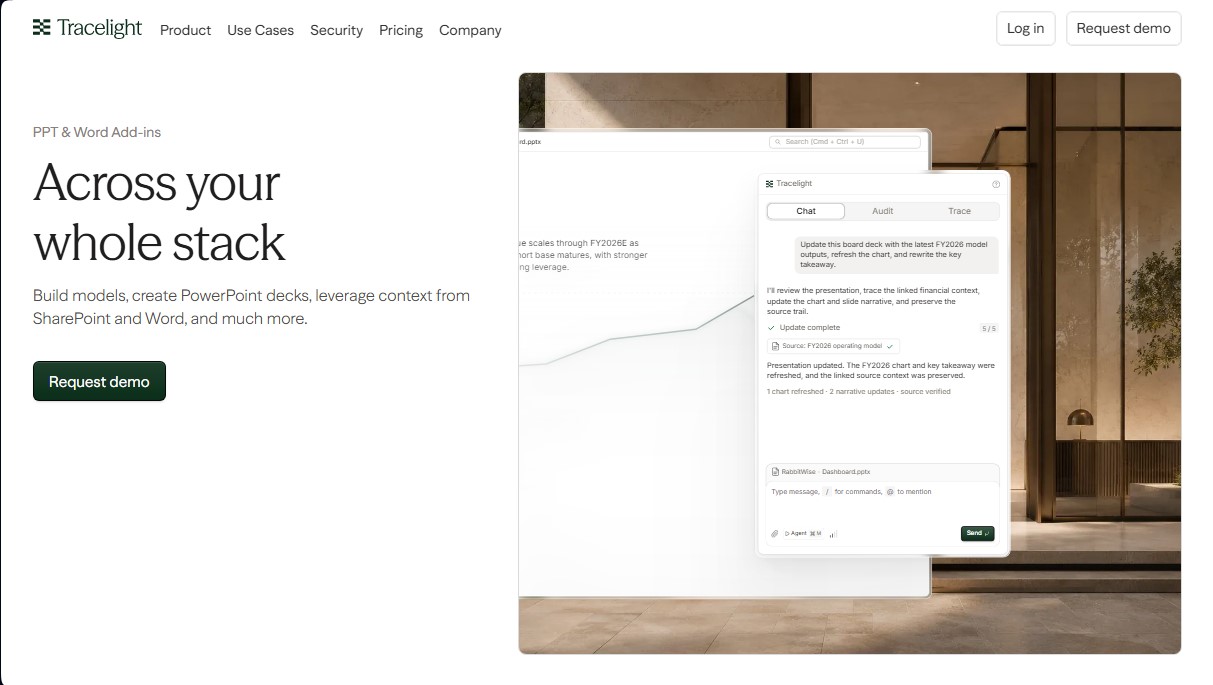
The technology behind Tracelight employs natural language processing algorithms and data auditing systems to understand the context of files stored in SharePoint or Word. Through a chat and command interface, users can request complex actions, such as updating a chart with results from the latest fiscal year or rewriting a slide's key takeaways. The AI does more than just execute the task; it maintains full traceability of the information's origin, allowing for the instant verification of the source of every figure to ensure data integrity.
Its most notable functional capabilities for financial modeling and strategic communication include:
- Deck-to-XLSX Sync: Automatically verifies and updates every number in the presentation against the original Excel model to prevent discrepancies caused by outdated versions.
- Inconsistency Detection: Scans the entire document to identify contradictory values across different slides, formatting errors, or failures in data logic.
- Consistent Brand Generation: Builds slides that faithfully follow the firm’s corporate templates, style guides, fonts, and color palettes.
- Model Auditing: Analyzes Excel workbooks for formula errors, broken links, or manual entries that should be dynamic before exporting data to PowerPoint.
This tool is particularly useful for Private Equity professionals, mergers and acquisitions (M&A) analysts, and corporate development departments that handle large volumes of sensitive data. By using the Tracelight PPT Add-in, teams achieve greater operational efficiency and drastically reduce the risk of human error when preparing due diligence reports or earnings presentations for boards of directors. The AI’s ability to act across the company's entire document stack ensures that the workflow is seamless, professional, and fully auditable.
Tracelight PPT Add-in features and use cases
How to use Tracelight PPT Add-in
Tracelight PPT Add-in FAQ
What are the main features the Tracelight PPT Add-in offers for my presentations?
This tool allows you to update presentations with the latest data from financial models, automatically refresh charts, and rewrite key takeaways while always maintaining a clear audit trail to the original source.
How does Tracelight help ensure data consistency within a document?
The system performs a comprehensive review of the slide deck to detect mismatched values, formatting errors, or figures that have become outdated relative to the source model.
Can the Tracelight PPT Add-in adapt to my company’s visual design?
Yes, the add-in generates every slide using your firm’s corporate template, strictly adhering to fonts, colors, master layouts, and all branding elements.
Is it possible to verify the numbers on the slides against an Excel workbook?
The review feature syncs every figure in the presentation with the corresponding Excel model to ensure data accuracy and capture any discrepancies between different versions.
What pricing tiers are available for Tracelight?
The platform offers a free trial, Pro and Max plans with higher usage limits, and an Enterprise option that includes priority support and advanced security features.
What security measures does Tracelight include to protect confidential information?
The tool features enterprise-grade security, configurable data retention options, Single Sign-On (SSO), and a confidential mode to ensure privacy at all times.
In which use cases is Tracelight most effective?
It is particularly useful for mergers and acquisitions (M&A), commercial or financial audits, asset valuations, and corporate development teams handling complex models.
Does the Tracelight PPT Add-in work with programs other than PowerPoint?
This ecosystem is designed to integrate seamlessly across your entire workflow, allowing you to leverage context and data from both Microsoft Word and SharePoint.
Tracelight PPT Add-in pricing and plans
Starter (Free Trial)
Limited access to the Tracelight platform.
Limited chat messages.
3 Model Review runs.
Spreadsheet apps.
Limited Excel add-in.
Limited PowerPoint and Word add-ins.
Pro ($40/mo)
Includes everything in the Starter plan.
Higher usage limits.
Confidential mode available with enterprise-grade privacy.
Access to MCP and integrations.
Premium LLM access.
Max ($200/mo)
Includes everything in the Pro plan.
5x the usage capacity of the Pro plan.
Priority support.
Priority access to new features.
Enterprise (Contact Sales)
Includes everything in the Max plan.
Unlimited usage across the Tracelight platform.
Custom skill library for the entire organization.
Access to the latest LLM models.
Single Sign-On (SSO) and enterprise-grade security.
Configurable data retention.
Deployment support, onboarding, and top-priority support.
Early access to new features.
Admin panel for centralized control and billing.
Tracelight PPT Add-in Screenshots
Tracelight PPT Add-in user reviews
Write a review
Checking your session...
Tracelight PPT Add-in Reviews
Loading reviews...
Tracelight PPT Add-in alternatives


PropHours-Material Participation
Track rental tasks and material participation hours with AI. Attach evidence and generate reports to maximize tax deductions.

FactorialHR
AI platform centralizing HR, finance, and IT. Automate payroll, time tracking, and expenses to streamline management and boost your company's productivity.


Bank Statement Converter
Convert PDF bank statements and images to Excel or CSV. Securely edit transactions and validate balances against the original without sharing login credentials.