
Share
Learn English with YouTube videos. Turn subtitles into vocabulary flashcards with AI, contextual translations, examples, and various interactive review modes.
What is TubeVocab?
TubeVocab is an advanced AI-powered language learning solution that allows users to learn English using real YouTube content. Its primary function is to transform any video on the platform into an interactive study environment, facilitating the seamless acquisition of contextual vocabulary. This tool is ideal for students who prefer learning with authentic materials such as interviews, vlogs, or TED talks, moving away from the generic and out-of-context word lists found in traditional methods.
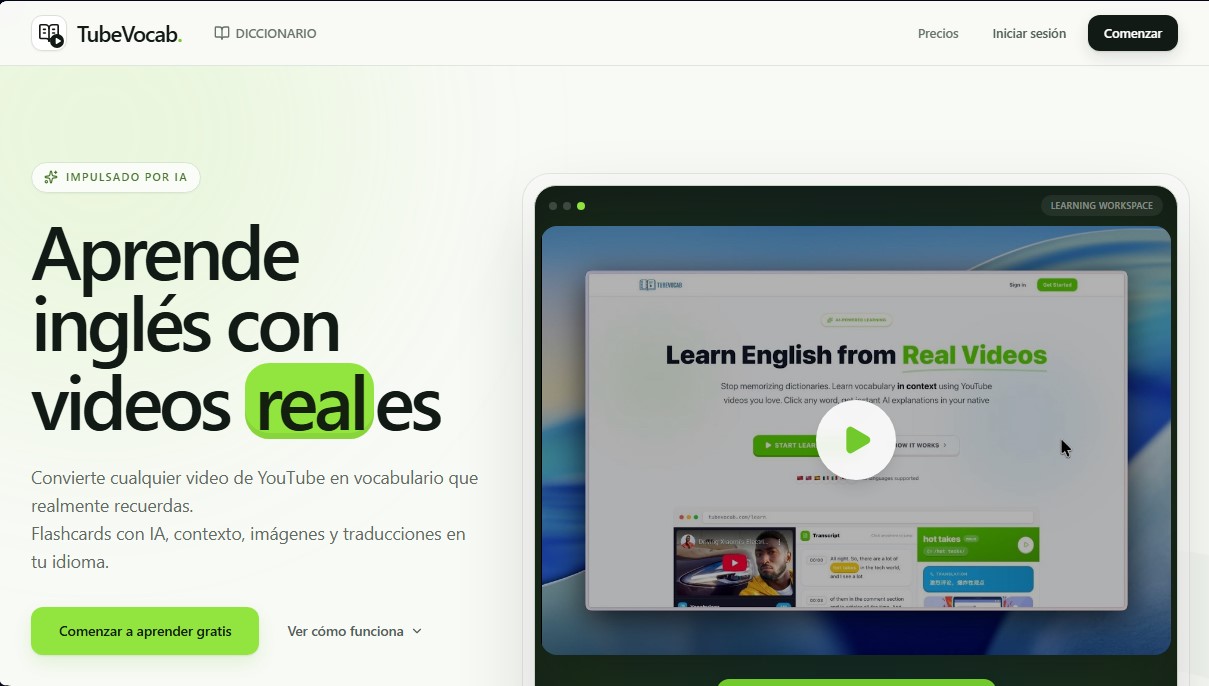
The way TubeVocab works stands out for its simplicity and technological efficiency. By entering a video URL, the platform generates synchronized interactive subtitles. When a user encounters an unknown term, the tool's AI instantly creates a flashcard that includes the translation into their native language, phonetic transcription, usage examples, and an AI-generated image. This technology ensures that learning is always linked to the specific context of the scene, significantly improving long-term retention.
Key features and practical benefits include:
- Smart Flashcards: Automatically generated with detailed information, synonyms, and collocations based on the specific video clip viewed.
- Spaced Repetition System (SRS): Uses algorithms to schedule optimal reviews, ensuring vocabulary is committed to long-term memory.
- Six Practice Modes: Includes dictation exercises, fill-in-the-blank quizzes, matching games, and quick reviews to target different cognitive skills.
- Multi-language Support: Capable of providing explanations and translations in 56 native languages, allowing for personalized learning from a computer.
- Direct Link to Footage: Every saved word allows you to jump back to the exact moment in the video to hear the original native pronunciation.
In addition to vocabulary building, TubeVocab leverages artificial intelligence to offer video summaries and keyword recommendations, optimizing the student's workflow. The tool also features Anki integration and the ability to export materials to PDF, providing the flexibility to study off-platform. By combining YouTube's visual content with natural language processing, this application positions itself as a robust resource for improving listening comprehension and lexical fluency in a practical and efficient way.
TubeVocab features and use cases
How to use TubeVocab
TubeVocab FAQ
What is TubeVocab and how does it help improve my English?
TubeVocab is a tool that turns any YouTube video into a personalized lesson using interactive subtitles and AI-generated flashcards.
Can I use TubeVocab for free?
The platform offers initial free access with enough credits to process three videos and generate fifty flashcards, with no credit card required.
How many native languages does the app support?
The system supports up to fifty-six different languages for translations and contextual explanations of the words you choose to learn.
What sets TubeVocab apart from traditional study methods?
The tool focuses on contextual learning using real-world content rather than generic lists, linking every saved word to the exact moment it appears in the original video.
Can I choose any YouTube video to practice with?
You can import any content from the platform that has English subtitles, allowing you to learn from vlogs, interviews, or talks that interest you.
What features are included in TubeVocab’s flashcards?
The generated flashcards include phonetic pronunciation, context-specific definitions, real-world usage examples, and illustrative images to improve retention.
What practice methods are available to review what I've learned?
There are six different modes to reinforce your knowledge, including dictation, fill-in-the-blank exercises, matching games, and a spaced repetition system.
Can I export TubeVocab content to other formats?
Subscription plans allow you to export flashcards to PDF for printing and offer full integration with the Anki app.
TubeVocab pricing and plans
Basic
Free ($0 forever)
110 credits (equivalent to 3 videos + 50 flashcards).
1 channel subscription.
PDF export and Anki integration.
AI-powered word recommendations and video summaries.
Plus
$8/month (or $5/month billed annually at $60)
1,500 credits per month (equivalent to 20 videos + 1,100 flashcards).
Up to 100 channel subscriptions.
PDF export (printable cards) and Anki integration.
AI-powered word recommendations, video summaries, and highlights.
Monthly streak freezes and repair cards.
Standard support.
Credits reset monthly.
Pro
$20/month (or $12.42/month billed annually at $149)
5,000 credits per month (equivalent to 50 videos + 4,000 flashcards).
Up to 100 channel subscriptions.
PDF export (printable cards) and Anki integration.
AI-powered word recommendations, video summaries, and highlights.
Monthly streak freezes and repair cards.
Priority support.
Credits reset monthly.
TubeVocab Screenshots
TubeVocab user reviews
Write a review
Checking your session...
TubeVocab Reviews
Loading reviews...
TubeVocab alternatives

SayLingo.ai
Practice 30 languages with AI tutors. Improve your pronunciation and grammar through real conversations, guided lessons, and official exam preparation.
JapanesePal
Practice Japanese conversation with an AI tutor. Improve your fluency and pronunciation for travel, work, or culture with instant corrections.
PortuguesePal
Practice Brazilian or European Portuguese with an AI tutor. Improve your fluency and pronunciation with real conversations and instant corrections.

MakeLesson
Transform educational materials into interactive, auto-graded lessons. Includes student management, scheduling, and payments in an all-in-one platform for teachers.