
Share
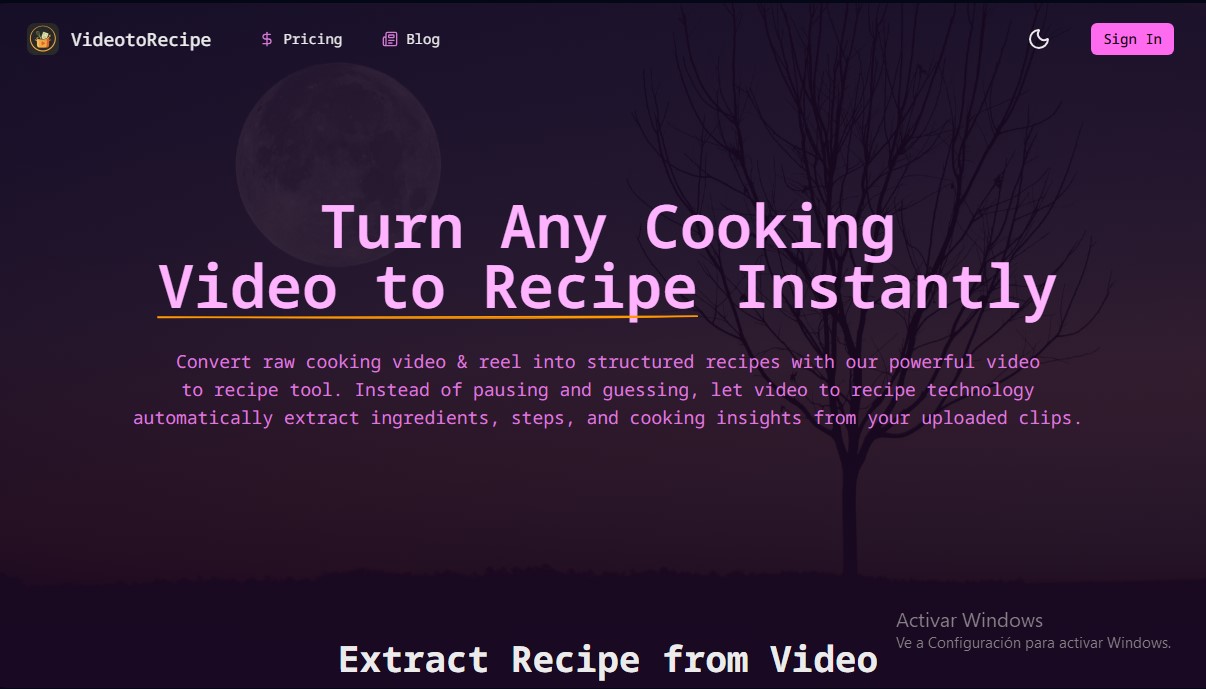
Turn cooking videos into structured recipes. Automatically extract ingredients, steps, and nutritional info from video clips using AI.
What is VideoToRecipe?
VideoToRecipe is an AI-powered tool designed to instantly transform cooking videos and reels into structured recipes. Its primary function is to automate the extraction of culinary information from audiovisual content, eliminating the need to constantly pause videos or take manual notes. This solution is ideal for food enthusiasts, users looking to organize their social media finds, and professionals who need to quickly document preparation processes from their computer or mobile device.
The operation of VideoToRecipe is based on an advanced analysis engine that integrates visual and auditory signal processing. When a video file is uploaded, the AI scans the sequence to identify ingredients, techniques used, and cooking times. The technology behind this AI recipe extractor is capable of recognizing elements even in fast-paced clips from platforms like YouTube, TikTok, or Instagram, generating a coherent and easy-to-follow text document. The system supports a wide range of formats, such as MP4, MPEG, WMV, FLV, and MOV, ensuring compatibility with most modern digital recordings.
The tool's core capabilities provide detailed results in just a few seconds:
- Intelligent Ingredient Identification: Generates accurate lists by analyzing both what is shown on screen and what is mentioned in the audio.
- Step-by-Step Instructions: Breaks down the cooking procedure into chronologically ordered phases to make executing the dish easier.
- Calorie Estimation: Provides an approximate calculation of nutritional value based on the components detected by the AI.
- Editable Results: Users can refine, correct, or customize any part of the generated recipe to suit their preferences.
- Library Management: Allows users to store and organize all conversions in a personal collection accessible at any time.
The practical utility of VideoToRecipe lies in its ability to convert visual inspiration into a functional working format. By transforming dynamic content into structured text, users save time and avoid common mistakes when interpreting measurements or steps omitted in short-form video editing. It is an efficient culinary productivity tool that allows you to move from watching to cooking with total confidence, maintaining an organized record of every dish without manual effort. It is worth noting that the workflow is straightforward: simply upload the clip, start the analysis, and download the recipe, ready to use or save in a digital cookbook.
VideoToRecipe features and use cases
How to use VideoToRecipe
VideoToRecipe FAQ
What is VideoToRecipe and how does it work?
It is an AI-powered tool that analyzes cooking videos to automatically extract ingredients, step-by-step instructions, and estimated calorie counts.
How much does it cost to extract a recipe with VideoToRecipe?
Each extraction costs ten credits, though new registered users get one free trial to test the service.
Which file formats are compatible with the platform?
The system supports the most common video formats, such as MP4, MPEG, WMV, FLV, and MOV, as long as the file does not exceed 1,000 megabytes.
Can I use videos from YouTube, TikTok, or Instagram on VideoToRecipe?
Yes, you can download videos from these social media platforms and upload them directly to our tool so the artificial intelligence can generate a structured recipe.
Can I edit the recipe once the system has finished the analysis?
Of course. All results generated by the tool are fully editable, allowing you to personalize them or adjust any details to suit your preferences.
Where are the recipes I’ve created with VideoToRecipe stored?
The platform features a personal library where all your extractions are saved, making it easy to manage and access them at any time.
How accurate is the ingredient recognition?
Our advanced technology is capable of identifying ingredients even if they aren't clearly shown, providing precise quantity estimates to make your cooking easier.
What is the maximum video length I can upload?
Depending on your chosen plan, you can upload videos ranging from 15 minutes on the basic plan to 45 minutes on the premium plan.
Does VideoToRecipe offer any annual subscription discounts?
Yes, the annual plan offers significant savings compared to monthly billing and provides the highest number of credits and priority processing.
How can I contact support if I have questions?
You can reach out to our technical support team via email to resolve any issues related to your account or credits.
VideoToRecipe pricing and plans
Free Trial
Price: $0
- One-time use for new registered users.
- Extract a recipe from a video up to 5-10 minutes long.
Starter Plan
Price: $19.9 per month
- 200 credits valid for 1 month (each video consumes 10 credits).
- Video length limit: under 15 minutes.
- Supported formats: MP4.
- Standard generation speed.
- Watermark-free results.
- Standard customer support.
Standard Plan
Price: $29.9 per month
- 300 credits valid for 1 month (each video consumes 10 credits).
- Video length limit: under 30 minutes.
- Supported formats: MP4 and MPEG.
- Fast generation speed.
- Watermark-free results.
- High-priority customer support.
Premium Plan
Price: $195 per year
- 3,000 credits valid for 1 year (each video consumes 10 credits).
- Video length limit: under 45 minutes.
- Supported formats: MP4, MPEG, WMV, and FLV.
- Maximum generation speed.
- Watermark-free results.
- Top-priority customer support.
VideoToRecipe Screenshots
VideoToRecipe alternatives

Hireci recipe saver app
Convert social media videos, photos, and links into editable recipes. Organize your digital cookbook, plan menus, and automatically generate grocery lists.

Nommer cook recipes together
Turn any recipe into a plan for two. Split tasks and sync steps in real time to cook in coordination and finish at the same time.
ReciBites: Recipe Meal Planner
Save recipes from any source, plan meals, and generate grocery lists. Analyze nutrients and calories to personalize your diet with AI.
Cookbook AI
Transform your recipes into professional cookbooks. AI automates design and layout, creating print-ready documents from your notes or photos.
Meal Planner Pro
Personalized diet planner tailored to your health and fitness goals. Generates weekly menus with recipes, macro tracking, and automatic grocery lists.