

Share
Generate AI videos, images, voices, and music. Animate photos, create content from text, lip-sync, and apply professional effects quickly and easily.
What is Vidnix?
Vidnix is a comprehensive AI content generation platform designed to transform static ideas into high-quality visual and audio pieces. This tool functions as a multi-model ecosystem that allows users to create AI videos, images, music, and voices from a single dashboard. Its primary goal is to simplify audiovisual production, eliminating the need for complex editing software and enabling both professionals and hobbyists to generate dynamic content in minutes via a computer or web browser.
The technology behind Vidnix is based on the integration of the most advanced deep learning engines on the market. The platform utilizes cutting-edge models such as Veo 3.1, Wan 2.6, Kling Video 01, and Runway Aleph to create cinematic sequences. For image generation, it incorporates powerful models like Midjourney, Flux 2, and Nano Banana 2. Additionally, for natural language processing and audio generation, it relies on GPT-4o, Suno for music creation, and text-to-speech (TTS) systems with advanced lip-syncing.
Among its most notable functional capabilities are:
- Image to Video: Converts still photos into videos with camera movement, fluid transitions, and cinematic effects.
- Text to Video: Generates full scenes from detailed text descriptions or motion prompts.
- Motion Control and Lip Sync: Offers tools to direct animation and synchronize lip movements in AI avatars.
- Video Extension and Editing: Provides the ability to extend clip duration (6s, 10s, or 12s) and apply specific visual effects.
- Technical Customization: Users can define the aspect ratio (16:9 or 9:16), resolution, and use seeds to maintain visual consistency.
Using Vidnix provides significant practical benefits across various sectors. Social media content creators can quickly produce eye-catching visual pieces to improve their impact on the feed. Product designers and marketing specialists can transform static images into dynamic ads for e-commerce or professional presentations. Likewise, digital artists and filmmakers find this tool to be an efficient solution for concept visualization and creating visual prototypes without high production costs.
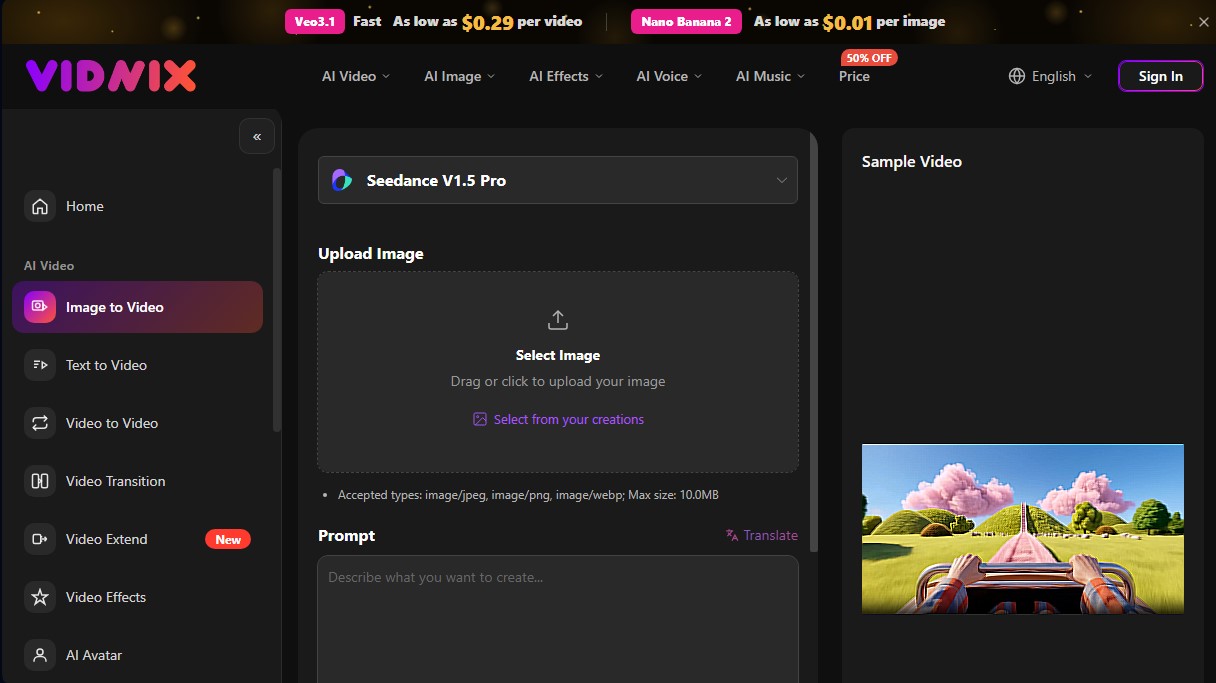
The interface is optimized for an intuitive process: simply upload a file in JPEG, PNG, or WebP format, enter a descriptive prompt, and run the generation. As a versatile solution that unifies AI video generation, image editing, and audio creation, Vidnix positions itself as an essential tool for optimizing post-production times and elevating the narrative quality of any digital project.
Vidnix features and use cases
How to use Vidnix
Vidnix FAQ
What is Vidnix and what are its main features?
It is a comprehensive AI platform that allows you to automatically create high-quality videos, images, effects, voices, and music.
Do I need advanced technical skills to use Vidnix?
No prior editing experience is necessary, as the tool generates professional results simply by uploading an image or writing a prompt.
Can I use the generated videos for commercial purposes?
Yes, content created under subscription plans includes commercial use rights for ads, presentations, and social media.
What image formats can I upload to convert into video?
The platform accepts JPEG, PNG, and WebP files with a maximum size of 10 megabytes per file.
What is the maximum length of the video clips I can create?
You can choose from various video lengths, with options for 6, 10, and 12 seconds per generation.
In what resolutions can I export my Vidnix projects?
The tool allows you to generate and export content in 480p or 720p resolutions, depending on your preferences.
How does the Vidnix credit system work?
The service uses credits that allow you to generate videos starting at $0.29 and images for as low as one cent.
Is it possible to add sound to the animations I create?
Yes, the tool allows you to include background music, voiceovers, or sound effects to make your videos more immersive.
Vidnix pricing and plans
Free Plan: 0 $
- 20 welcome credits upon sign-up to test the generation tools.
Basic Plan (Monthly): 9,9 $ per month
- 500 credits per month.
- Model access: Veo3.1, Wan 2.6, Kling Video 01, Runway Aleph, Nano Banana, Flux 2, and Midjourney.
- AI Tools: Video, image, voice (TTS), music, and avatar generation.
- Commercial use rights.
- Watermark-free downloads.
- Private mode.
Pro Plan (Monthly): 26 $ per month
- 2,000 credits per month.
- Full access to all AI models (Veo, Kling, Runway, Flux, Midjourney, etc.).
- Commercial use rights.
- Watermark-free downloads.
- Private mode.
Plus Plan (Monthly): 44 $ per month
- 3,600 credits per month.
- Full access to all AI models on the platform.
- Commercial use rights.
- Watermark-free downloads.
- Private mode.
One-Time Payment Plans (One Time Pay):
- Entry-level (1 $): 150 credits (up to 15 videos or 150 images).
- Basic (21 $): 1,000 credits (up to 200 videos or 333 images).
- Pro (55 $): 3,600 credits (up to 720 videos or 1,200 images).
- Plus (99 $): 6,900 credits (up to 1,415 videos or 30,000 images).
- All plans include commercial rights, watermark-free downloads, and access to premium models (Veo3.1, Kling, Midjourney, etc.).
Vidnix Screenshots
Vidnix alternatives



Osmo Studio
AI animation studio for professional motion graphics and videos. Control every detail, collaborate with teams, and export with transparent backgrounds.

Victoria Secret Runway
Create fashion show videos by integrating your face into real scenes. Just upload a photo to replace professional models and walk the runway.


VideoWeb Video Generator
Generate professional AI videos from text or images. Features realistic avatars, automated scripts, and optimized formats for marketing and social media.