
Share
Generate cinematic AI videos and photos from text or images. The ideal tool for creating high-quality ads, social media content, and marketing materials.
What is VioEvo?
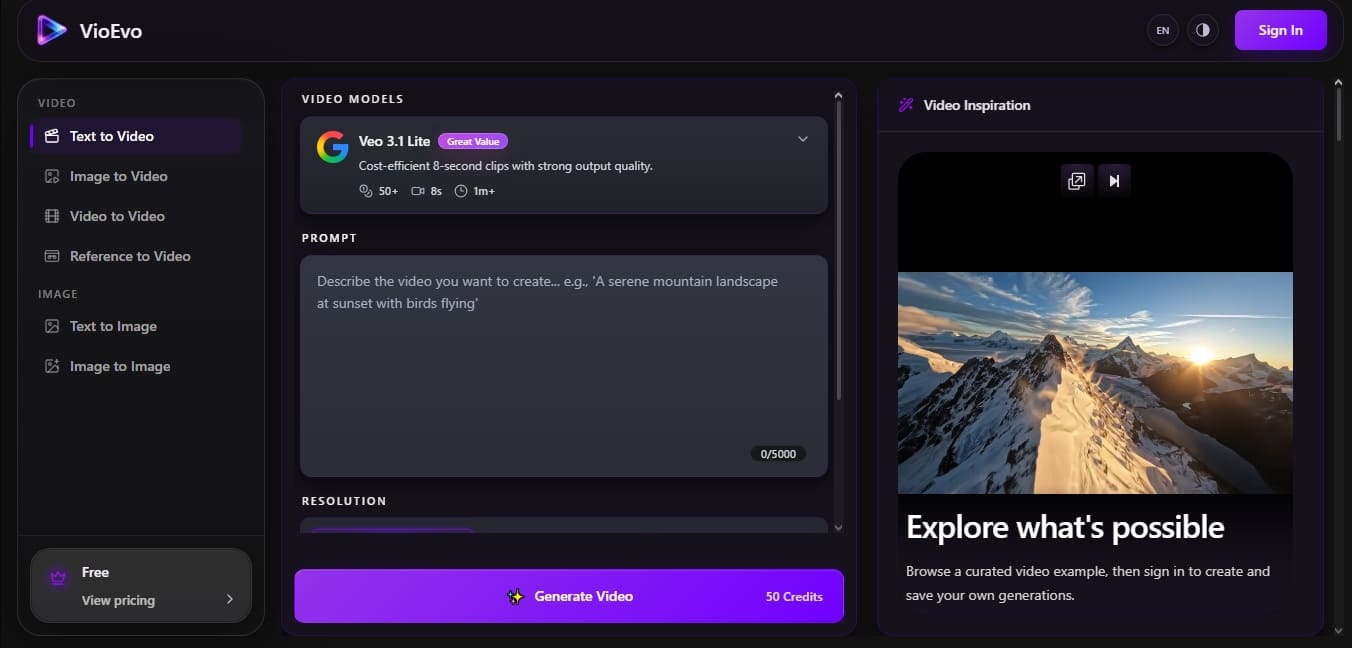
VioEvo is an all-in-one AI film studio designed to transform text descriptions and multimedia files into high-quality visual content. This tool specializes in AI video generation and image creation, offering a streamlined workflow for professionals who require speed without sacrificing aesthetic quality. Its architecture is built to turn written outlines into cinematic motion suitable for commercials, social media posts, product demos, and storyboards.
The platform operates on a prompt-first approach, where the user maintains creative control through precise instructions. The system enables various advanced tasks such as text-to-video, image-to-video, video-to-video, and reference-to-video. Thanks to its focus on professional production, users can generate clips of up to 8 seconds with resolutions reaching 4K. Additionally, the platform supports specific formats for different channels, allowing users to choose between a 16:9 aspect ratio for monitors and TVs, or 9:16 for vertical mobile devices.
VioEvo's technology is powered by a wide range of cutting-edge models, allowing users to select processing power based on the project's needs:
Veo 3.1 (available in Lite, Fast, and Quality versions) for high fidelity and visually stunning clips.
Kling 3.0 to achieve dynamic and fluid motion.
Seedance 2 for a solid visual balance in standard productions.
Additional models such as Wan 2.7 Video, Grok Imagine, and Happy Horse 1.0.
The creation process is divided into functional steps that facilitate rapid iteration. First, the subject and scene are defined; next, the movement and pacing (calm, dramatic, or energetic) are specified; and finally, camera behavior is adjusted. This structure allows the AI model to interpret not just what appears on screen, but how the action should feel.
This AI video generator is especially useful for content creators and marketing departments seeking AI cinematography for teaser trailers or advertising content. By including audio generation capabilities in select workflows, VioEvo makes it easy to produce complete audiovisual pieces, allowing users to compare variations and refine the composition before final export. It is a robust solution for those who need to take an abstract concept and turn it into a commercial-ready clip without complex post-production processes.
VioEvo features and use cases
How to use VioEvo
VioEvo FAQ
What is VioEvo and what kind of content can I create with it?
VioEvo is an artificial intelligence platform that allows you to transform text and images into cinematic video clips, as well as generate high-quality static images.
Can I use the videos generated on VioEvo for commercial purposes?
Yes, paid plans include a commercial use license, allowing you to use your creations in advertisements, social media, product demos, and professional presentations.
Which AI models are available in the tool?
The platform integrates several advanced models, such as Veo 3.1 (in both Lite and Quality versions), Kling 3.0, Seedance 2, and Wan 2.7, to adapt to various motion and quality requirements.
Is it possible to create vertical videos for social media?
Absolutely. You can configure your projects with a 16:9 aspect ratio for horizontal formats or 9:16 for content optimized for mobile devices.
What is the maximum duration for video clips on VioEvo?
The tool allows you to generate clips up to 8 seconds long, specifically designed to maintain high visual fidelity and fluid motion.
How does the platform's credit system work?
Each generation consumes a specific number of credits that renew monthly based on your subscription plan, allowing you to create a set number of videos or images.
What elements should a prompt include to get the best results on VioEvo?
For optimal results, we recommend providing a detailed description of the subject, the environment, the type of camera movement, and the desired atmosphere or visual style.
Does the tool offer high-definition resolution options?
Yes. Depending on the selected model, you can generate content in 720p, 1080p, and even 4K quality for a professional finish.
VioEvo pricing and plans
Free Plan (0 $):
Create a free account to start generating immediately.
Access to text-to-video, image-to-video, and image generation tools.
Basic Plan (7,90 $ per month - Billed annually at 94,80 $):
1,000 credits per month (12,000 total credits per year).
Generate up to 20 videos or 66 images per month.
Credits renew monthly.
180-day cloud history.
Commercial use license.
No watermarks.
Pro Plan (23,90 $ per month - Billed annually at 286,80 $):
5,000 credits per month (60,000 total credits per year).
Generate up to 100 videos or 333 images per month.
Credits renew monthly.
180-day cloud history.
Commercial use license.
No watermarks.
Team Plan (71,90 $ per month - Billed annually at 862,80 $):
18,000 credits per month (216,000 total credits per year).
Generate up to 360 videos or 1,200 images per month.
Credits renew monthly.
1-year cloud history.
Commercial use license.
No watermarks.
VioEvo Screenshots
VioEvo alternatives



Osmo Studio
AI animation studio for professional motion graphics and videos. Control every detail, collaborate with teams, and export with transparent backgrounds.

Victoria Secret Runway
Create fashion show videos by integrating your face into real scenes. Just upload a photo to replace professional models and walk the runway.


VideoWeb Video Generator
Generate professional AI videos from text or images. Features realistic avatars, automated scripts, and optimized formats for marketing and social media.