
Share
AI platform for video, images, and audio. Create cinematic clips from text or photos, animate portraits, and produce professional-quality music.
What is Voor AI Video Generator?
Voor AI is an all-in-one creative studio designed for generating multimedia content through artificial intelligence. This platform stands out as an AI video generator and a cinematic movie maker that allows users to transform ideas, images, or existing footage into professional clips. Its primary focus is centralizing text-to-video, image-to-video, and advanced editing tools into a single workflow, simplifying content production for social media, advertisements, and complex audiovisual projects right from your computer.
The tool functions as an aggregator of next-generation models, integrating leading technologies such as MiniMax H3 Max, Sora 2, Kling 3.0, Wan 3.0, and Seedance 2.5. Thanks to this multi-model approach, users can choose the engine that best fits their goals—whether they need speed with optimized models or superior visual quality with cinematic approaches that prioritize lighting, continuity, and camera movement. Additionally, it includes an AI Creative Agent that assists in the creative process, ensuring visual consistency throughout the entire generation phase.
Its core capabilities cover various areas of digital production:
- Video and Film Generation: Create clips from scratch using prompts, animate static photos with natural movement, or extend the duration of existing videos with the AI Video Extender.
- Motion Control and Avatars: Includes motion control features to direct the camera and the creation of AI avatars for presentations or educational content.
- Advanced Image Studio: Access models like Midjourney v8.1, FLUX, and GPT Images to generate realistic photos, illustrations, or marketing materials with integrated text.
- Integrated Audio Tools: Features include text-to-speech, music generation, and an AI Jingle Maker to add sound to visual pieces without leaving the platform.
- Quick Editing Utilities: Tools for background removal, image enhancement via an upscaler, and the creation of 3D AI elements.
One of Voor AI's competitive advantages is its operational transparency. The system allows you to preview the exact credit cost and settings before processing a request, which optimizes professional workflows. Users can reuse community-tested prompts and access preconfigured workflows for specific tasks, such as turning a product photo into a studio-quality advertisement. It is a versatile solution for content creators, marketing agencies, and independent filmmakers looking for a powerful, scalable AI film generator that does not require deep technical knowledge of traditional editing software.
Voor AI Video Generator features and use cases
How to use Voor AI Video Generator
Voor AI Video Generator FAQ
What is Voor AI Video Generator, and what kind of content can I create with it?
It is an all-in-one creative platform that uses artificial intelligence to generate professional videos, images, and audio from text prompts or existing files.
Can I turn a static photo into a video with Voor AI?
Yes, the tool features a dedicated image-to-video function that transforms photos into animated clips with natural, cinematic motion.
Does Voor AI Video Generator offer a free trial?
Every new account receives fifty welcome credits to explore the features for free, with no credit card required to get started.
Can I use my creations for commercial purposes?
Users subscribed to any paid plan can use their generated content for commercial and professional purposes, subject to our terms of service.
How long does it take for Voor AI to generate a full video?
While images are generated in just a few seconds, videos typically take about a minute, depending on the model's complexity and the selected duration.
What happens to my unused credits at the end of the month?
Any unused credits roll over automatically to the next month, as long as you keep your subscription active on the platform.
Do I need to install any special software to use Voor AI Video Generator?
No downloads are necessary; the entire suite of tools runs quickly and easily right from your web browser.
Does the tool include audio features in addition to video?
Yes, the platform allows you to generate text-to-speech voiceovers, create music, and produce sound effects to complement your visual projects.
How does Voor AI ensure the security and privacy of my uploaded files?
Our system uses enterprise-grade encryption to process data in isolated environments, ensuring your private content remains inaccessible to third parties.
Can Voor AI improve the resolution of an existing image?
Yes, the studio includes upscaling and enhancement tools that automatically increase the resolution and sharpness of any image.
Voor AI Video Generator pricing and plans
Free Plan
Price: 0 €
- 50 welcome credits upon account creation.
- No credit card required.
- Access to image and video generation features for testing.
Starter
Price: 29,99 $ per month (or 8,33 $ per month with 100 $ annual billing).
- 2,400 credits per month.
- 2K/4K image generation and AI video.
- 1 concurrent generation.
- Private generation with no watermarks.
- Commercial use allowed (subject to terms).
- Unused credits roll over to the following month.
Pro
Price: 89,99 $ per month (or 25 $ per month with 300 $ annual billing).
- 9,700 credits per month.
- 2K/4K image generation and AI video.
- 3 concurrent generations.
- Private generation with no watermarks.
- Priority support.
- Commercial use allowed (subject to terms).
- Unused credits roll over to the following month.
Unlimited
Price: 149,99 $ per month (or 75 $ per month with 900 $ annual billing).
- Unlimited generations across all models (no credit consumption).
- 1,000 monthly bonus credits for workflows.
- 2K/4K image generation and AI video.
- 5 concurrent generations.
- Private generation with no watermarks.
- Priority support.
- Commercial use allowed (subject to terms).
- "Fair use" speed throttling for sustained intensive usage.
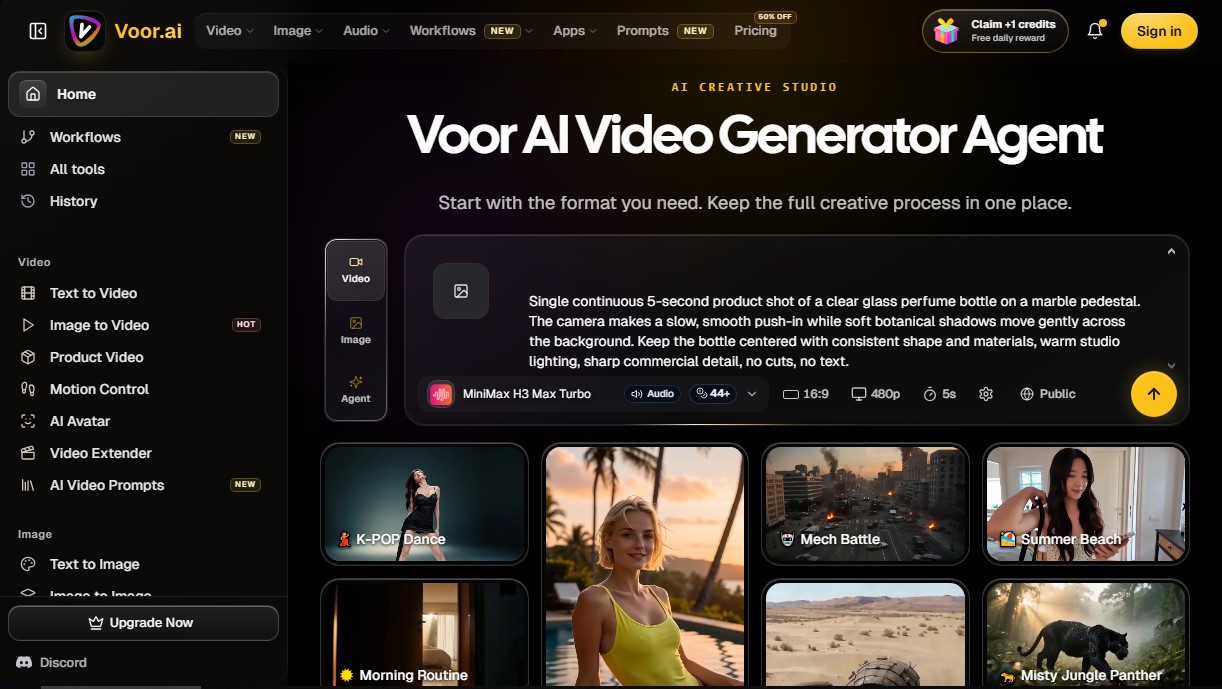
Voor AI Video Generator Screenshots
Voor AI Video Generator alternatives



Osmo Studio
AI animation studio for professional motion graphics and videos. Control every detail, collaborate with teams, and export with transparent backgrounds.

Victoria Secret Runway
Create fashion show videos by integrating your face into real scenes. Just upload a photo to replace professional models and walk the runway.


VideoWeb Video Generator
Generate professional AI videos from text or images. Features realistic avatars, automated scripts, and optimized formats for marketing and social media.