Whiteboard Video Maker
Share
Generate AI whiteboard animations from text, PDFs, or links. Features automatic illustrations, voiceovers, and hand-drawing for tutorials and marketing.
What is Whiteboard Video Maker?
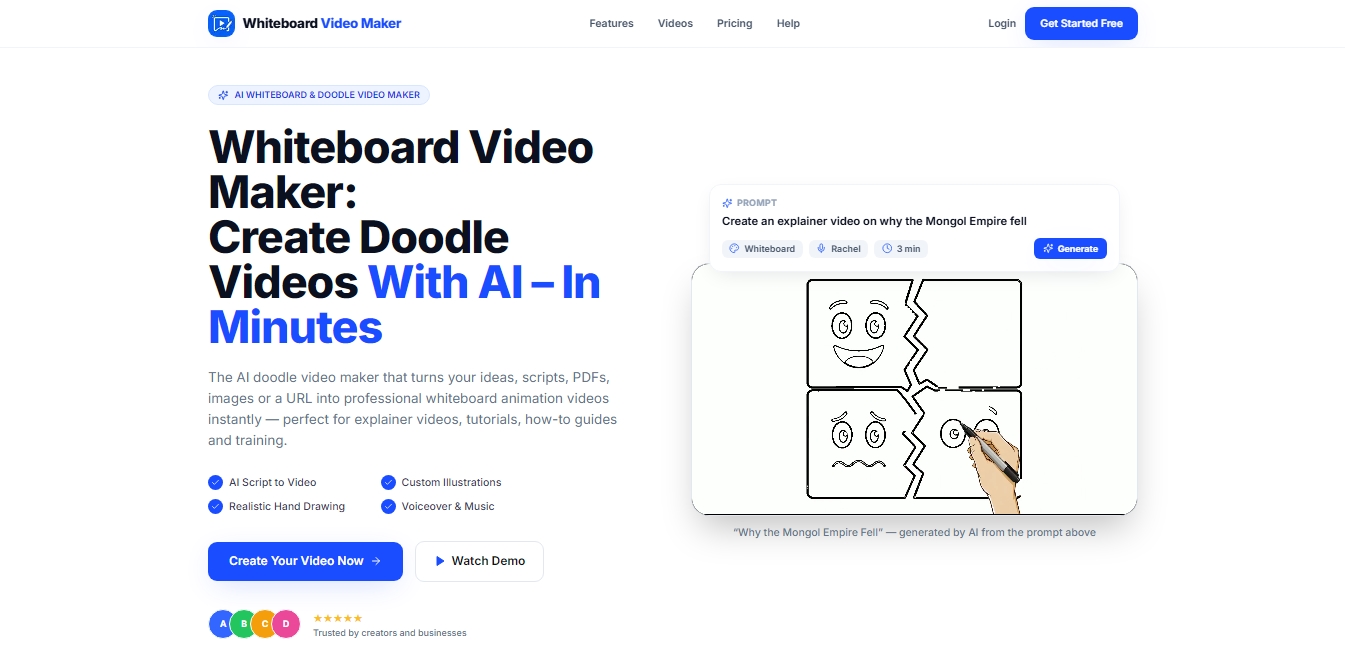
Whiteboard Video Maker is an artificial intelligence platform specializing in the automated production of whiteboard animation videos, also known as doodle videos. This tool allows you to transform concepts, scripts, PDFs, Word documents, images, or even URLs into professional videos in a matter of minutes. Its technology is designed to facilitate the creation of explainer videos, training tutorials, learning guides, and social media content, eliminating the technical complexity of traditional editing software.
The core of the tool uses language and visual generation models to automate the entire workflow. By inputting text or a document, the Whiteboard Video Maker AI writes a coherent script divided into scenes. Next, the system generates custom illustrations and synchronizes a realistic hand animation that draws each element in real time on the canvas. The platform also integrates natural AI voices in over 30 languages, allowing for the production of global content without the need for professional voice actors or recording equipment.
Key Features and Functionalities:
Document-to-Video Conversion: The ability to process external files and automatically convert them into visual scripts using the AI script writer.
Realistic Hand Drawing: Simulation of natural strokes that keep the viewer's attention through step-by-step visual development, a technique known as sketch animation.
Style Customization: The option to choose between classic black-and-white animations or colored drawings based on brand needs.
High-Definition Export: Support for 1080p HD resolution in horizontal (16:9) and vertical (9:16) formats, optimizing content for platforms like YouTube, Instagram, or TikTok.
Audio Library: Includes background music and automatic timing adjustment between the voiceover, drawing, and melody for a professional finish.
From a practical standpoint, Whiteboard Video Maker is an efficient solution for educators, marketing departments, and HR teams. Its functional approach allows users without prior design experience to create engaging educational materials or sales presentations that increase information retention. By automating image searching and audio synchronization, the tool drastically reduces production times, allowing for the simple and professional scaling of audiovisual content creation from any computer.
The process can be summarized in three operational steps: inputting the idea or source document, the automatic generation of visual and audio content by the AI, and the final download of the file ready for distribution. This methodology eliminates barriers to entry for whiteboard animation creation, making it a key resource for corporate communication and modern digital learning.
Whiteboard Video Maker features and use cases
How to use Whiteboard Video Maker
Whiteboard Video Maker FAQ
What is Whiteboard Video Maker?
It is an AI-powered tool that transforms your ideas, documents, or links into professional whiteboard animation videos in just a few minutes.
Do I need technical skills to use Whiteboard Video Maker?
No, the platform handles drawing the illustrations and automatically syncing the voiceover, so you don't need any prior design or video editing experience.
Can I create a video for free?
Yes, the tool allows you to generate your first video (up to one minute long) completely free, without having to provide any credit card information.
What kind of content can I upload to generate the script?
You can enter a short description, paste a website URL, or upload PDF, Word, or even image files for the AI to use to create the content.
What languages are available for Whiteboard Video Maker voiceovers?
The system supports over thirty different languages, including Spanish, and uses highly realistic AI voices to narrate your stories.
What quality are the finished videos downloaded in?
All projects can be exported in 1080p Full HD and are available in both horizontal and vertical formats for social media.
How long does it take to get the final result?
What used to take days of manual work is now completed in just a few minutes, thanks to the automatic generation of scenes, drawings, and animations.
What is the difference between a whiteboard video and a doodle video?
Both terms refer to the same visual style where a hand appears to draw illustrations on a light background while a voiceover narrates the content.
Can I edit the script before the final video is generated?
Yes, paid plans allow you to edit the scenes and instructions before the final export to ensure the result is perfect.
Whiteboard Video Maker pricing and plans
Free
$0 per month forever.
1 free video.
Maximum duration of up to 1 minute.
Watermark-free preview.
Access to all content input types (prompts, PDF, URL, etc.).
Starter
$9.99 per month (or $99.99 per year).
15 video credits per month (1 credit equals 1 minute of finished video).
Videos up to 5 minutes long.
Scene and prompt editing before rendering.
Option to toggle voiceover on or off.
Landscape (16:9) and portrait (9:16) formats.
1080p HD export.
Pro
$19.99 per month (or $199.99 per year).
35 video credits per month (1 credit equals 1 minute of finished video).
Videos up to 10 minutes long.
Priority video generation.
Scene and prompt editing before rendering.
Option to toggle voiceover on or off.
1080p HD export.
Ultra
$60 per month (or $599.99 per year).
100 video credits per month (1 credit equals 1 minute of finished video).
Commercial license for video use.
Videos up to 10 minutes long.
Priority video generation.
Scene and prompt editing before rendering.
Option to toggle voiceover on or off.
Whiteboard Video Maker Screenshots
Whiteboard Video Maker alternatives
AI Microdrama Generator by Picsart
Create vertical micro-drama series with consistent characters. Plan seasons, generate scripts, and produce AI-powered short episodes with cliffhangers.
Dramily - AI Short Drama Generator
Generate short series with AI for social media. Create consistent scripts, characters, and storyboards. Manage the entire production and export ready-to-post episodes.
Cinematic Slideshow Studio
Create cinematic videos from your photos with AI. Automate editing, music, and voiceovers for professional 4K results.

Boords Agent
AI pre-production assistant that turns scripts into storyboards, generates images, and localizes text. Automates revisions and versions to streamline video approvals.
OralSlides
Turn PowerPoint slides into AI-narrated videos. Automatically generate scripts and lifelike voices to export your presentations in MP4 format.