
Cinematic Slideshow Studio
Share
Create cinematic videos from your photos with AI. Automate editing, music, and voiceovers for professional 4K results.
What is Cinematic Slideshow Studio?
Cinematic Slideshow Studio is an advanced online video creation tool that uses artificial intelligence to transform static photos and clips into cinematic-quality movies. This platform positions itself as an efficient alternative to traditional video editors, eliminating the steep learning curve by automating editing, framing, and audio synchronization tasks. The system is designed for both individual users looking to document personal events and professionals who require high-impact visual presentations without investing weeks in post-production.
The functionality of this AI presentation tool is based on a two-phase composition engine. In the first phase, the user uploads between 20 and 200 files (supporting JPG, PNG, HEIC, and MP4 formats). AI Vision technology analyzes each image to detect faces and key elements, applying Smart Crop to prevent poor framing. In the second phase, the AI organizes the content following a narrative thread, grouping photos by theme, mood, and emotional rhythm to generate a coherent scene structure.
Key capabilities include:
AI Voiceover Narration: Allows for the integration of a script that the tool converts into professional narration with studio-quality voices. This feature is ideal for adding personal stories to weddings, graduations, or memorials.
Smart Script Composition: The AI analyzes the entered text to automatically synchronize transitions and key moments with the timing of the music and voiceover.
Cinematic Effects and Transitions: Includes frame-by-frame effects such as Ken Burns motion, dynamic particles, and film or Polaroid-style borders.
Native Multi-track Editor: Although the process is automated, it offers a browser-based desktop studio with a timeline and asset library for precise manual adjustments.
Cinematic Slideshow Studio is particularly useful for creating travel reels, real estate presentations, tributes, and corporate videos. The platform facilitates 4K export, ensuring optimal resolution for large-format screens. As a cloud-based application, it requires no downloads or installations, allowing the heavy processing of files and effect generation to take place externally, optimizing the user's device resources. It is a practical solution for those looking for a slideshow generator with music and voice that delivers professional results quickly and automatically.
Cinematic Slideshow Studio features and use cases
How to use Cinematic Slideshow Studio
Cinematic Slideshow Studio FAQ
Is Cinematic Slideshow Studio really free?
Yes, we offer a free-forever plan that allows you to create unlimited projects and export videos in 720p without ever needing to enter your credit card details.
Do I need to download any software to use Cinematic Slideshow Studio?
There is no need to download or install anything on your computer because our tool works directly in any modern web browser.
What image and video formats can I upload to the platform?
You can upload between 20 and 200 files in JPG, PNG, HEIC, and MP4 formats, which our AI will then process to compose your movie.
Can Cinematic Slideshow Studio automatically generate a voiceover?
Our AI technology allows you to write a script or paste your story so a professional-quality voice can narrate it in seconds, perfectly timed to the rhythm of your images.
How does artificial intelligence help in creating the presentation?
The AI uses computer vision to analyze your photos, detecting faces to apply the best framing while automatically organizing your content by theme and mood.
Is it possible to export projects in 4K resolution?
4K exporting is available for Pro plan users, while the free plan allows you to export files at 720p resolution.
Can I add my own music to the videos I create in Cinematic Slideshow Studio?
You have the option to upload your own audio files or let our system automatically select a music track that fits the style of your project.
Is there a time limit for these cinematic videos?
We do not impose any time limits on the length of your presentations, so you can include as many moments as you need to tell your full story.
Cinematic Slideshow Studio pricing and plans
Free Plan: $0 per month
Unlimited projects.
1 GB cloud storage.
720p exports at 30 fps with no video length limits.
Limit of 3 exports per month with watermarks.
Full access to the editor, stickers, effects, and AI composition assistant.
Short AI script generation and 10 standard voices.
Pro Plan: $14 per month
Unlimited exports with no watermarks.
10 GB cloud storage.
1080p and 4K exports at up to 60 fps.
Over 40 cinematic borders, Polaroid-style frames, and premium transitions.
Medium and long-form AI script generation.
8 premium ElevenLabs voices.
Full access to Pexels, Unsplash, and ElevenLabs asset libraries.
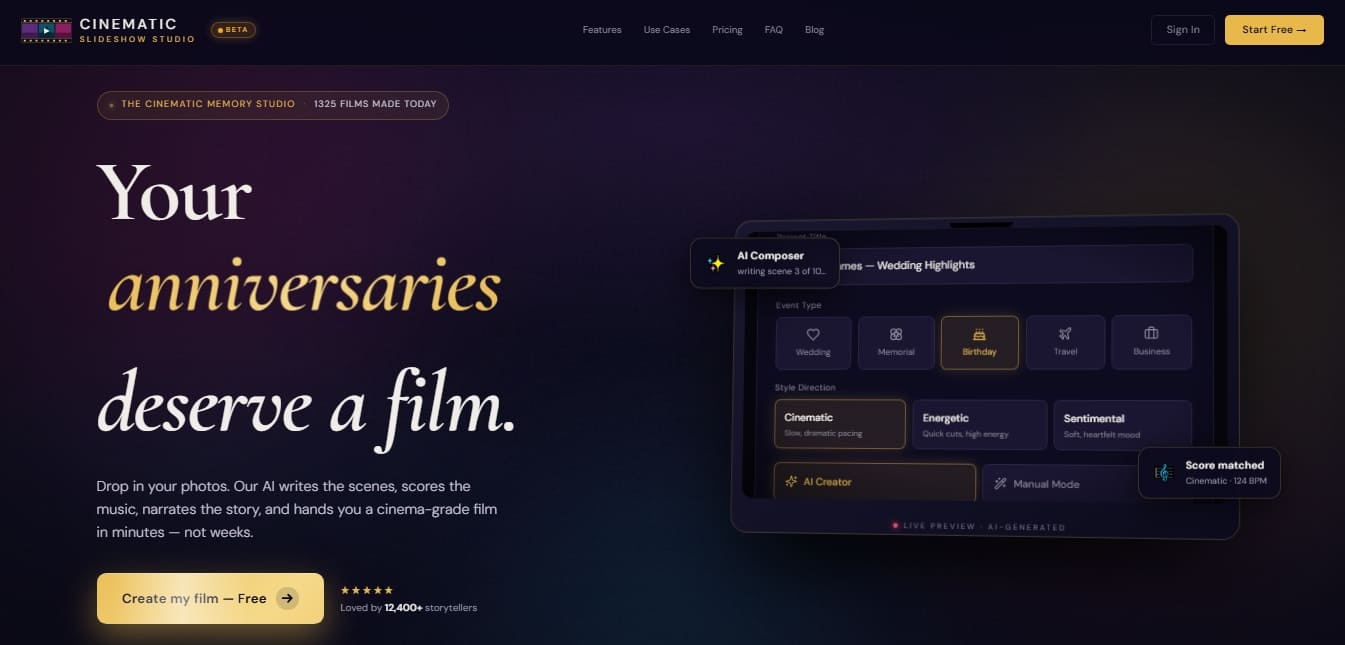
Cinematic Slideshow Studio Screenshots
Cinematic Slideshow Studio alternatives

AI Video Text Remover
Use AI to remove subtitles, logos, and watermarks from your videos. Automatically reconstruct backgrounds for a clean, blur-free result.
KineMaster
Professional AI mobile video editor with auto captions, background removal, and object tracking. Features thousands of templates and 4K export.
Map Animation
Generate AI-powered animated route and map videos from text. Customize cinematic camera movements and export in high resolution and various formats.

Kapwing Hinglish Subtitles Generator
Generate automatic Hinglish captions for videos in 100+ languages. Includes AI-powered editing and dubbing tools to reach bilingual audiences.

Auto Captioner
Generate automatic AI captions for videos. Customize design with templates, edit text, and translate into multiple languages to boost your visual content's impact.