Share
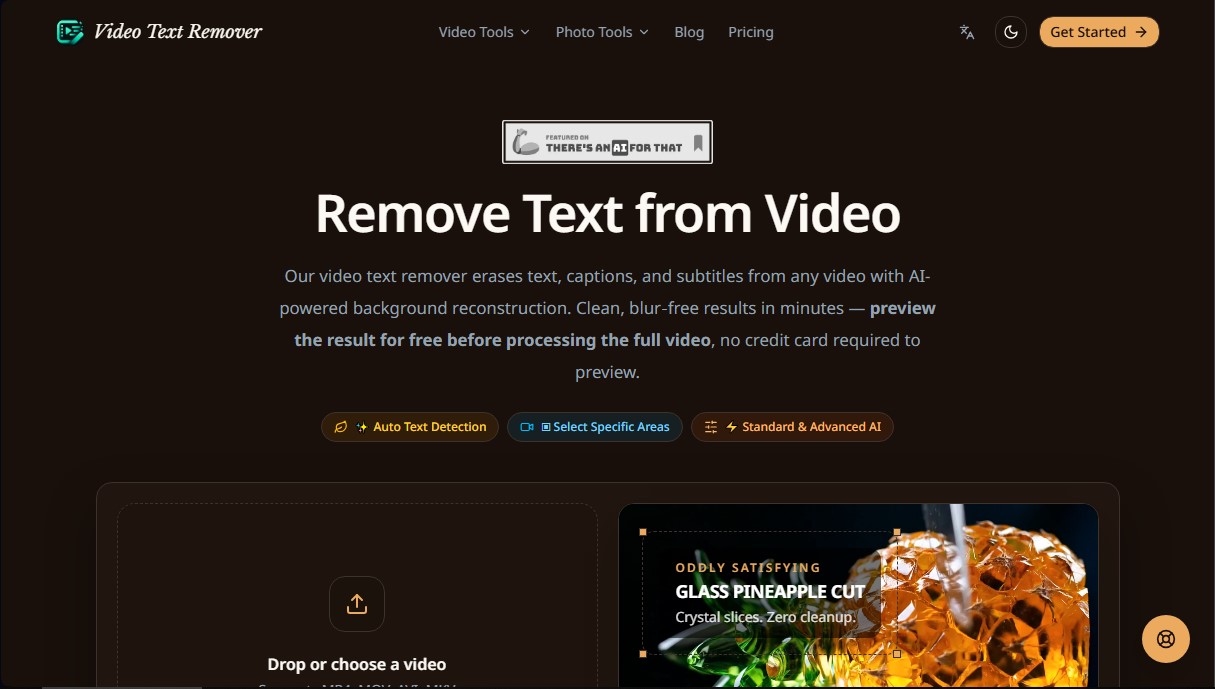
Use AI to remove subtitles, logos, and watermarks from your videos. Automatically reconstruct backgrounds for a clean, blur-free result.
What is AI Video Text Remover?
AI Video Text Remover is a specialized tool for advanced video editing, designed to remove unwanted visual elements using artificial intelligence. Its primary function is to remove text from videos, hardcoded subtitles, logos, and watermarks automatically. This application is especially useful for content creators, editors, and professionals who need to clean up footage for redistribution on platforms like Instagram Reels, YouTube Shorts, or TikTok without resorting to complex manual processes.
The technology used by this AI video editor is based on AI-powered background reconstruction. Unlike traditional editing methods that typically apply a blur over the affected area, this tool employs generative video fill algorithms. The system analyzes adjacent frames and surrounding pixels to accurately recreate the image that should be behind the text. Thanks to this context-aware background reconstruction approach, visual artifacts are eliminated, and the consistency of textures, colors, and motion is maintained throughout the clip.
The core capabilities of AI Video Text Remover include:
- Automatic text detection: The system scans the video to automatically identify and segment subtitles and text overlays.
- Manual area selection: Allows the user to mark specific zones, such as channel logos, stock watermarks, or timestamps.
- TikTok watermark removal: Efficiently erases dynamic logos and usernames that move across the screen.
- Multi-format support: Compatible with MP4, MOV, AVI, and MKV files, maintaining the original resolution and frame rate upon export.
- In-browser processing: Allows working with files up to 500 MB directly from your computer, eliminating the need to install heavy software.
The workflow is straightforward and functional: the user uploads the file, the AI processes the removal of selected elements by reconstructing the background, and a preview is generated to verify quality before the final download. By avoiding the use of blur masks, the result is a clean, professional video that looks as if it never had any overlays.
This tool is an efficient solution for removing hardcoded subtitles that cannot be turned off, cleaning up technical demo clips, or recovering recorded material where a text tag was accidentally left on. By automating frame-by-frame cleanup, AI Video Text Remover saves hours of technical work, delivering videos ready for professional use in just a few minutes.
AI Video Text Remover features and use cases
How to use AI Video Text Remover
AI Video Text Remover FAQ
Will the output be blurry when using AI Video Text Remover?
No, the tool uses artificial intelligence to reconstruct the original background frame-by-frame instead of simply applying a blur over the text.
What file formats does the platform support?
You can upload videos in MP4, MOV, AVI, and MKV formats with a maximum file size of 500 MB per file.
Can I try AI Video Text Remover for free before buying credits?
Yes, you can log in to generate a free preview of the result without needing to enter your credit card information.
Is it possible to remove TikTok watermarks with this tool?
Yes, the system allows you to remove dynamic logos, usernames, and TikTok overlays by reconstructing the background without having to crop the video.
How does the credit system for video processing work?
Standard processing consumes one credit per second of video, while advanced text processing requires two credits per second of video duration.
Are my files safe on your servers?
Your videos are uploaded via an encrypted connection and are automatically and permanently deleted from our servers as soon as the download of your result is complete.
Do I need to install any software to use AI Video Text Remover?
No, the tool works directly from your web browser, so there is no need to install any programs or additional plugins on your computer.
What happens if the video has very complex subtitles?
the AI is trained to handle hardcoded subtitles in any position; however, if the background is extremely complex, you can contact our support team for assistance.
AI Video Text Remover pricing and plans
Free Version
Free preview of the result before processing the full video.
No credit card required for the trial.
Access to automatic text detection and background reconstruction tools.
Lite Package (One-time payment): $6.99
300 credits (approximately 5 minutes of standard processing).
Process videos up to 15 minutes long.
Remove text, subtitles, logos, and watermarks.
Watermark-free downloads.
Credits valid for 12 months.
Note: Advanced text processing consumes 2 credits per second, compared to 1 credit in standard mode.
Creator Package (One-time payment): $24.99
1,800 credits (approximately 30 minutes of standard processing).
Process videos up to 15 minutes long.
Up to 1080p output quality.
Remove text, subtitles, logos, and watermarks.
Watermark-free downloads.
Credits valid for 12 months.
Note: Advanced text processing consumes 2 credits per second.
Pro Package (One-time payment): $59.99
5,400 credits (approximately 90 minutes of standard processing).
Process videos up to 15 minutes long.
Up to 1080p output quality.
Remove text, subtitles, logos, and watermarks.
Watermark-free downloads.
Priority processing queue access (coming soon).
Credits valid for 12 months.
Lite Subscription: $9.99/mo ($7.99/mo billed annually)
900 credits per month (approximately 15 minutes of standard processing).
Process videos up to 15 minutes long.
Remove text, subtitles, logos, and watermarks.
Watermark-free downloads.
Credits renew every billing cycle.
Creator Subscription: $19.99/mo ($15.99/mo billed annually)
2,400 credits per month (approximately 40 minutes of standard processing).
Process videos up to 15 minutes long.
Up to 1080p output quality.
Remove text, subtitles, logos, and watermarks.
Watermark-free downloads.
Credits renew every billing cycle.
Pro Subscription: $39.99/mo ($31.99/mo billed annually)
6,000 credits per month (approximately 100 minutes of standard processing).
Process videos up to 15 minutes long.
Up to 1080p output quality.
Remove text, subtitles, logos, and watermarks.
Watermark-free downloads.
Priority processing queue access (coming soon).
Credits renew every billing cycle.
AI Video Text Remover Screenshots
AI Video Text Remover alternatives


KineMaster
Professional AI mobile video editor with auto captions, background removal, and object tracking. Features thousands of templates and 4K export.
Map Animation
Generate AI-powered animated route and map videos from text. Customize cinematic camera movements and export in high resolution and various formats.

Kapwing Hinglish Subtitles Generator
Generate automatic Hinglish captions for videos in 100+ languages. Includes AI-powered editing and dubbing tools to reach bilingual audiences.

Auto Captioner
Generate automatic AI captions for videos. Customize design with templates, edit text, and translate into multiple languages to boost your visual content's impact.