Share
Generate AI-powered animated route and map videos from text. Customize cinematic camera movements and export in high resolution and various formats.
What is Map Animation?
Map Animation is an artificial intelligence tool specifically designed for professional, automated map animation creation. Its primary function is to transform text descriptions or prompts into dynamic videos that showcase routes, trajectories, and detailed geographical contexts. This application is geared toward content creators, documentarians, travel video producers, and geographic storytelling specialists who need to visualize journeys without relying on complex, manual video editing processes.
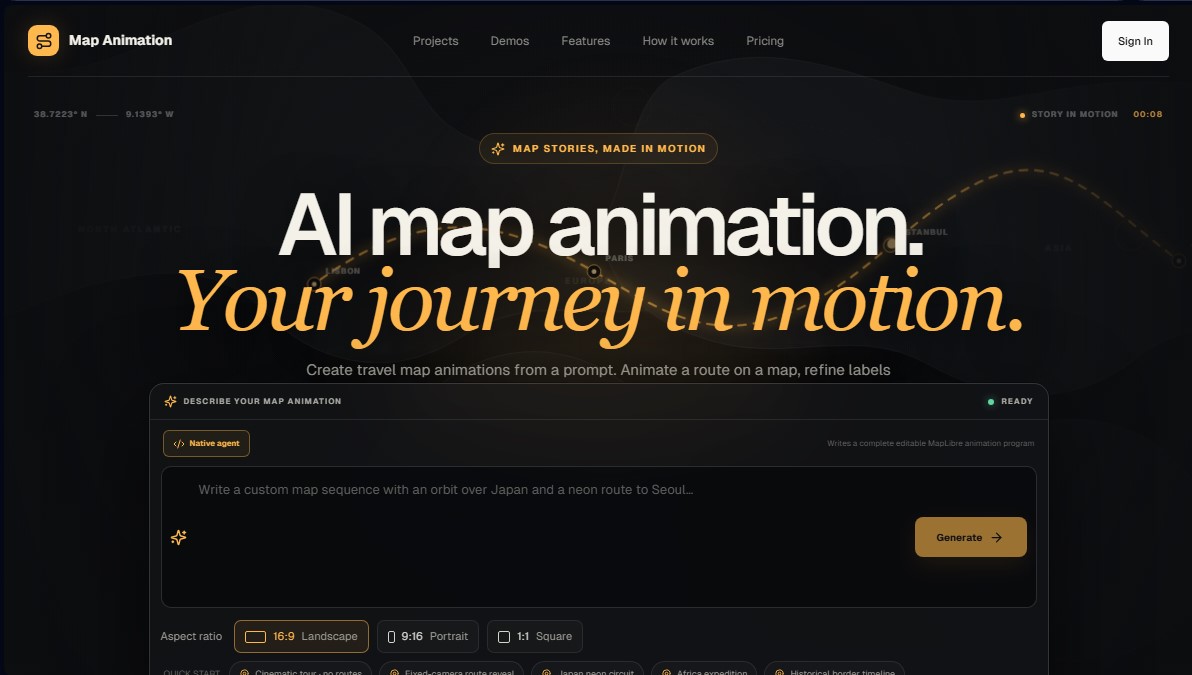
The platform's operation is powered by a native AI agent capable of writing editable animation programs based on MapLibre. The process begins when the user describes their route, mentioning cities, stops, and the desired visual style. The tool's technology interprets these instructions to generate a sequence that includes everything from cinematic camera movements to precise location labeling. The system allows for fine-tuning through an interactive chat or its visual editor, making it easy to customize titles, pacing, and line styles, such as neon-effect routes.
Key capabilities of Map Animation include:
- Animated Route Generation: Allows for tracing paths between multiple geographic points, revealing the route progressively or fixed according to the project's needs.
- Advanced Camera Control: Facilitates programming orbits over points of interest, coast-to-coast pans, and smooth transitions between different map scales.
- Format Adaptability: The tool offers a choice of aspect ratios, including 16:9 (horizontal), 9:16 (vertical for mobile and social media), and 1:1 (square).
- High-Quality Export: Supports file downloads in MP4 and WebM formats, reaching 4K resolution and a frame rate of up to 60 fps, depending on the browser and computer performance.
From a functional standpoint, Map Animation simplifies the workflow by integrating AI generation with a browser-based editing studio. Users can create travel route recaps, stories about historical borders, or geographic expeditions with high technical precision. The platform allows for real-time previews of every change, ensuring that the storytelling in motion is cohesive before the final export.
This AI tool for animated maps is ideal for those seeking a professional finish for their geographical presentations, allowing artificial intelligence to manage the complexity of geospatial programming while the user maintains creative control over the visual narrative and map design.
Map Animation features and use cases
How to use Map Animation
Map Animation FAQ
What is Map Animation and how can it help me tell stories?
It is an AI-powered tool designed to transform text descriptions into professional map animations, allowing you to dynamically visualize travel routes and geographic journeys.
How do I create a custom route in Map Animation?
Simply enter the names of cities or stops in your preferred order and describe the route's style. The AI will then generate an editable animation sequence complete with labels and camera movements.
What export format options does Map Animation offer for videos?
The platform allows you to export MP4 and WebM files in resolutions up to 4K. You can choose between landscape, vertical (for social media), or square formats depending on your needs.
Can I edit the camera movement manually?
Yes. In addition to automatic generation, you have access to a visual editor and a timeline to refine cinematic camera movements and adjust the pace of your geographic storytelling.
How does the Map Animation credit system work?
Credits are used exclusively for AI generation and revision requests. Previewing, visual editing, and browser-based exporting do not consume any credits.
Can I use Map Animation for free?
The tool offers a free plan that provides an initial ten thousand credits, allowing you to explore its core features and complete your first video exports at no cost.
What is the difference between the Starter and Pro subscription plans?
The Starter plan provides one million monthly credits for frequent creators, while the Pro plan offers three million credits per month for users with larger projects or high-volume requirements.
On which devices can I export my animations?
Exporting is handled directly through your browser, and performance depends on your device's hardware capabilities. Compatible systems can reach up to sixty frames per second.
Map Animation pricing and plans
Free Plan
Price: $0
- 10,000 credits (one-time grant).
- AI-powered map generation and revisions.
- Full access to the visual editor.
- Export videos in MP4 and WebM formats directly from your browser.
Starter Plan
Price: $14.99 per month (or $108 per year)
- 1,000,000 monthly credits.
- Includes all Free plan features.
- AI generation and follow-up edits.
- Credits are allocated monthly and expire at the end of the period.
Pro Plan
Price: $29.99 per month (or $216 per year)
- 3,000,000 monthly credits.
- Includes all Free plan features.
- AI generation and follow-up edits.
- Credits are allocated monthly and expire at the end of the period.
Map Animation Screenshots
Map Animation alternatives

Comik AI-Anime Character Creator
Design anime characters using text or images. Generate multi-view design sheets to ensure visual consistency across comics, manga, and animated videos.



ToonBee AI
Generate animated videos from scripts with consistent characters across scenes. Includes AI voiceovers and music. Ideal for marketing, education, and social media.
Logo Animation AI
Create professional logo animations in seconds. Export 4K with transparent backgrounds and sound using templates or by describing motion with natural language.