Share
Generate animated videos from scripts with consistent characters across scenes. Includes AI voiceovers and music. Ideal for marketing, education, and social media.
What is ToonBee AI?
ToonBee AI is an AI-powered cartoon video generator designed to transform scripts or text-based ideas into full animations with character consistency. Its primary function is to allow any user, from a computer and without technical editing skills, to create animated stories where the protagonist maintains the same face, clothing, and proportions across all scenes. This tool is especially useful for educators, marketers, small businesses, and content creators on platforms like YouTube or TikTok.
The operation of ToonBee AI is powered by cutting-edge AI models like Kling, Seedance, MiniMax, and Wan, which have been optimized for visual storytelling. The process begins by entering a script or a brief description of the story. The platform automatically breaks it down into scenes, allowing the user to set a reference character. By uploading an image or generating an initial one and "locking" it, the tool's technology conditions subsequent renders to ensure the visual stability of the cast, preventing characters from changing their appearance between cuts.
Its core capabilities and practical benefits include:
- Visual consistency: Ensures that the story's narrative thread isn't broken by variations in the main character's design.
- Variety of artistic styles: Offers a choice of over 10 styles, including 3D animation, flat 2D, anime, storybook style, comic book, and watercolor.
- End-to-end production: The system automatically generates the voiceover and soundtrack, delivering a finished and synchronized video file.
- Optimized formats: Supports 16:9 aspect ratios for presentations and native 9:16 for mobile, making it ideal for vertical formats like Reels or Shorts.
- Commercial use rights: Generated videos are suitable for monetized channels, paid advertising, and client projects.
ToonBee AI is an efficient solution for creating explainer videos, where abstract concepts are better communicated through drawings than live-action footage. It is a key tool for developing children's stories, product tutorials, or internal training content. Since it runs directly in the browser, it doesn't require heavy software installation or a powerful graphics card, facilitating a fast workflow that reduces weeks of traditional production to just a few minutes of cloud processing. Its focus on scene automation and per-segment credit management allows for precise control over the final result before the definitive export.
ToonBee AI features and use cases
How to use ToonBee AI
ToonBee AI FAQ
How does ToonBee AI ensure character consistency across all scenes?
Simply upload a reference image once, and the tool will consistently maintain the character's features, clothing, and proportions throughout the entire video.
Can I use videos created with ToonBee AI for commercial purposes?
Yes, all plans include commercial use rights for monetized YouTube channels, paid ads, courses, and client work with no attribution required.
How does the per-scene credit system work in ToonBee AI?
The cost is clearly displayed before generating each scene and varies based on the chosen model or resolution, allowing you to easily manage your balance.
What animation styles does ToonBee AI offer for my projects?
You have access to over ten different styles, including 3D animation, 2D cartoons, anime, storybook, watercolor, comic book, and realistic cinematic art.
Do I need to have a script already written to use the tool?
It’s not required. You can simply provide a brief idea, and the AI will draft the full script and break down the scenes for you.
Is there a ToonBee AI app I can download to my computer?
There’s no need to download any software. The platform runs directly in your web browser on Windows, Mac, and Linux without requiring a powerful graphics card.
Can I try ToonBee AI for free?
Yes, new accounts receive free trial credits to generate a character and render one full short scene before deciding whether to purchase a plan.
What happens if a scene generated by ToonBee AI doesn't turn out right?
If a render fails, the credits are automatically returned to your account, and you can regenerate that specific scene using the same character reference.
Does ToonBee AI include voiceovers and background music for the videos?
Yes, the models generate native audio with AI voiceovers and soundtracks that are integrated directly into the final video during the creation process.
What video formats can I create with the tool?
You can generate videos in 16:9 landscape format for YouTube or native 9:16 vertical format designed specifically for Reels, TikTok, and Shorts.
ToonBee AI pricing and plans
Free Plan
Free trial for new users designed to test the tool's quality before making a purchase.
Includes enough free credits to generate one character and render a full short scene.
Starter Plan
Price: $19.50 per month ($9.90 per month billed annually). The entry-level option to start generating cartoon videos.
2,000 credits per month.
Access to all generation models.
Commercial license included.
Standard support.
Shared queue with 1 active task.
Restrictions: Cost per clip varies by model, duration, and resolution (a 5-second scene consumes between 65 and 200 credits).
Basic Plan
Price: $39 per month ($19.50 per month billed annually). Geared toward creators who are starting to use AI animation on a regular basis.
5,000 credits per month.
Access to all generation models.
Commercial license included.
Standard support.
Shared queue with 1 active task.
Restrictions: Narration costs approximately 0.11 credits per second, and scene animation costs 20 credits per second.
Pro Plan
Price: $69 per month ($34.50 per month billed annually). Designed for creators who need to produce content at a faster pace.
10,000 credits per month.
Access to all generation models.
Commercial license included.
Priority support.
Shared queue with 1 active task.
Max Plan
Price: $119 per month ($59.50 per month billed annually). Built for users and professionals producing a high volume of monthly videos.
20,000 credits per month.
Access to all generation models and new releases.
Commercial license included.
Priority support.
Shared queue with 1 active task.
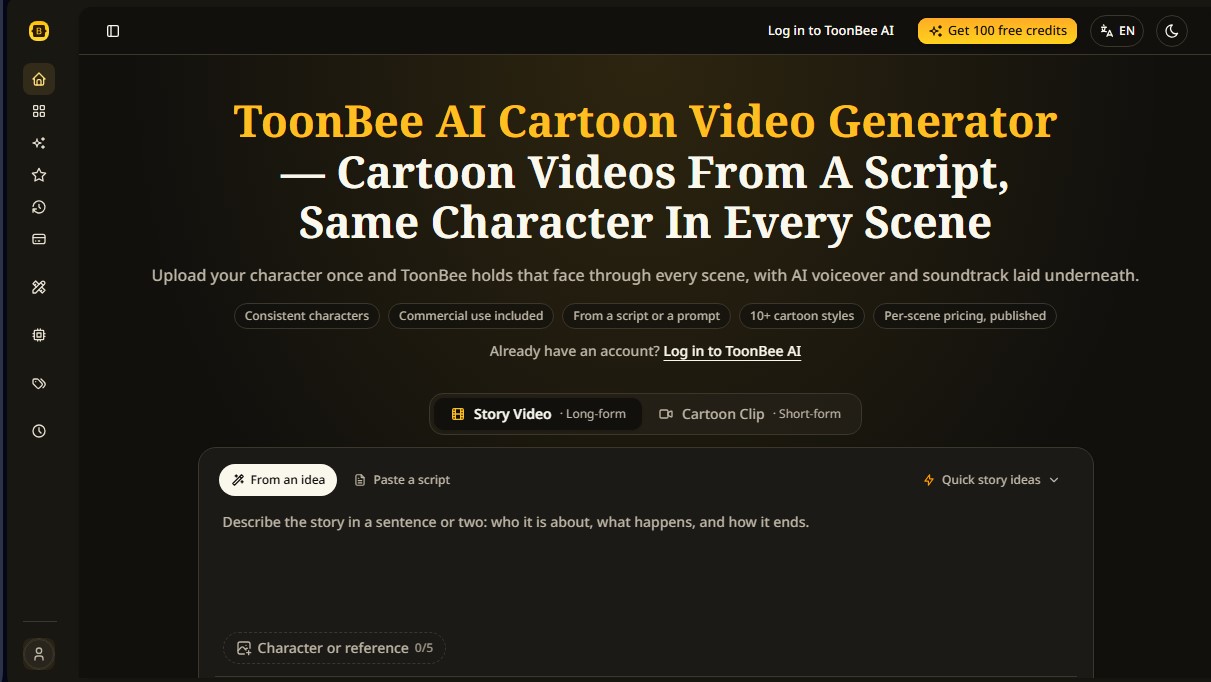
ToonBee AI Screenshots
ToonBee AI alternatives

Comik AI-Anime Character Creator
Design anime characters using text or images. Generate multi-view design sheets to ensure visual consistency across comics, manga, and animated videos.

Whiteboard Video Maker
Generate AI whiteboard animations from text, PDFs, or links. Features automatic illustrations, voiceovers, and hand-drawing for tutorials and marketing.