Share
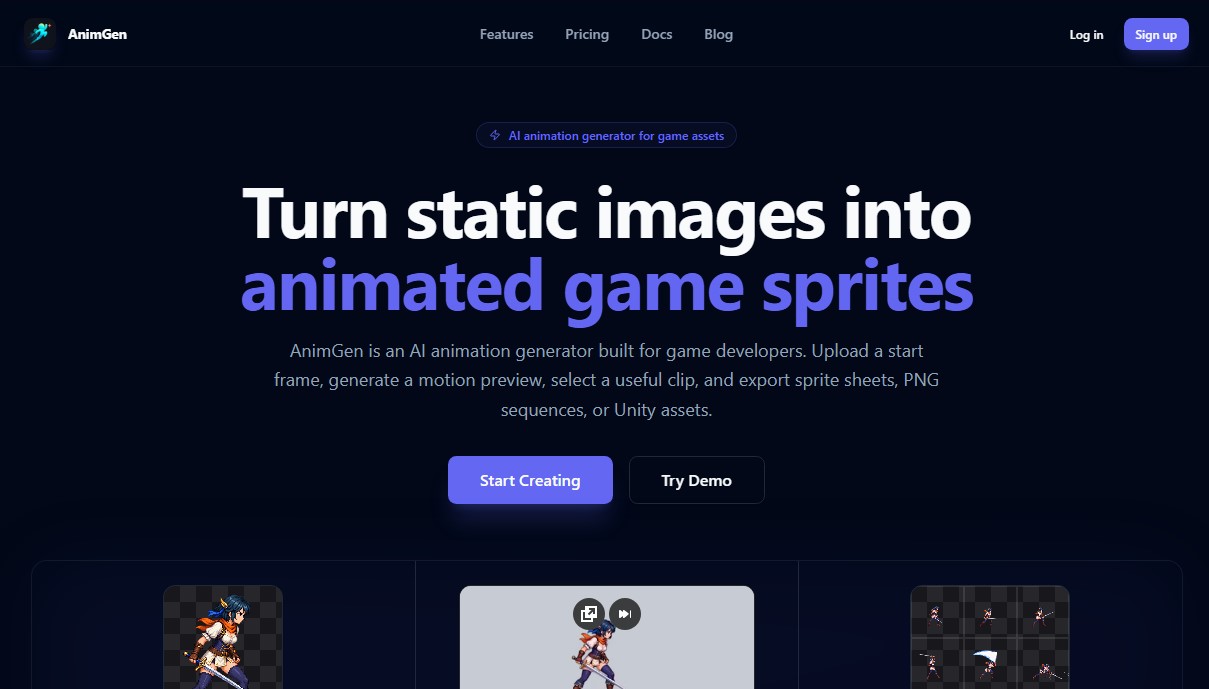
Transform static images into game animations with AI. Create sprite sheets and PNG sequences exportable to engines like Unity, Unreal Engine, or Godot.
What is AnimGen?
AnimGen is an AI animation generator specifically designed for game developers looking to transform static images into dynamic assets. This tool allows users to convert a single sprite or character illustration into a fluid movement sequence, streamlining the 2D game development workflow. Its primary function is to automate the generation of complex animations from a base image, eliminating the need to manually draw every frame.
The AnimGen workflow follows a structured process: upload, generate, and export. The user uploads a static character, ideally a transparent PNG, and uses text descriptions or prompts to define the desired action. The generative AI technology processes the image and creates a video preview showing the suggested movement. Thanks to its integrated timeline, users can perform non-destructive editing, allowing them to scrub frame-by-frame, select the most precise movement segment, and adjust the loop before final export.
One of the platform's most standout capabilities is its versatility in output formats, designed for seamless technical integration into development engines. AnimGen supports generating:
- Configurable sprite sheets (e.g., 4x4) with included JSON metadata.
- PNG frame sequences.
- Asset packs ready for engines like Unity, Godot, Unreal Engine (Paper2D), and Cocos Creator.
- Video files with alpha channels, such as WebM and ProRes 4444, to preserve the art's original transparency.
From a functional perspective, the tool offers granular control over production. It allows users to adjust the frame rate between 12, 24, or 60 FPS and provides specific controls based on the selected AI model to maintain the character's visual consistency. In addition to the image-to-animation feature, the platform allows importing existing videos to convert them into sprite sheets, facilitating digital rotoscoping or the repurposing of recorded footage.
AnimGen is particularly valuable for indie studios and technical artists who need to produce high-quality game assets with limited resources. By enabling a single reference image to generate multiple animations (running, jumping, attacking), the tool significantly reduces production times and costs associated with 2D character design while maintaining a professional finish that meets video game industry standards.
AnimGen features and use cases
How to use AnimGen
AnimGen FAQ
What exactly is AnimGen, and what is it used for?
AnimGen is an AI-powered tool designed for game developers that converts static images into ready-to-use animations and sprite sheets.
How does the animation creation process work in AnimGen?
Simply upload a character image, generate a motion preview using a text description, adjust the loop on the timeline, and export the final result in your preferred format.
Can I use assets generated with AnimGen in commercial projects?
Yes. As long as you are on a paid subscription plan or have purchased a credit pack, any assets you generate can be used commercially in your games.
Which game engines is the tool compatible with?
The platform generates files compatible with the most popular engines, including Unity, Godot, Unreal Engine, and Cocos Creator, and includes specific JSON metadata to make integration seamless.
What export formats does AnimGen offer for my animations?
You can export your work as sprite sheets with JSON, PNG image sequences, MP4 videos, WebM with transparency, or professional formats like ProRes 4444.
Does AnimGen offer a free trial for new users?
When you create a new account, you receive a one-time gift of 120 welcome credits so you can test the full workflow before committing to a paid plan.
Do subscription credits roll over from month to month?
Monthly subscription credits are valid for the current billing period and reset each cycle. However, credits from one-time purchase packs remain valid for a full year.
Is it possible to edit the animation range before exporting?
Yes. There is a built-in timeline that lets you review your animation frame by frame, allowing you to select the exact segment you want and preview the loop in real time.
AnimGen pricing and plans
Free Plan
Price: 0 € (no credit card required).
- 120 welcome credits (one-time grant, non-renewing).
- 200 MB account storage.
- Export limited to PNG frame ZIP files.
- Personal evaluation license (commercial use not included).
Basic Plan
Price: 9,99 $ per month.
- 1,100 credits per month.
- 5 GB storage.
- Access to all export formats (spritesheets, JSON, Unity, Godot, Unreal, Cocos, WebM, ProRes).
- Commercial license included.
Expert Plan
Price: 29,99 $ per month.
- 3,500 credits per month.
- 20 GB storage.
- Access to all export formats.
- Commercial license included.
Ultra Plan
Price: 99,99 $ per month.
- 12,500 credits per month.
- 100 GB storage.
- Access to all export formats.
- Commercial license included.
Credit Packs (Pay-as-you-go)
Price: From 4,99 $ up to 49,99 $ (one-time payment).
- Small Pack (4,99 $): 500 credits.
- Medium Pack (19,99 $): 2,000 credits.
- Large Pack (49,99 $): 5,000 credits.
- Credits and export formats valid for 365 days.
- Commercial license for assets created during the access period.
- Storage limit fixed at 200 MB.
AnimGen Screenshots
AnimGen alternatives

Osmo Studio
AI animation studio for professional motion graphics and videos. Control every detail, collaborate with teams, and export with transparent backgrounds.

Comik AI-Anime Character Creator
Design anime characters using text or images. Generate multi-view design sheets to ensure visual consistency across comics, manga, and animated videos.