Share
Generate AI videos and short series from text or photos. Create recurring characters, choose styles, and direct scenes with total creative control.
What is InkFlick?
InkFlick is an advanced AI short-form drama creation platform designed to transform text ideas or static images into full cinematic productions. This tool allows content creators, screenwriters, and hobbyists to generate high-quality videos without requiring prior technical knowledge in professional editing or animation. The system integrates into a structured workflow that spans from script conception to final rendering, offering a comprehensive solution for generative video production.
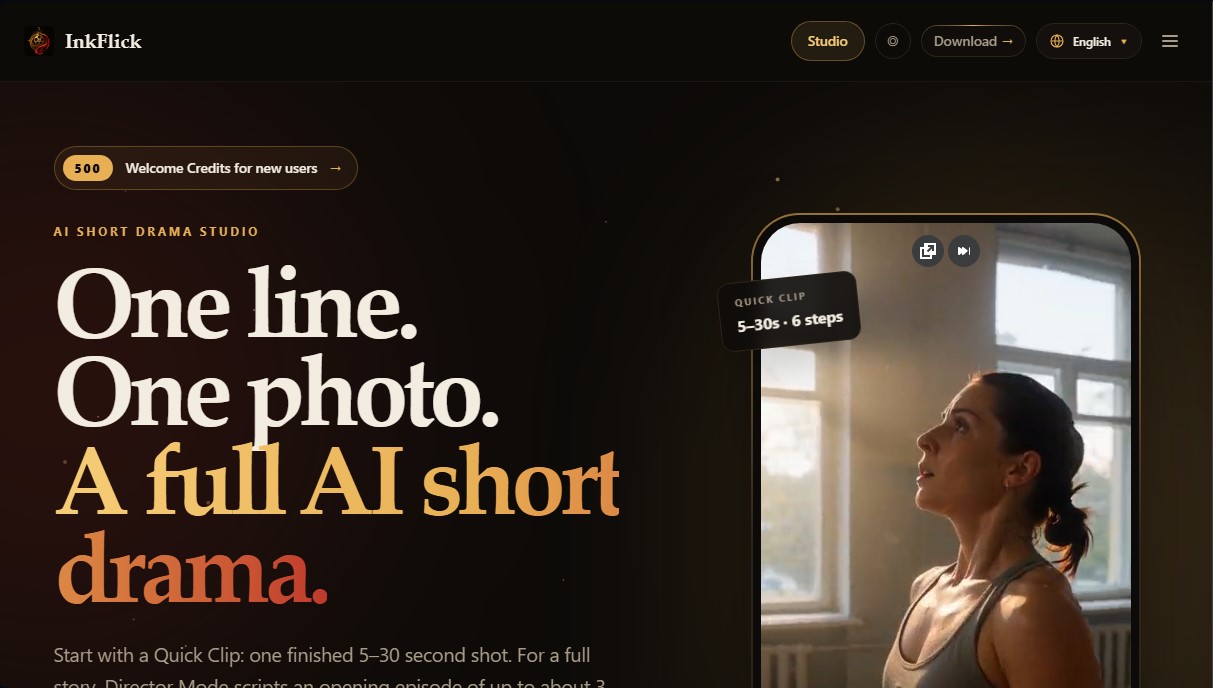
The application offers two main modes tailored to different creative needs. The Quick Clip feature is focused on immediacy, allowing users to generate shots between 5 and 30 seconds from a single sentence or photo, eliminating the complexity of managing timelines or long scripts. On the other hand, Director Mode provides total control for more ambitious productions. In this mode, users can direct an initial episode of up to 3 minutes and continue the series with subsequent 60-second chapters, maintaining a coherent narrative structure over time.
One of InkFlick’s technological pillars is its ability to ensure character consistency through its Cast Me feature. This technology allows users to define a reusable virtual actor from a description or a photograph (whether it’s a person, a pet, or a product), ensuring their visual identity remains identical across different scenes and episodes. Additionally, the tool’s story engine facilitates the creation of interactive plots, where users can decide the direction of the narrative at the end of each clip, dynamically branching the story from an exact point.
The production process on the platform is divided into four functional stages:
- Writing: Converting basic concepts into detailed scripts using the AI Enhance feature.
- Casting: Selecting and designing fixed protagonists that can be redesigned for different visual universes.
- Storyboarding: Reviewing and adjusting visual shots before processing the video, with an option to redraw individual frames.
- Filming: Final rendering in the background with customizable quality options and native sound.
The tool stands out for its aesthetic versatility, offering predefined visual styles including photorealism, anime, 3D, comic book style, claymation, and webtoon. InkFlick is compatible with various workflows and can be used on computers (Windows and Mac) as well as mobile devices (iPhone and iPad) and web browsers. This flexibility, combined with the ability to include voiced dialogue, makes it a robust solution for efficient and scalable AI serialized content production.
InkFlick features and use cases
How to use InkFlick
InkFlick FAQ
What is InkFlick, and what can it create?
It is an AI studio designed to generate short dramas and cinematic videos from just a single line of text or a photo.
How many credits do new users receive when they sign up for InkFlick?
All new users receive five hundred welcome credits to start producing their first clips right away.
What is the maximum length of the videos created with this tool?
Quick clips last between five and thirty seconds, while initial episodes in Director Mode can be up to three minutes long.
Can I use the same characters in different InkFlick episodes?
Yes, the reusable cast feature allows the same character to maintain their visual identity and exact appearance throughout an entire series or story.
What visual style options does the platform offer for productions?
It offers eight visual styles, including photorealistic, anime, 3D, storybook, webtoon, comic book, claymation, and Chinese anime.
Do I need to download software to use InkFlick?
It’s not necessary; in addition to apps for iPhone, Mac, and Windows, there is a version that runs directly in your web browser.
How do additional credit packs work?
These are permanent credits that do not expire. They can be purchased for extra generations depending on the desired length and quality of the video.
Can I use my own photos to star in an InkFlick video?
Yes, the feature allows you to upload a photo of yourself, someone else, or even a pet to turn them into the lead actor of any story.
InkFlick pricing and plans
Welcome Plan
Price: Free.
- 500 welcome credits for new users.
- Access to "Quick Clips" creation (5-30 seconds) from a phrase or photo.
- Access to "Director Mode" for episodes up to 3 minutes long.
- Scripting tools, reusable cast, and storyboards.
Credit Packs (One-time payment)
Price: From $2.99 to $74.99.
- 500 Credit Pack: $2.99.
- 1,200 Credit Pack: $6.99.
- 3,000 Credit Pack: $14.99.
- 8,000 Credit Pack: $39.99.
- 15,000 Credit Pack: $74.99.
- Credits are permanent and do not expire.
- Generation costs vary based on video length, quality, and the selected AI engine.
- Create reusable characters from photos or descriptions to maintain consistency.
- Access to 8 preset visual styles (Photorealistic, 3D, Anime, Storybook, Webtoon, Comic, Clay, and Chinese Anime).
- Includes advanced editing features: scene redrawing, interactive plots, and chapter-based novel adaptation.
- Sync credits across devices (iOS, Mac, and browser).
InkFlick Screenshots
InkFlick alternatives

Vidverse AI
Vidverse AI brings several AI video, image and voice models into one web and mobile app, so you can turn text or photos into clips, images and voiceovers.

Comik AI-Anime Character Creator
Design anime characters using text or images. Generate multi-view design sheets to ensure visual consistency across comics, manga, and animated videos.

KiwiMotion AI
Generate videos, images, voices, and avatars with AI. Features motion control, voice cloning, background removal, and professional file upscaling.


Zeemo | AI Short Drama Generator
Generate short AI dramas with consistent characters across episodes. Integrate script, voice, and video on a single canvas to produce professional, coherent series.