
Share
Generate AI videos up to 30 seconds and images from text or photos. Features various models and adjustable formats to create and animate professional visual content.
What is VidKiss?
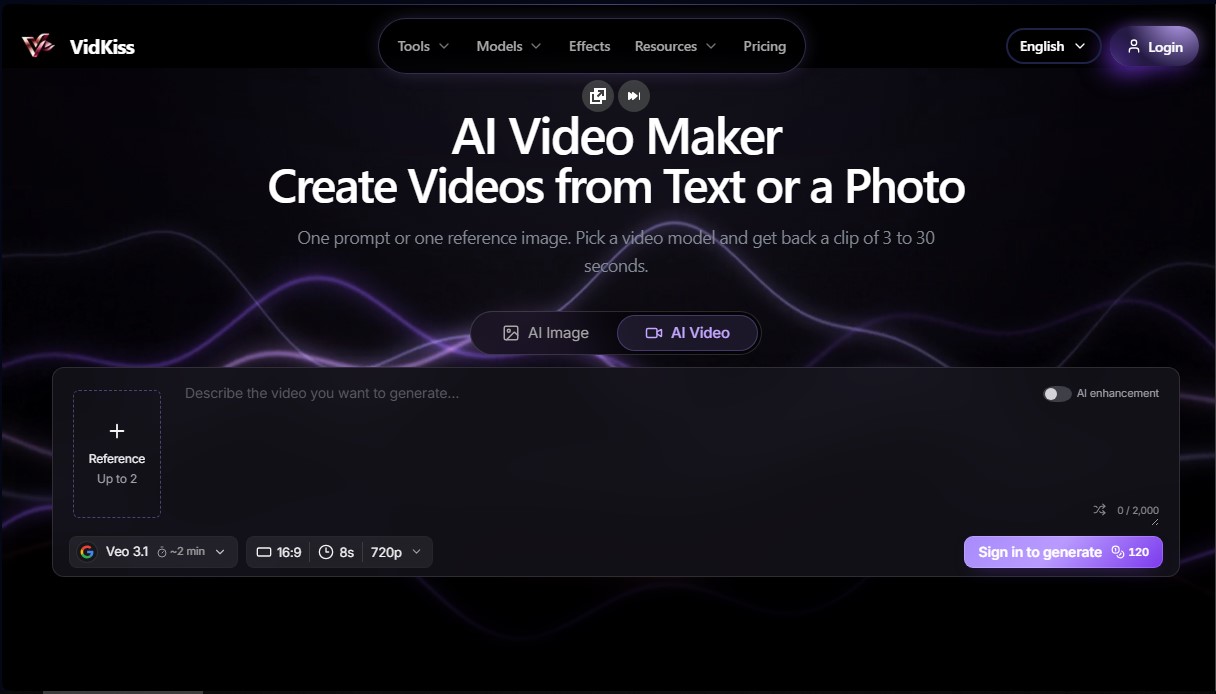
VidKiss is an advanced workspace specializing in AI video generation, designed to centralize multiple cutting-edge models into a single platform. Its primary function is to enable the creation of video clips from text descriptions or reference images, eliminating the need to manage separate accounts across different services. This tool is ideal for marketing teams, content creators, and designers looking to produce short-form footage—such as ads, social media assets, or storyboards—quickly and professionally from any computer or mobile device.
VidKiss operates by integrating powerful generative AI models through the cloud. As a browser-based application, it requires no local processing power or dedicated graphics cards. Users can choose from an extensive library of video engines like MiniMax H3, Kling 3.0, Veo 3.1, Seedance 2.5, or Gemini Omni Flash. For static image creation, the platform utilizes technologies such as Nano Banana and GPT Image. The workflow is intuitive: enter a detailed prompt or upload an image, select the desired model, and configure technical parameters before rendering.
Key functional capabilities include:
- Text-to-Video Generation: Creating full scenes by describing specific subjects, actions, lighting, and camera movements.
- Image-to-Video Animation: Transforming a static photograph into a moving clip, using a single reference frame to maintain consistency.
- Duration and Format Control: Allowing for clips between 3 and 30 seconds, with the ability to adjust the aspect ratio (16:9, 9:16, 1:1) and resolution based on model compatibility.
- Integrated Image Generation: Specific models to create frames that can serve as the foundation for subsequent video workflows.
- Generation History: Project storage to compare variations, make adjustments, and download final files in minutes.
The main advantage of VidKiss is its aggregation capability within a unified system. By providing access to multiple AI providers, users can experiment with different aesthetics and technical capabilities without additional technical hurdles. The platform optimizes the creation of high-quality visual content, facilitating the production of product b-roll and rapid visual concepts. Additionally, it includes prompt examples and AI enhancement tools to ensure results are sharp and professional, meeting the demands of a digital market that prizes speed and originality.
VidKiss features and use cases
How to use VidKiss
VidKiss FAQ
What is VidKiss and what can I do with this tool?
VidKiss is an advanced AI-powered platform that lets you generate videos and images from text or photos using multiple models, all from a single account.
Can I try VidKiss for free?
Yes, new users receive free credits upon sign-up to start creating right away, with no payment information required.
What is the maximum length for videos generated on VidKiss?
The tool allows you to create video clips with custom durations ranging from 3 to 30 seconds.
Do the credits I purchase on the platform expire?
No, credits purchased through one-time packages do not have an expiration date and will remain in your balance until you decide to use them.
Do I need a powerful graphics card to use VidKiss?
No special hardware is required because the entire generation process happens in the cloud. You can access the platform through any standard web browser.
Can I turn my own photo into an animated video?
Yes, the image-to-video feature allows you to upload a reference image and describe the desired motion for the AI to animate.
Which AI models are available on the interface?
You have access to a wide selection of cutting-edge video models such as MiniMax H3, Kling, and Veo 3.1, as well as image-specific models like Nano Banana.
How is the credit cost for each generation determined?
The exact cost depends on the selected model and the length of the clip. The required number of credits is always displayed on the screen before you confirm the creation.
VidKiss pricing and plans
Free Plan
Price: 0 $ (Free credits upon registration).
Features: Initial credits to test text-to-video and image-to-video features; no credit card required.
Credit Packs (One-time payment)
Price: Starting at $4.98 for 500 credits.
Features: One-time purchase with no subscription; purchased credits never expire; access to all platform models.
Basic Plan
Price: $9/mo ($7.50/mo billed annually).
Features: 1,000 credits per month (equivalent to approximately 1,000 images or 109 clips per year); access to all video and image models (MiniMax H3, Veo 3.1, Kling 3.0, etc.); shared balance for text and image; commercial use subject to model provider terms; credits never expire.
Pro Plan
Price: $29/mo ($24.17/mo billed annually).
Features: 5,000 credits per month (equivalent to approximately 5,000 images or 545 clips per year); access to all video and image models from a single balance; text-to-video and image-to-video tools; credits never expire.
Studio Plan
Price: $59/mo ($49.17/mo billed annually).
Features: 11,000 credits per month (equivalent to approximately 11,000 images or 1,200 clips per year); full access to all available models; generation and download history; credits never expire.
General Restrictions and Costs:
A 5-second clip starts at 40 credits (varies by model and settings).
Clips can range from 3 to 30 seconds in length.
Resolution and aspect ratio depend on the compatibility of the selected model.
VidKiss Screenshots
VidKiss alternatives

Vidverse AI
Vidverse AI brings several AI video, image and voice models into one web and mobile app, so you can turn text or photos into clips, images and voiceovers.

Comik AI-Anime Character Creator
Design anime characters using text or images. Generate multi-view design sheets to ensure visual consistency across comics, manga, and animated videos.
AppGrowthKit
Generate AI screenshots and icons for the App Store and Google Play. Features 3D mockups, localization in 42 languages, and ASO audits to boost mobile rankings.

Burning Bridges AI
Create custom videos by inserting your photos into preset scenes. Swap the lead and audience while keeping the original choreography and audio.

KiwiMotion AI
Generate videos, images, voices, and avatars with AI. Features motion control, voice cloning, background removal, and professional file upscaling.