Domer
Share
Generate high-quality videos and images from text or photos. Features tools to animate images, remove watermarks, and create social media content.
What is Domer?
Domer is an advanced AI video generation and image creation platform designed to streamline the workflow for content creators, marketing professionals, and small businesses. This tool enables the production of high-quality visual assets without the need for physical recording equipment, using only text descriptions or static images as a foundation. Its core value proposition lies in its technical flexibility, as it integrates multiple artificial intelligence models into a single interface, allowing users to choose the technology that best fits the nature of their project.
Domer’s operations are structured around several key functional capabilities:
- Video Generation (Text-to-Video): Allows for the creation of clips from scratch using detailed prompts. It is ideal for producing content for TikTok, Instagram Reels, or YouTube Shorts.
- Image Animation (Image-to-Video): Users can upload a photo and define the desired movement, transforming static files into dynamic scenes with pans, rotations, or zooms.
- Image Creation and Editing: Includes text-to-image and image-to-image tools to generate posters, avatars, or product mockups, using models such as GPT Image 2.5 or Nano Banana 2.
- Assisted Editing Tools: Features functions to remove watermarks from photos and videos, as well as background removers to automatically clean up visual material.
On a technological level, Domer stands out by offering access to next-generation engines. Users can select from Google Veo 3.1 for maximum visual quality, Kling 3.0 for faster processing and motion control, or Wan 3.0 when longer clips are required, reaching up to 15 seconds in 1080p resolution. Additionally, it incorporates specialized features like Kling Motion Control, which allows for transferring movement from a reference video to a static image, providing precise control over the resulting animation.
The practical benefits of this tool include obtaining high-definition MP4 files without watermarks, facilitating their direct use in professional projects. As a browser-based application, it requires no heavy software installations on your computer and allows for agile resource management.
The platform is particularly useful for creating product demos, advertising concepts, and supporting material (B-roll). Full ownership of the generated content belongs to the user, allowing for commercial exploitation without licensing restrictions. The system operates on a credit-based model, offering a versatile solution for both independent creators and agencies looking to scale their visual content production through generative AI.
Domer features and use cases
How to use Domer
Domer FAQ
What exactly is Domer and what is it for?
It is an AI generator that lets you create professional videos from text or images directly in your browser without needing to record any actual footage.
What video generation models does Domer offer?
The platform allows you to choose from several advanced models, such as Google Veo for maximum quality, Kling for faster speed, and Wan for clips up to fifteen seconds long.
Do videos created with Domer have watermarks?
No, all videos are exported clean in MP4 format and can be used freely for commercial projects or social media without any attribution required.
Do the credits I purchase on the platform expire?
Domer credits never expire, allowing you to use them at any time without the pressure of monthly expiration dates.
Is it possible to try Domer for free?
Yes, you receive ten free credits upon signing up to test the image and video generation features before committing to a paid plan.
Can I use Domer videos on social media platforms like TikTok or Instagram?
The tool is optimized for content creators and can generate videos in both vertical and horizontal formats, making them ideal for Reels, Shorts, and TikTok.
How long does it take Domer to generate a video?
Processing time depends on the model you choose, but it generally takes between sixty seconds and two minutes to produce a high-definition clip.
What file types can I upload for the image-to-video feature on Domer?
The platform supports PNG, JPG, and WebP files up to ten megabytes, allowing you to animate your static photos using artificial intelligence.
Domer pricing and plans
Free Version
- 10 free credits upon sign-up to test the image and video generation tools.
Starter Plan
Starting at $9.99 per month (or $59.99 per year with annual billing).
- 2,400 credits per year.
- Approximate limit of 20 videos or 100 images per month.
- Credits never expire.
- Access to standard models.
- Watermark-free HD downloads.
- Private generation and fast generation speeds.
- Ad-free experience.
Basic Plan
Starting at $19.99 per month (or $119.99 per year with annual billing).
- 6,000 credits per year.
- Approximate limit of 50 videos or 250 images per month.
- Credits never expire.
- Access to standard models.
- Watermark-free HD downloads.
- Private generation and fast generation speeds.
- Ad-free experience.
Pro Plan
Starting at $39.99 per month (or $399.99 per year with annual billing).
- 14,400 credits per year.
- Approximate limit of 120 videos or 600 images per month.
- Credits never expire.
- Access to all available models.
- Watermark-free HD downloads.
- Private generation and fast generation speeds.
- Ad-free experience.
Ultra Plan
Starting at $99.99 per month (or $999.99 per year with annual billing).
- 60,000 credits per year.
- Approximate limit of 500 videos or 2,500 images per month.
- Credits never expire.
- Access to all models and early access to new versions.
- Ultra HD resolution.
- Watermark-free downloads.
- Private generation and maximum generation speeds.
- Ad-free experience.
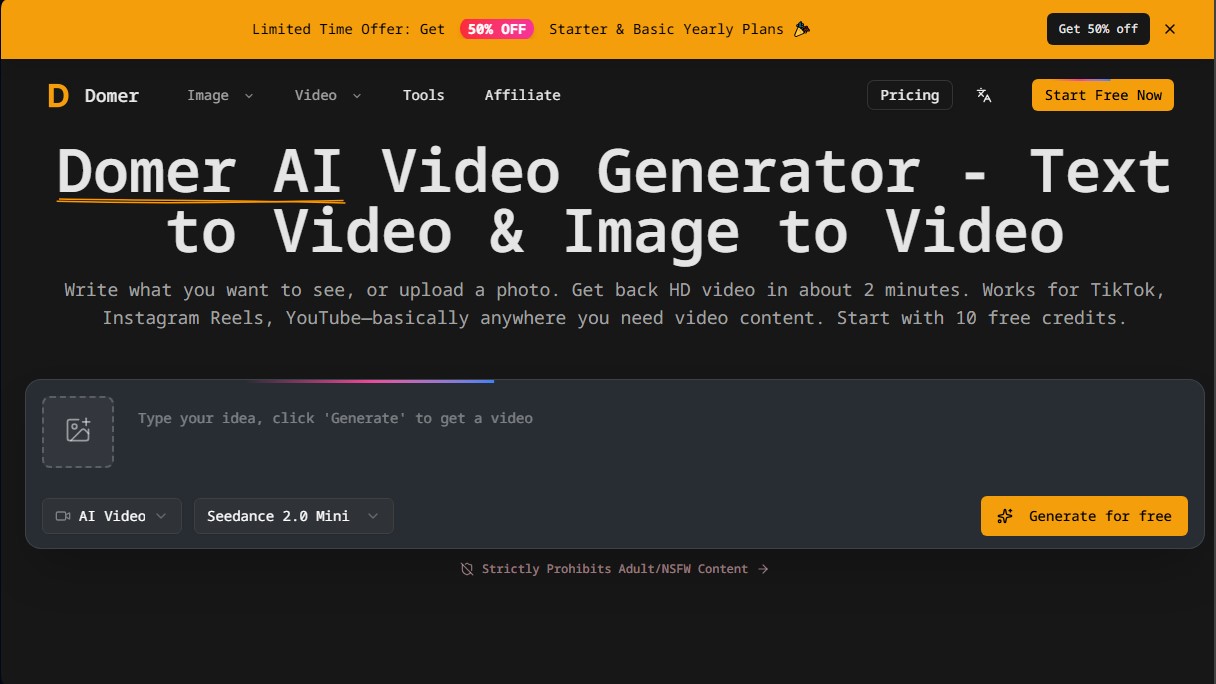
Domer Screenshots
Domer alternatives

Comik AI-Anime Character Creator
Design anime characters using text or images. Generate multi-view design sheets to ensure visual consistency across comics, manga, and animated videos.
AppGrowthKit
Generate AI screenshots and icons for the App Store and Google Play. Features 3D mockups, localization in 42 languages, and ASO audits to boost mobile rankings.

Burning Bridges AI
Create custom videos by inserting your photos into preset scenes. Swap the lead and audience while keeping the original choreography and audio.

KiwiMotion AI
Generate videos, images, voices, and avatars with AI. Features motion control, voice cloning, background removal, and professional file upscaling.