Share
Create professional logo animations in seconds. Export 4K with transparent backgrounds and sound using templates or by describing motion with natural language.
What is Logo Animation AI?
Logo Animation AI is an advanced tool designed to transform static logos into high-quality professional animations using artificial intelligence. This platform enables businesses, designers, and content creators to generate dynamic video pieces in seconds, eliminating the learning curve associated with complex editing software. Its primary utility lies in creating intros for video channels, corporate presentations, and social media content that requires immediate visual impact.
The system operates through an AI director that interprets the structure of the uploaded logo (in PNG, JPG, or WebP formats) to apply fluid movements. Users can choose from a variety of predefined styles or use text prompts to describe the type of animation they want, allowing for customization based on natural language. This technology processes information in the cloud, so it does not require a high-performance computer; it is also accessible from a smartphone or tablet.
Among the most notable technical capabilities of Logo Animation AI are:
- 4K UHD Export: Provides videos with impeccable clarity, suitable for any professional digital medium.
- Transparent Background: Offers the option to download files with an alpha channel (WebM format), making it easy to overlay the logo on other videos in external editors without the need for chroma keying techniques.
- Audio Synchronization: The tool includes integrated sound effects that automatically adjust to the rhythm and transitions of the generated animation.
- Variety of Visual Styles: Includes options such as 3D Logo Animation, cinematic reveals, particle effects, neon, and glitch-style distortions.
- Format Compatibility: Supports MP4 outputs for direct use as well as specific formats for advanced post-production.
From a practical standpoint, Logo Animation AI optimizes workflow by removing the need for manual keyframe configuration. If the user does not define a specific movement, the AI analyzes the design and automatically proposes an animation that matches the brand's style. This makes it an efficient solution for marketing agencies and entrepreneurs looking for production-ready results with commercial use rights included. The platform guarantees file privacy, ensuring that brand assets are not used to train public models, which reinforces its profile as a professional and secure tool for developing corporate visual identity.
Logo Animation AI features and use cases
How to use Logo Animation AI
Logo Animation AI FAQ
Can I use Logo Animation AI for free?
Yes, when you sign up, you receive free credits to create your first animations without having to enter any credit card information.
What file types can I upload to Logo Animation AI to animate my brand?
The tool supports PNG, JPG, or WebP files up to 10 MB. We recommend using logos with transparent backgrounds for the best results.
Can I download my video with a transparent background?
Yes, you can export your animation in WebM format with an alpha channel to easily overlay it in any video editor, presentation, or website.
Does Logo Animation AI include sound effects in the animations?
All generated animations include sound effects synced to the movement, though you have the option to disable the audio before exporting.
Do I have commercial usage rights for the generated videos?
Yes, you have full commercial usage rights to use your animations in ad campaigns, social media, YouTube, or professional projects for clients.
What resolution are the final files exported in?
The platform allows you to render videos in high definition up to 4K, ensuring crystal-clear quality in both 16:9 landscape and 9:16 vertical formats.
Do I need prior editing experience to use Logo Animation AI?
No technical experience is necessary. You can choose from pre-designed templates or simply describe the desired movement in plain English, and the AI will do all the work for you.
How long does it take for the tool to generate a complete animation?
Most animations are processed in the cloud and are ready to download within 30 to 50 seconds.
Will there be a watermark on my exported videos?
No, all videos exported from the platform are completely watermark-free, even those created during the free trial.
Are my files and logos safe on the platform?
Yes, your privacy is guaranteed. We do not use your logos to train public AI models, and we also offer private generation options on our paid plans.
Logo Animation AI pricing and plans
Free Plan (0 $):
Free sign-up credits to create your first animations.
No watermark.
Public generations (may be featured in the web gallery).
LITE - One-time payment (15 $):
50 credits (allows up to 3 5-second animations at 1080p).
Up to 4K resolution export.
Transparent background available.
Faster generation speed.
Private generations.
Commercial use included.
No watermark.
Creator - One-time payment (29 $):
250 credits (allows up to 16 5-second animations at 1080p).
Up to 4K resolution export.
Transparent background available.
Faster generation speed.
Private generations.
Commercial use included.
No watermark.
Studio - One-time payment (59 $):
500 credits (allows up to 33 5-second animations at 1080p).
Up to 4K resolution export.
Transparent background available.
Faster generation speed.
Private generations.
Commercial use included.
No watermark.
LITE - Monthly (15 $/mo):
50 monthly credits (allows up to 3 5-second animations at 1080p).
Up to 4K resolution export.
Transparent background available.
Faster generation speed.
Private generations.
Commercial use included.
No watermark.
Creator - Monthly (29 $/mo):
250 monthly credits (allows up to 16 5-second animations at 1080p).
Up to 4K resolution export.
Transparent background available.
Faster generation speed.
Private generations.
Commercial use included.
No watermark.
Studio - Monthly (59 $/mo):
500 monthly credits (allows up to 33 5-second animations at 1080p).
Up to 4K resolution export.
Transparent background available.
Faster generation speed.
Private generations.
Commercial use included.
No watermark.
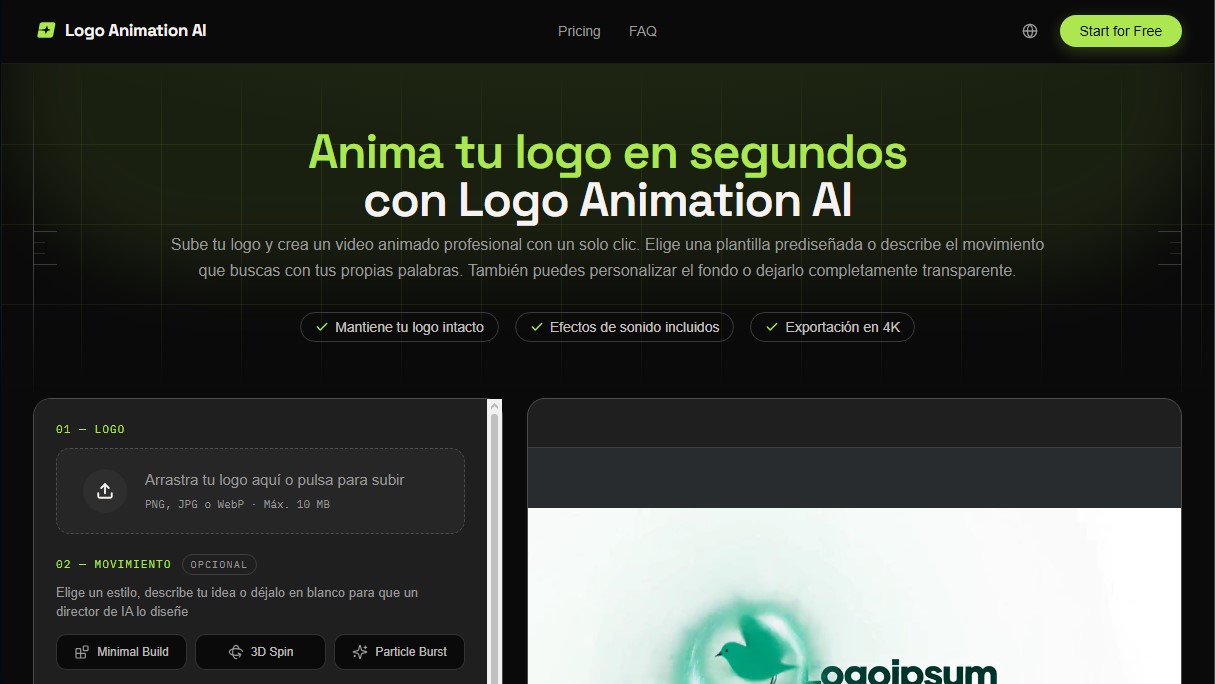
Logo Animation AI Screenshots
Logo Animation AI alternatives

Comik AI-Anime Character Creator
Design anime characters using text or images. Generate multi-view design sheets to ensure visual consistency across comics, manga, and animated videos.
ToonBee AI
Generate animated videos from scripts with consistent characters across scenes. Includes AI voiceovers and music. Ideal for marketing, education, and social media.