
Share
Generate automatic AI captions for videos. Customize design with templates, edit text, and translate into multiple languages to boost your visual content's impact.
What is Auto Captioner?
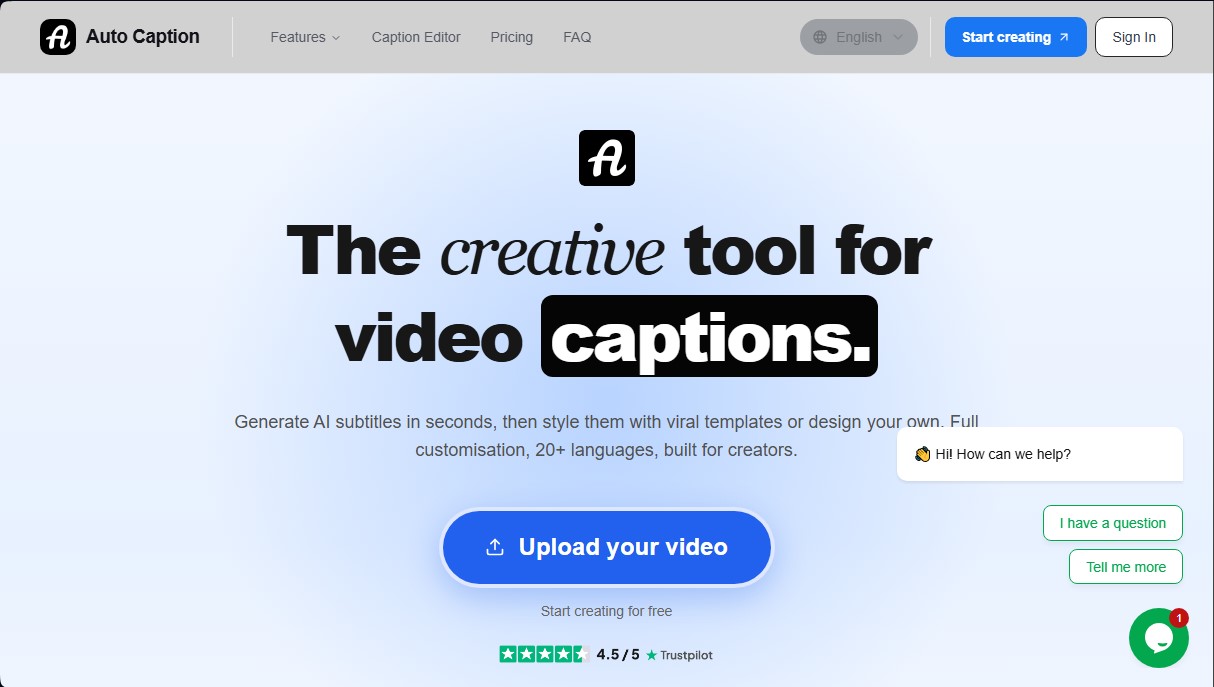
Auto Captioner is a creative tool specializing in generating AI auto-captions for video content. Designed to run directly from your computer's browser, this application transforms audio into text in a matter of seconds, making it easy to create accessible content optimized for digital platforms. Its primary function is to simplify the editing workflow through smart video transcription that recognizes over 20 languages, including English, Spanish, French, German, and Portuguese, among others.
The operation of Auto Captioner is based on a structured four-step process: file upload, automatic generation, style editing, and export. The system supports common formats such as MP4, MOV, and WebM, processing the video file locally on the device to guarantee privacy, while only the audio is sent to transcription services. The technology used is capable of accurately managing different accents, background noise, and multiple speakers, which significantly reduces manual correction time.
For creators looking for a professional and eye-catching finish, the tool offers more than 25 style templates and viral animations similar to current trends on TikTok and Instagram Reels. Users can fully customize the appearance of the text, adjusting typography, colors, and timing through an intuitive subtitle editor. Beyond aesthetics, the application allows for exporting videos with burned-in captions, ensuring the message reaches the audience even if their mobile device is muted.
This application is highly useful for various professional profiles:
- YouTube Creators: Helps improve watch time and video SEO for long-form content through accurate subtitles.
- Social Media Managers: Enables the generation of dynamic captions for Shorts and Reels with high-impact visual styles.
- Educators and Coaches: Make their online lessons and courses accessible quickly and efficiently.
- Podcasters: Facilitates converting audio clips into engaging video pieces to promote episodes on social media.
- Agencies and Freelancers: Allows for delivering captioned projects to clients without the need for complex editing software or steep learning curves.
In addition to text generation, Auto Captioner includes AI subtitle translation capabilities, allowing content to be globalized to reach international audiences. The tool's versatility extends to any aspect ratio—whether horizontal, vertical, or square—adapting to the technical specifications of every social network. By using artificial intelligence for subtitling, the manual workload is eliminated, allowing users to focus on communication strategy and the quality of their content.
Auto Captioner features and use cases
How to use Auto Captioner
Auto Captioner FAQ
Is Auto Captioner actually free?
Yes, you can generate, edit, and export your videos with captions at no cost, although the free version includes a small watermark.
What video formats does the tool support?
Auto Captioner is compatible with the most common formats, such as MP4, MOV, and WebM, in any aspect ratio, whether vertical or horizontal.
Is it safe to process my files on this platform?
Your original video always stays on your device and is processed locally in your browser; only the audio is sent to generate the transcription.
How many languages can Auto Captioner transcribe?
The system automatically recognizes more than twenty different languages, including English, Spanish, French, German, Portuguese, and Japanese.
What are the benefits of an Auto Captioner Pro subscription?
The Pro plan removes the watermark, supports videos up to thirty minutes long, enables AI translation, and allows the use of custom fonts.
Can I customize the visual style of the captions?
Yes, you have access to over twenty-five pre-designed style templates and a full editor to manually adjust the design and timing.
How can I remove the watermark from my exports?
To get your videos without the website logo, you must upgrade your account to one of the paid plans available in the pricing section.
What is the maximum video length allowed by the tool?
The free version allows videos up to ten minutes long, while the Pro plan supports up to thirty minutes and the Max plan up to one hour.
Auto Captioner pricing and plans
Free
0 $
Everything you need to start creating subtitles with the tool's basic features.
AI-powered subtitle generation.
Access to all subtitle styles and animations.
Video exports in up to 720p quality.
Video duration limit of up to 10 minutes.
Includes a small AutoCaptioner.com watermark.
Pro
9,90 $ / month
A plan designed to remove watermark restrictions and add customization tools.
No watermark on exports.
Videos up to 30 minutes long.
AI subtitle translation.
Save and reuse custom styles.
Ability to upload your own fonts.
Priority support.
Max
14,90 $ / month
Tailored for power users working with long-form content.
Includes all Pro plan features.
Videos up to 1 hour long.
Auto Captioner Screenshots
Auto Captioner alternatives

AI Video Text Remover
Use AI to remove subtitles, logos, and watermarks from your videos. Automatically reconstruct backgrounds for a clean, blur-free result.

KineMaster
Professional AI mobile video editor with auto captions, background removal, and object tracking. Features thousands of templates and 4K export.
Map Animation
Generate AI-powered animated route and map videos from text. Customize cinematic camera movements and export in high resolution and various formats.

Kapwing Hinglish Subtitles Generator
Generate automatic Hinglish captions for videos in 100+ languages. Includes AI-powered editing and dubbing tools to reach bilingual audiences.